
What Robots Can Do Now
Construction robots are not taking over job sites in one clean wave. That is still the wrong picture.
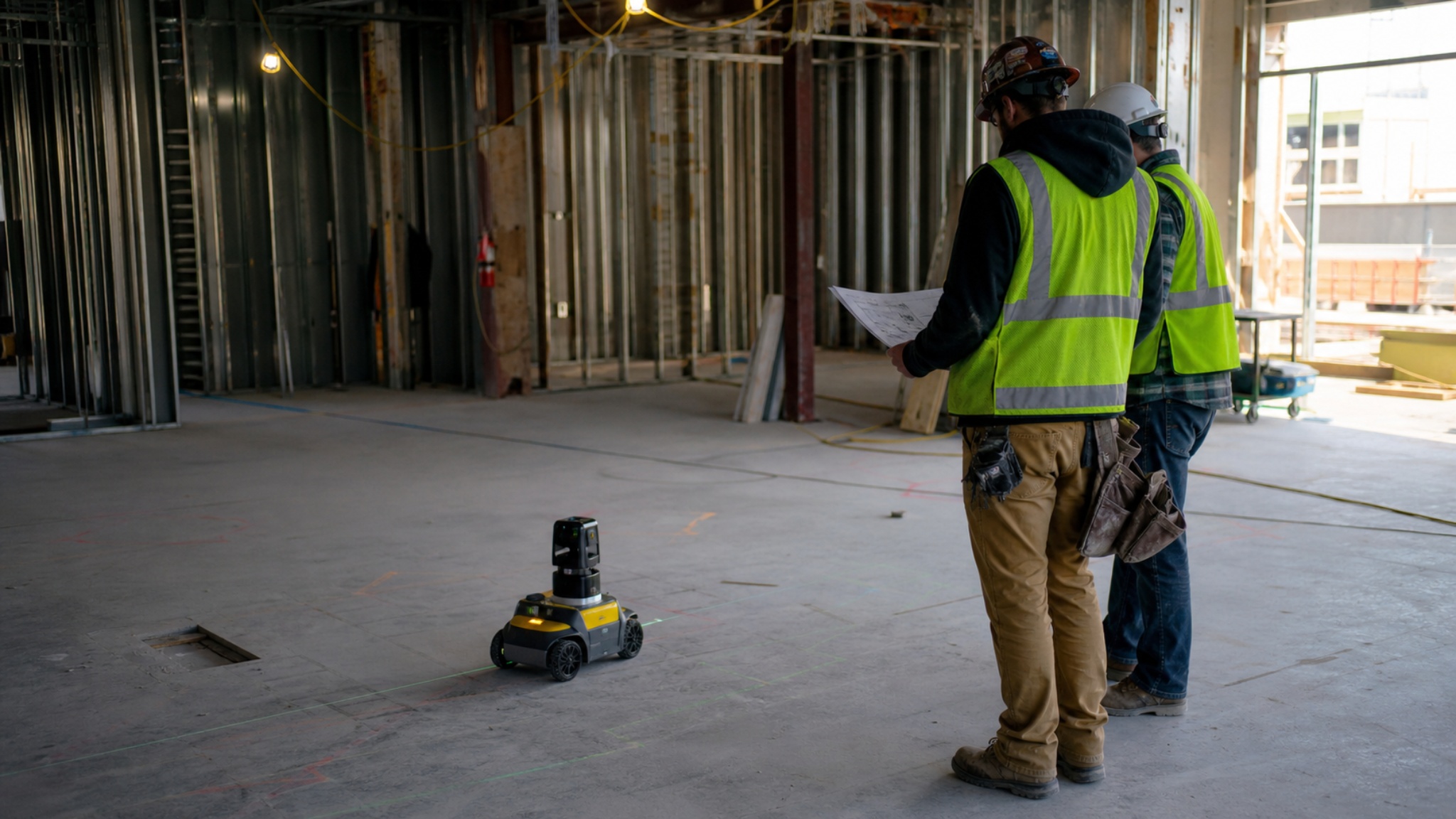
The useful robots are narrower. They print layout lines on slabs. They scan sites. They tie rebar. They drill overhead holes. They dig repeatable trenches. They help with drywall finishing. They support masonry crews. They turn site data into something the project team can check before the next trade covers the mistake.
That is where the shift is happening. Not in a fantasy job site where humanoids frame a building from start to finish. In the repetitive, physical, coordination-heavy parts of construction where tired people still lose time with tape, chalk, ladders, rework, and bad information.
I would read construction robotics this way: the robot is not replacing the builder. It is attacking the task that was already too repetitive, too measurable, too risky, or too easy to mess up by hand.
What Changed Since the Old Construction Robot Hype
The older version of this topic was mostly about spectacle: bricklaying robots, robot dogs, and big claims about replacing labor.
The newer story is more useful. Construction robots are becoming part of jobsite workflows, not just tech demos. Layout robots now connect more directly to BIM and CAD workflows. Reality-capture platforms are mixing drones, 360 cameras, ground robots, and AI progress tracking. Rebar robots are moving from service-only models into direct purchase. Finishing robots are getting better at sanding, painting, and drywall work. 3D construction printing is shifting from one-off houses toward builder systems.
The boring part is the important part: robots are getting useful where the task is repeatable and the output can be checked.
| Old Hype | Better Way to Read It Now |
|---|---|
| Robots will replace construction workers. | Robots are replacing or assisting specific repetitive tasks first. |
| Bricklaying robots will solve housing. | Masonry robots help when wall systems, access, units, and layout suit the machine. |
| Robot dogs are the future of sites. | Ground robots are mostly useful as carriers for scanners, cameras, and inspection data. |
| AI will automate the whole build. | AI is more useful for coordination, progress tracking, layout, documentation, and error detection. |
| 3D printing replaces ordinary construction. | 3D printing is a wall-production system that still needs engineering, services, finishes, and approvals. |
Where Robots Work First
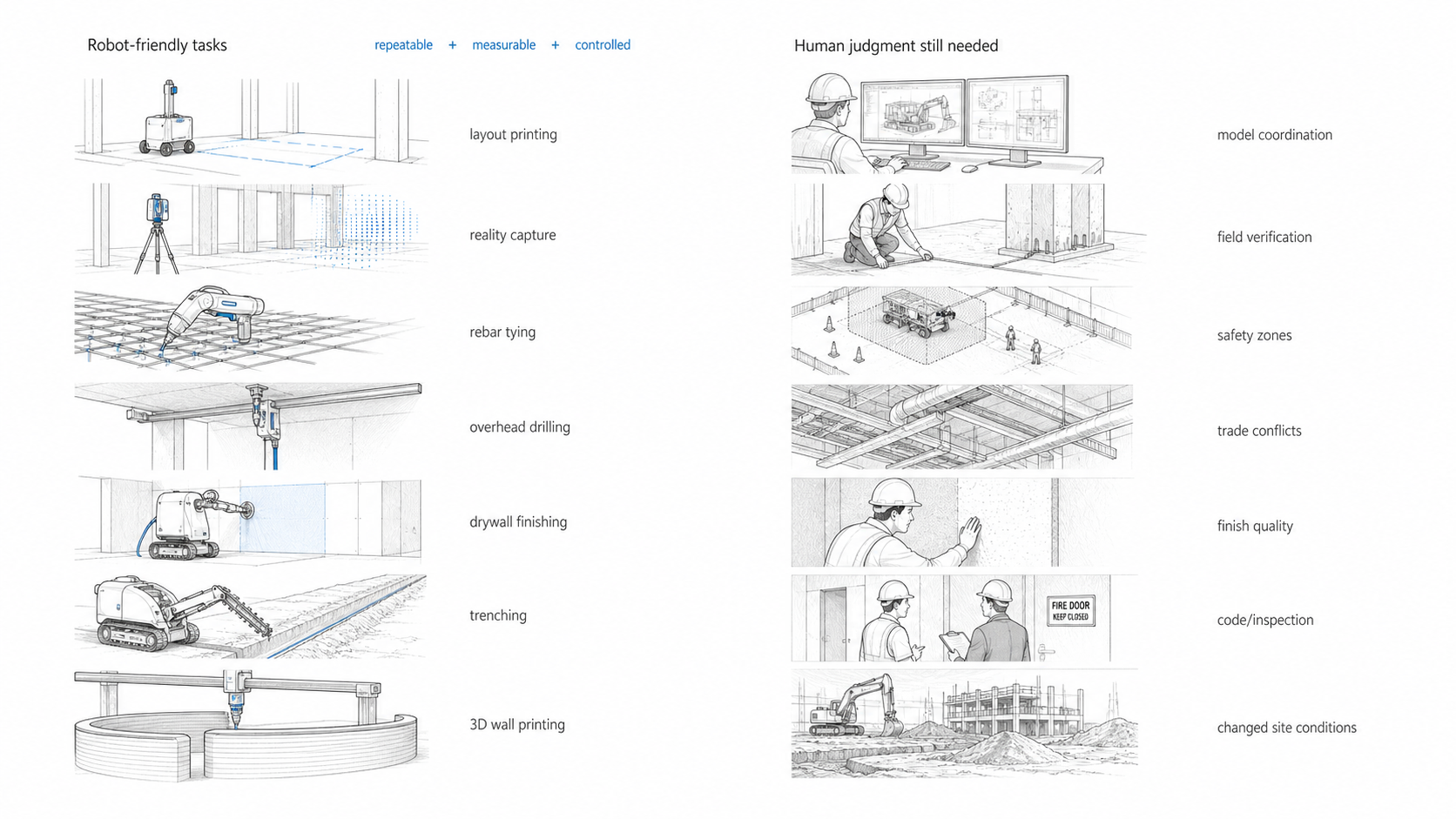
Illustration by ArchitectureCourses.org. Construction robots work best in repeatable, measurable, controlled tasks, while coordination, field judgment, safety, and changing site conditions still depend heavily on people.
The best construction-robotics use cases have a pattern. The work is repeated. The work zone can be controlled. The output can be measured. The job has enough volume to justify setup time.
That is why layout, scanning, rebar tying, overhead drilling, wall finishing, trenching, masonry assistance, and 3D-printed wall systems are moving faster than general-purpose jobsite robots.
| Robot Task | What It Solves | What Still Needs Human Judgment |
|---|---|---|
| Layout printing | Moves CAD or BIM information onto the slab with less manual marking. | Model coordination, control points, field verification, and trade conflicts. |
| Reality capture | Scans progress, documents as-built conditions, and feeds digital-twin workflows. | Deciding whether a deviation matters and who owns the fix. |
| Rebar tying | Reduces repetitive tying work on bridge decks and large mats. | Bar placement, lap details, embeds, cover, inspection, and pour readiness. |
| Overhead drilling | Uses digital plans to mark and drill MEP hanger holes. | Coordination, access, slab conditions, and late design changes. |
| Drywall and painting | Reduces sanding, spraying, and overhead finish strain. | Surface prep, touch-up, protection, lighting, and finish standards. |
| Autonomous trenching | Improves repeatable excavation, especially for solar and utility runs. | Trench safety, utility locates, soil, slope, shoring, and competent-person inspection. |
| 3D construction printing | Turns wall construction into a robotic toolpath and material-flow problem. | Design, engineering, permitting, reinforcement, services, openings, and finishes. |
Layout Robots Are the Clearest Early Win
If I had to pick one construction robot category that makes sense first, I would pick layout.
Layout controls the job. A wall line that moves a little can become a door problem, a ceiling problem, an MEP clash, a rated-wall issue, or a finish problem. On hospitals, labs, airports, schools, data centers, and large commercial interiors, layout is not just snapping chalk on concrete. It is the handoff between the model and the trades.
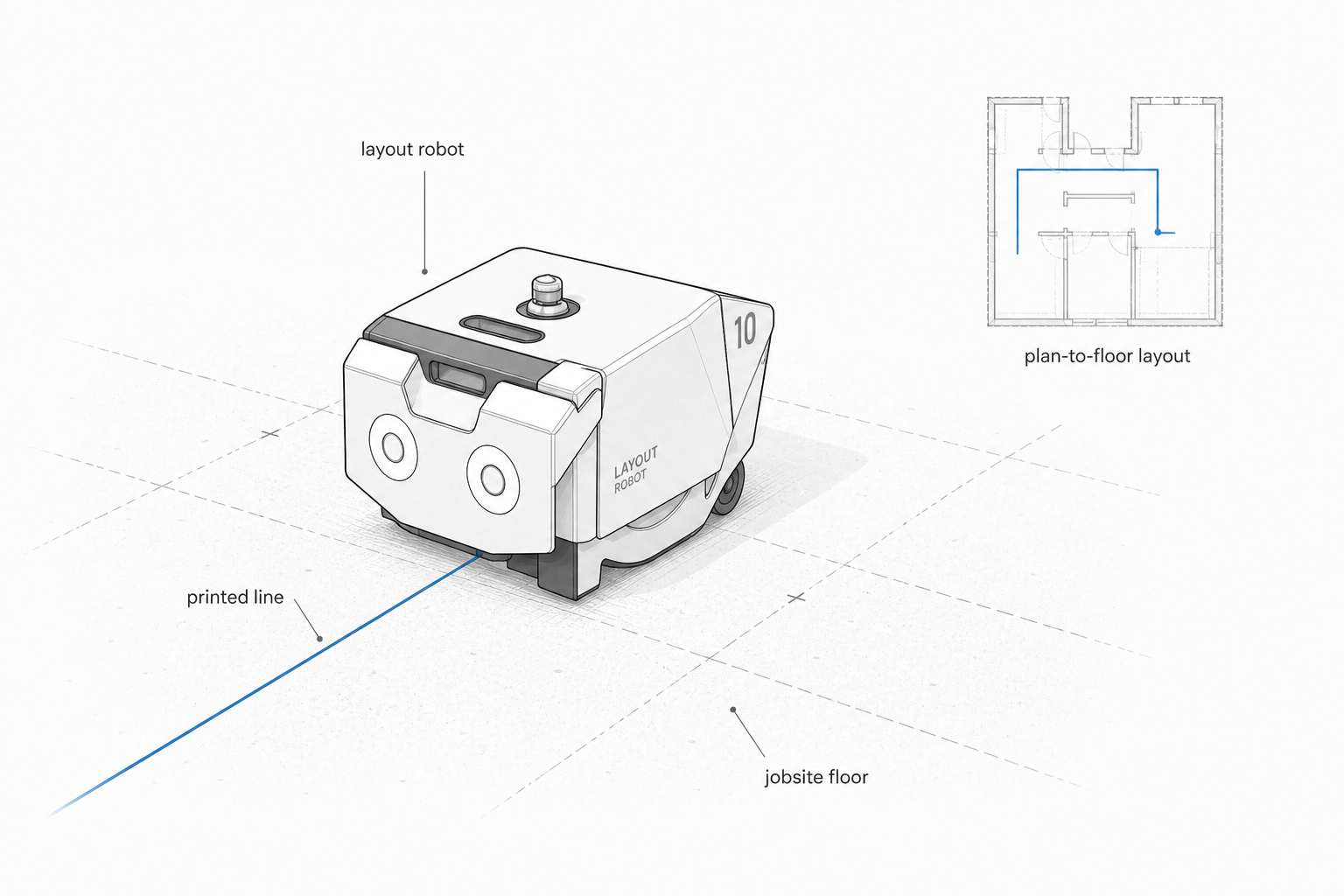
Image by ArchitectureCourses.org. A field layout robot prints construction information directly onto a slab so trades can see wall lines, MEP runs, and coordination marks in place.
Dusty Robotics and Model-to-Floor Layout
Dusty Robotics is built around a simple jobsite problem: crews often do not have the right information under their boots when the work starts.
Dusty’s FieldPrint Platform connects the model to the field through Autodesk Revit and AutoCAD plugins, a project portal, and the FieldPrinter 2 robot. The robot prints the model full scale on the jobsite floor, including lines, labels, symbols, trade information, and coordination marks.
The value is not only speed. It is clarity. A printed slab can show the framing crew, mechanical crew, electrical crew, and superintendent the same coordinated information in the same place.
The warning is just as important. A layout robot can print bad information very accurately. If the model is wrong, the robot does not fix the job. It only moves the error from the screen to the slab.
If you are still learning how digital drawings become field information, start with Revit interface and terminology and AutoCAD basics for architects and engineers. The robot is only useful when the drawing workflow behind it is clean.
HP SitePrint and Floor Deviation Marking
HP SitePrint is another strong layout example because it is moving beyond basic line printing. HP now presents SitePrint as a robotic layout and floor-deviation marking tool, with real-time floor level measurement, deviation marking, and improved navigation.
That matters because slab problems do not stay in the slab. Floor flatness, slope, and surface deviation affect partitions, doors, casework, equipment, floor finishes, and some ceiling and wall installation workflows.
A robot that can mark layout and help identify floor-level problems is more useful than a robot that only replaces a chalk line.
I would still be careful before calling this a small-contractor tool. SitePrint needs control points, total-station setup, CAD preparation, and enough repeated work to justify the process. For larger interiors and data-center-type projects, it is much easier to see the value.
Reality Capture Is Becoming the Jobsite Memory
The next big category is reality capture: drones, 360 cameras, ground robots, laser scanners, and AI systems that compare the site against the model, schedule, or payment claim.
This is less flashy than a robot arm, but it may matter more. Construction teams lose a lot of time trying to answer basic questions:
- What was installed this week?
- Which floor is ready for the next trade?
- Does the installed work match the model?
- Which issue is blocking progress?
- What changed since the last walkthrough?
- Can we prove the condition before it gets covered?
That is not futuristic. That is project control.
Spot, Trimble, and Robotic Scanning
Boston Dynamics’ Spot gets attention because it looks dramatic. The useful version is quieter: Spot carries scanners and cameras through a site on repeatable routes.
Trimble’s integration of Spot with the Trimble X7 laser scanner and FieldLink software helped make this workflow more practical for construction documentation. The point is not the robot dog. The point is regular, repeatable capture of field conditions.
That can help a team compare installed work against the model, update point clouds, document progress, and reduce the time people spend walking the same route with a scanner.
Where it earns its cost: big sites, repeated scans, complex coordination, hard-to-reach areas, and owners who need a strong visual record. Where it may be too much: small jobs where one careful walkthrough gives you enough information.
DroneDeploy and AI Site Records
DroneDeploy shows where this category is going. The platform now describes a mix of drones, robots, 360 cameras, and AI agents for progress, quality, and safety data.
The useful part is not that AI can write a report. The useful part is that a site record can become searchable and comparable. A superintendent can ask what changed. A project manager can check whether a pay claim matches visible progress. A team can look back before a ceiling, wall, or slab condition gets covered.
This may become one of the most valuable forms of AI in construction because it reduces argument. It gives the project team better proof.
This is where construction project data starts to matter. The scan, photo, drone map, report, and model only help when someone uses the information to make a better field decision.
Rebar Robots Are Moving Into Tool Territory
Rebar is a strong robotics target because the work is repetitive, physical, and measurable. It is also hard on bodies.
Advanced Construction Robotics’ TyBOT is one of the clearest examples. TyBOT ties horizontal rebar intersections at scale, especially on bridge decks and large mats. The newer shift is important: TyBOT 3.0 is now available for direct purchase, after earlier use through Robot-as-a-Service.
That tells you the category is maturing. A robot that stays forever as a demo is one thing. A robot that contractors can buy, train on, and build into their equipment strategy is another.
The more interesting pairing is TyBOT with IronBOT. TyBOT ties. IronBOT helps lift, carry, and place rebar bundles. That is where the workflow starts to make sense: not one robot doing a stunt, but a set of tools taking strain out of one of the rougher parts of concrete construction.
I would not oversell it. Rebar robots do not replace inspection, engineering judgment, lap requirements, cover, embeds, bar placement, or pour readiness. They attack the repetitive labor bottleneck after the reinforcing layout is ready.
Overhead Drilling Robots Solve a Specific Pain
Overhead drilling is one of those jobs that sounds small until someone has to do it all day.
Hilti’s Jaibot is a semi-automated drilling robot for mechanical, electrical, plumbing, and interior installation work. It uses digital plans, marks and drills holes, includes dust-control features, and is designed to reduce the strain of overhead drilling.
This is exactly the kind of robotics that makes sense: one painful, repetitive, measurable task tied to a digital plan.
The robot does not solve coordination. It depends on coordination. If the hanger locations are wrong, the robot can drill wrong holes very efficiently. If ceiling conflicts change after the plan is prepared, someone still has to catch that before the machine turns layout into holes.
Finishing Robots Are Starting to Matter
Interior finishing is harder to automate than people think. The work depends on surface condition, light, access, dust, drying time, substrate quality, protection, touch-ups, and the finish level expected by the owner.
Still, this category is moving because the pain is obvious. Drywall finishing, sanding, and overhead coating are repetitive, dusty, physical, and schedule-sensitive.
Canvas and Robotic Drywall Finishing
Canvas, now under JLG’s product umbrella, focuses on robotic drywall finishing. The system is aimed at Level 4 and Level 5 finishes, where consistency and reduced sanding strain can matter on large interior jobs.
The value is not only speed. It is also worker health, dust reduction, repeatability, and getting finish crews out of the worst repetitive motions.
But drywall finishing is not only a machine pass. Board quality, joint layout, corners, protection, lighting, substrate condition, drying time, and touch-up work still decide whether the wall looks good.
For the basic wall system behind that finish work, see Drywall 101 and types of drywall sheets and sizes.
Okibo and AI-Guided Painting and Finishing
Okibo is one of the newer finishing examples worth including. Its EG7 and EG7+ systems are described as AI-guided painting and drywall finishing robots using 3D scanning and real-time modeling. The company says the system can work without special markers, BIM tools, cords, pumps, Wi-Fi, or major site preparation.
That direction matters. A robot that only works in perfect conditions has limited value. A robot that scans the wall in front of it and adjusts has a better chance on an active site.
Even then, the same rule applies: the robot can only finish the surface as well as the surrounding work allows. Poor protection, bad sequencing, damp conditions, bad substrate, and rushed trade stacking will still show up.
Masonry Robots Are Useful, But Easy to Misread
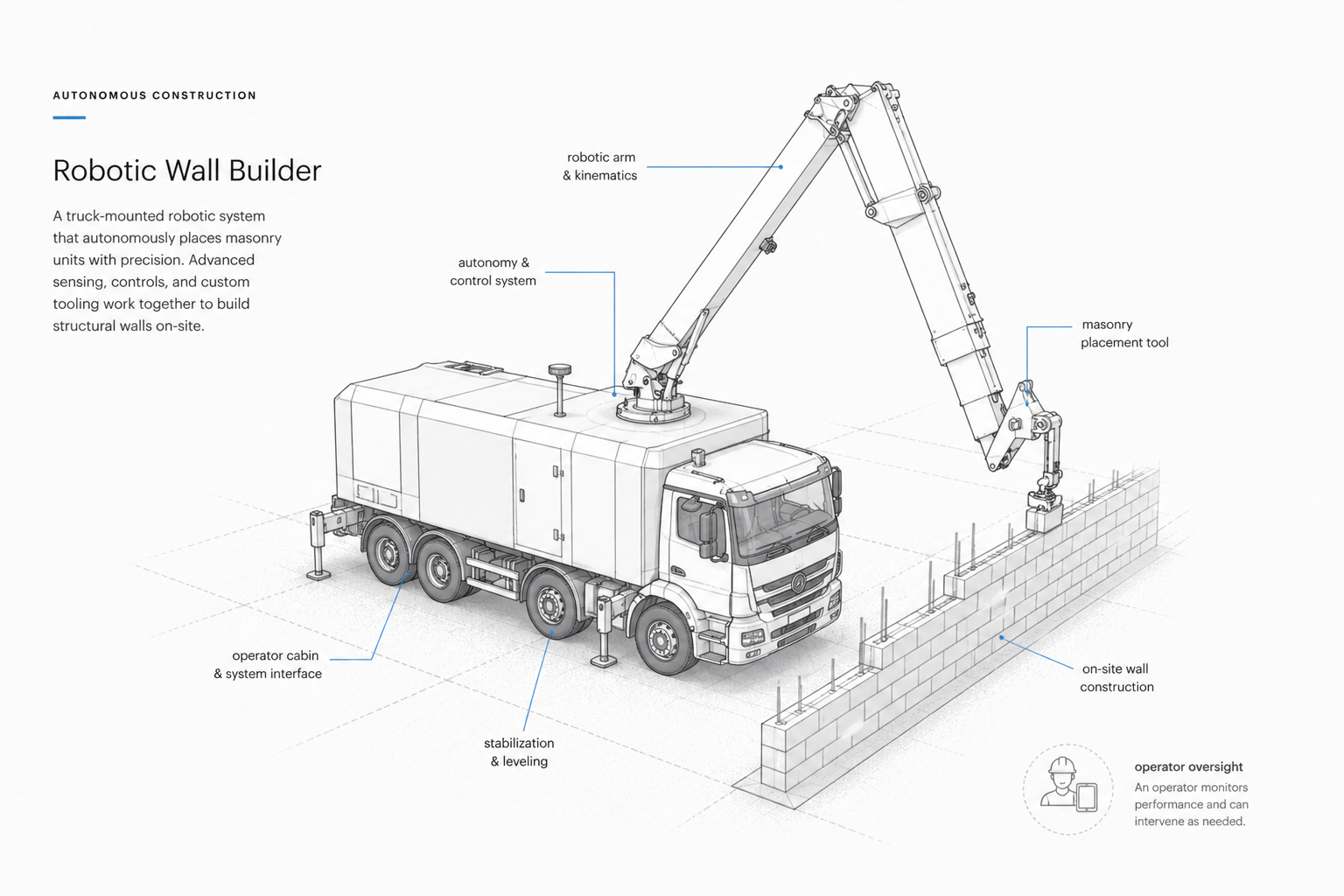
Illustration by ArchitectureCourses.org. Robotic wall-building systems can place masonry units with guided controls, but the work still depends on setup, layout, site conditions, inspection, and human oversight.
Masonry robotics is where articles often get sloppy. They throw around brick-per-hour claims and make it sound like the trade has been solved. It has not.
FBR’s Hadrian system is one of the serious automated masonry examples. Current FBR material says Hadrian is designed to lay up to 360 blocks per hour, with a 32-meter telescopic boom arm and the ability to build walls up to three stories from the roadside.
That is impressive, but it does not mean every masonry job can be automated.
Hadrian works best when the wall system, blocks, adhesive, access, layout, and project type suit the machine. That is different from a mason solving odd corners, flashing transitions, decorative bonds, existing conditions, site tolerances, patchwork, and repair work by hand.
Monumental is another masonry robotics company worth watching because it uses multiple smaller robots that work together on site. Its own material says the robots can process most masonry bonds and work with usual materials, while cameras and AI help register the immediate environment when the site does not fully match BIM or CAD.
That last point is important. Construction is full of “the model said this, but the site says something else.” Robots that can handle that gap are more useful than robots that only work in a perfect digital world.
If the reader is thinking about masonry as a building system, not only a robot task, concrete block homes and concrete block costs give useful background.
SAM and Masonry Assistance
SAM, the Semi-Automated Mason from Construction Robotics, belongs in this conversation but should be framed differently. SAM is a masonry-assist system, not a full replacement for the trade.
That distinction matters. A good mason is not just placing units. The work includes setup, bond, alignment, openings, corners, joint quality, wall ties, flashing awareness, weather judgment, and cleanup. SAM can reduce strain and support production. It does not make masonry judgment disappear.
Autonomous Equipment Fits Repeated Civil Work Best
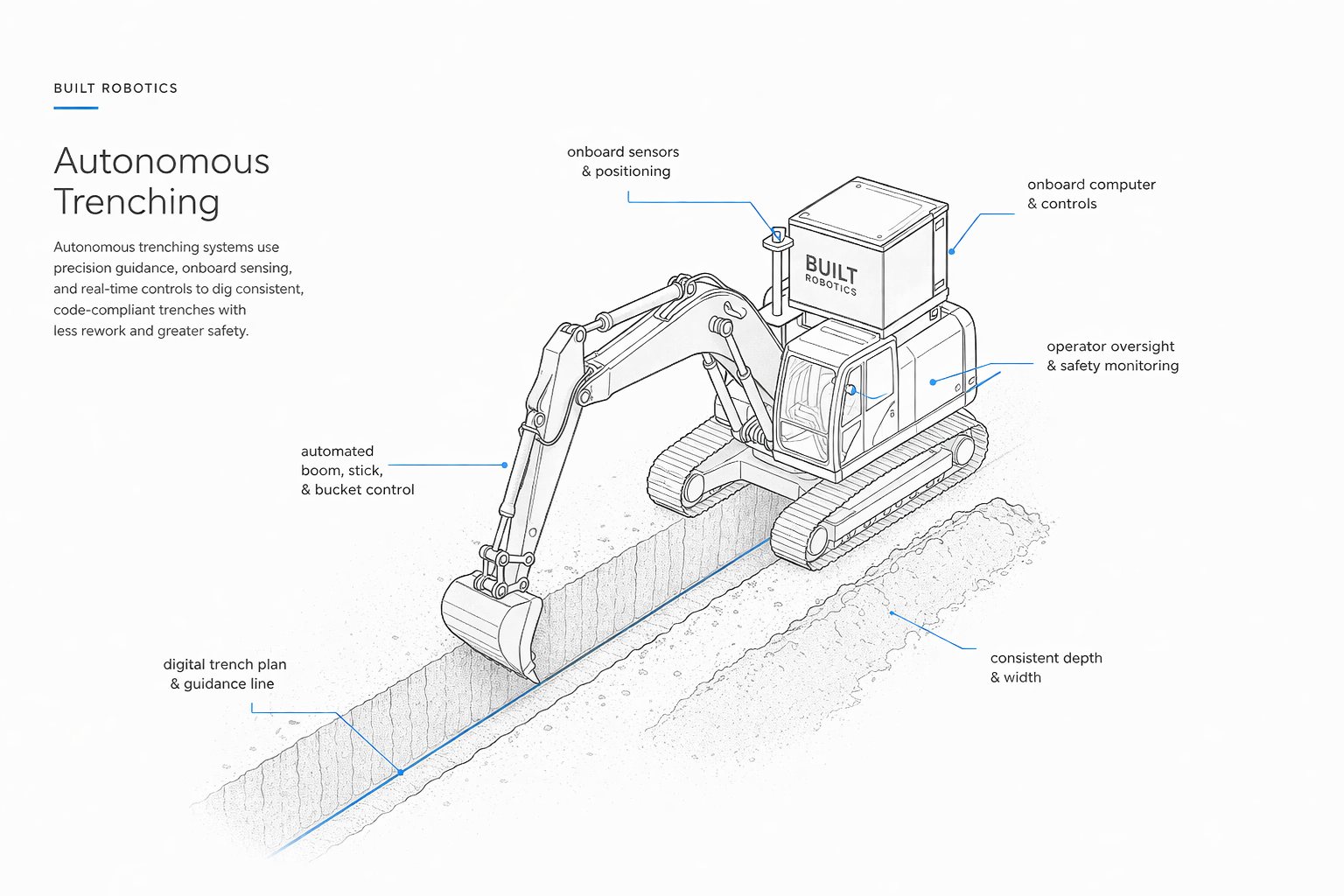
Image by ArchitectureCourses.org. Autonomous excavation shown in a controlled trenching task where path, grade, safety zone, and production can be measured.
Autonomous heavy equipment sounds dramatic, but the practical use is narrower: repeated trenching, grading, piling, and earthwork where the task can be defined and controlled.
Built Robotics is a strong example. Its Exosystem is an autonomous upgrade for excavators, used heavily in solar and energy infrastructure work. Built describes its autonomous trenching system around production, grade control, sensor coverage, geofencing, and safety layers.
This makes sense on utility-scale solar trenching. The work is repeated. The path can be planned. The output can be measured. Documentation matters. Keeping people out of the most exposed part of the operation also has value.
The safety warning still has to stay. Autonomous trenching does not cancel trench safety. OSHA trench rules, utility locates, soil type, water, access, protective systems, and competent-person inspections still matter. A robot can reduce exposure. It cannot make a bad excavation plan safe.
For related groundwork basics, see foundation excavation methods, excavation depth for foundations, and site preparation.
3D Construction Printing Is Becoming a Builder System
3D construction printing has lived between two extremes: exciting demos and claims that ordinary construction is about to disappear. The better read is narrower.
It is a wall-production system. It can be useful when the design, material, equipment, crew, code path, reinforcement, openings, services, finishes, and inspection process are planned around the printer from the start.
ICON Titan and Builder Ownership
ICON’s Titan program is worth adding because it moves 3D construction printing away from one-off spectacle and toward builder-accessible systems. ICON frames Titan as a package of robotics, software, materials, architecture, training, support, and warranty. Its BuildOS software translates architectural intent into tool paths while coordinating robotics, material flow, and environmental inputs.
That is the right frame. The printer is not the whole project. The system is the project.
The risk is that people see printed walls and think the hard work is over. It is not. You still need foundation work, reinforcement strategy, roof and floor connections, openings, MEP coordination, waterproofing, thermal performance, finish transitions, inspections, and code approval.
For the material side of that discussion, concrete block homes, sustainable concrete alternatives, and geopolymer concrete are useful companion pages.
Apis Cor and Mobile Robotic Printing
Apis Cor is another 3D construction printing company worth mentioning because it focuses on robotic systems that print concrete building structures on site, including systems aimed at low-rise work.
The useful question is not “Can a robot print walls?” It can. The better question is whether the whole building system makes sense in that location, under that code path, with that crew, climate, budget, and inspection process.
Humanoid Robots Are Still the Hype-Prone Category
Humanoid robots are starting to show up in construction marketing and pilot discussions, but this is where I would be most careful.
The humanoid form may help in environments designed around human movement. Construction sites are not clean factories. They are uneven, noisy, dusty, wet, crowded, and always changing. Ladders, cords, temporary edges, lifts, weather, material stacks, debris, and trade overlap make the problem much harder.
For now, I would treat humanoids as monitoring, data-capture, and limited-assistance experiments, not core construction production tools.
If a humanoid robot is walking a site, taking images, recording progress, or supporting a safety report, that may be useful. It is just not the same as framing walls, installing ducts, hanging board, tying rebar, or solving field conflicts.
The Software Matters More Than the Robot Body
The robot gets the attention. The software decides whether the tool is useful.
AI in construction is already more useful in coordination, documentation, progress tracking, layout, field-data cleanup, and issue detection than in full autonomy. That matters because most delays are not caused by a lack of futuristic machines. They are caused by missing information, bad sequencing, unclear responsibility, late decisions, and work starting before the details are ready.
A useful AI construction system should help answer:
- What changed since the last scan?
- Which work is behind schedule?
- Which trade is blocked?
- Does the installed work match the model?
- What needs to be fixed before the next trade starts?
- Which issue is a drawing problem, and which is a field condition?
That is where the money is. Not in making construction sound futuristic. In catching the problem before it becomes rework.
This is why construction AI belongs beside construction planning and scheduling, construction project management workflow, and construction quality management. The tool only matters if it improves the work.
Robots Make Bad Inputs More Expensive
This is the part I would not soften.
Automation does not forgive bad information. It spreads it faster.
If a person lays out a bad drawing slowly, there is at least a chance someone questions it while measuring. If a robot prints the bad drawing fast, the error moves across the slab. The same problem applies to drilling, scanning, scheduling, material takeoffs, and automated progress reports.
That is why architects, VDC teams, supers, and trade coordinators matter more, not less. The robot only knows what the project team gives it and what its sensors can read.
What Robots Still Cannot Do Well
Construction is not a controlled factory. That is the reason progress feels uneven.
A robot can perform well when the surface is prepared, the model is clean, the task is repeated, and the work zone is controlled. It struggles when everything changes at once.
| Hard Condition | Why Robots Struggle | Better Use of AI or Robotics |
|---|---|---|
| Old-building renovation | Existing conditions are crooked, hidden, undocumented, and inconsistent. | Scanning, documentation, quantity checks, and issue tracking. |
| Small custom residential jobs | Setup time and tool cost can outweigh the production gain. | Planning, takeoffs, visualization, scheduling, and design review. |
| Poorly coordinated BIM | The robot may execute unresolved information. | Clash detection, model cleanup, trade coordination, and layout review. |
| High-standard finish work | Light, texture, substrate, touch-ups, and owner expectations still matter. | Assistive sanding, spraying, scanning, and punch-list support. |
| Uncontrolled safety zones | Robots can introduce struck-by, contact, and separation hazards. | Exclusion zones, monitored stops, speed separation, training, and clear supervision. |
Safety Is Not Automatic
A robot can reduce certain hazards. It can keep a person out of a trench, reduce overhead drilling, reduce repetitive sanding, or scan an area without sending a worker through it. But a robot can also create new hazards if people and machines work too close together without clear rules.
NIOSH has warned that robot-safety approaches from controlled manufacturing settings are harder to apply on construction sites. Construction robots need careful attention to energy transfer, monitored stopping, separation, worker proximity, and unexpected contact.
The field version is simple: if the robot bumps, pins, pulls, strikes, or pushes someone off balance, the site has a problem.
I would not publish any construction robotics article without saying this clearly: automation is not a safety plan. It is one part of a safety plan.
That also connects to ordinary construction inspection. The site still needs people who can see risk, read conditions, and stop bad work before it becomes hidden work.
What This Means for Architects
Architects do not need to become robotics specialists. But they do need to understand what robot-ready construction information looks like.
Cleaner models matter. Coordinated grids matter. Clear wall types matter. Openings, sleeves, blocking, hanger zones, rated assemblies, MEP runs, ceiling zones, and tolerances matter. The more a job uses layout robots, drilling robots, scanning robots, or printed construction systems, the more expensive vague information becomes.
The architect’s job does not disappear. It shifts toward clearer intent, better coordination, and earlier decisions.
For the design-side version of this shift, read Artificial Intelligence in Building Design. For everyday office workflow, How Architects Use AI is the more practical page. If the question is software selection, see AI design software tools for architects and designers.
What This Means for Builders
For builders, the first question is not “Should we buy a robot?”
The better question is: where are we losing time because the task is repetitive, measurable, physically punishing, or poorly coordinated?
If the answer is layout, repeated scanning, rebar tying, overhead drilling, drywall finishing, trenching, or repeated wall production, robotics may be worth testing.
If the answer is bad supervision, late drawings, unclear scopes, missing decisions, bad sequencing, or weak trade coordination, the robot will not fix the project. It may just make the confusion move faster.
Before You Buy or Lease a Construction Robot
I would check these items before spending money on any construction robotics system.
| Question | Why It Matters |
|---|---|
| Is the task repeated enough? | Robots need volume. One-off conditions usually do not justify the setup. |
| Is the digital input clean? | Bad CAD, bad BIM, or bad control points will create bad field output. |
| Who verifies the work? | The robot’s output still needs checking before other trades build from it. |
| What happens when the site changes? | Weather, floor conditions, access, materials, and trade stacking can break the workflow. |
| What safety zone is required? | Robots need worker separation, stop rules, training, and supervision. |
| What is the cost model? | Purchase, leasing, Robot-as-a-Service, training, support, maintenance, and downtime all matter. |
| Does the crew want it? | A robot that crews see as a nuisance will fail even if the brochure looks good. |
The Jobs Most Likely to Change First
Robots will not change every construction job equally.
The most exposed work is repetitive, measurable, and physically hard. The least exposed work is judgment-heavy, messy, changing, and tied to field decisions.
| More Exposed to Automation | Less Exposed to Automation |
|---|---|
| Bulk layout marking | Final field coordination |
| Repeated scanning routes | Interpreting what the scan means |
| Rebar tying on large mats | Reinforcement inspection and constructability review |
| Overhead drilling from coordinated plans | Resolving MEP conflicts |
| Drywall sanding and spraying | Finish judgment, repair, and punch-list decisions |
| Repeatable trenching | Excavation safety planning and utility conflict decisions |
The safer career move is not to panic. It is to understand the workflow around the robot: BIM, layout, scanning, field data, scheduling, QA, safety, and coordination.
Skills Worth Learning Now
If you are an architecture student, builder, project engineer, or early-career designer, I would focus on these skills before worrying about humanoid robots.
- BIM coordination: know how models become field instructions.
- Layout logic: understand grids, control points, tolerances, and trade markings.
- Reality capture: learn how scans, 360 walks, drone images, and point clouds are used.
- Construction sequencing: know which trade blocks the next one.
- RFI and submittal thinking: understand how unclear information becomes delay.
- Safety basics: especially trenches, overhead work, machine zones, and fall risk.
- AI checking habits: never trust output just because it looks clean.
The person who understands both construction logic and digital tools will be more useful than the person who only knows how to prompt software.
For students, this overlaps with building technology and design, architectural technology, and software every new architecture student should learn.
FAQ
Are construction robots already being used?
Yes. They are being used for layout printing, scanning, rebar tying, overhead drilling, drywall finishing, trenching, masonry assistance, 3D construction printing, and site documentation. They are not yet general-purpose builders.
Will robots replace construction workers?
They will replace or reduce some repetitive tasks, but they will not replace construction judgment. Supervision, coordination, troubleshooting, safety planning, finish quality, renovation work, and field decisions still need people.
What construction robot makes the most sense first?
Layout robots and scanning robots are among the clearest early wins because they fit existing digital workflows and solve repeated field-documentation problems.
Are humanoid robots ready for construction?
Not for broad production work. Current humanoid construction use is more believable for site monitoring, data capture, reporting, and limited assistance than for building major work in changing field conditions.
Can small contractors use construction robots?
Sometimes, but the economics are harder. Small contractors may benefit more from AI estimating, takeoffs, scheduling, documentation, and layout support before owning a robot.
What is the biggest risk with AI construction tools?
The biggest risk is scaling bad information. If the model, drawing, control point, or schedule is wrong, AI and robots can push that mistake into the field faster.
Further Reading on Construction Automation
These books are useful if you want the deeper automation background. Keep them secondary to the jobsite issues above.
- Robot-Oriented Design — useful for understanding how construction workflows may need to change for automation.
- Automation in Construction — a broader introduction to robotics and automation in building work.
- Applications of Digital Twins and Robotics in the Construction Sector — useful for the link between robotics, scanning, and digital project data.
- Construction 4.0 — broader context on automation, data, and digital construction.
Read This Next
- Artificial Intelligence in Building Design
- How Architects Use AI
- AI Design Software Tools for Architects and Designers
- AI for Existing Buildings and Past Projects
- AI in Architectural Design - Real-World Examples
- Construction Planning and Scheduling
- Construction Project Data
Sources and References
- Dusty Robotics FieldPrint Platform
- Dusty for Autodesk AutoCAD plugin
- HP SitePrint robotic layout solution
- HP SitePrint floor deviation marking
- Advanced Construction Robotics TyBOT
- ACR TyBOT 3.0 direct purchase announcement
- Hilti Jaibot drilling robot
- Canvas drywall finishing robot
- Okibo AI-guided painting and drywall finishing robot
- Okibo EG7+ launch information
- FBR Hadrian automated construction robot
- Monumental construction robots
- Construction Robotics SAM
- Built Robotics autonomous trenching
- Built Robotics Exosystem technology
- ICON Titan 3D construction printer
- ICON Titan construction system
- Apis Cor robotic construction technology
- Boston Dynamics autonomous laser scanning
- Trimble X7 and Spot robotic scanning solution
- DroneDeploy reality capture, robotics, and AI agents
- DroneDeploy Progress AI
- NIOSH construction robotics safety bulletin