
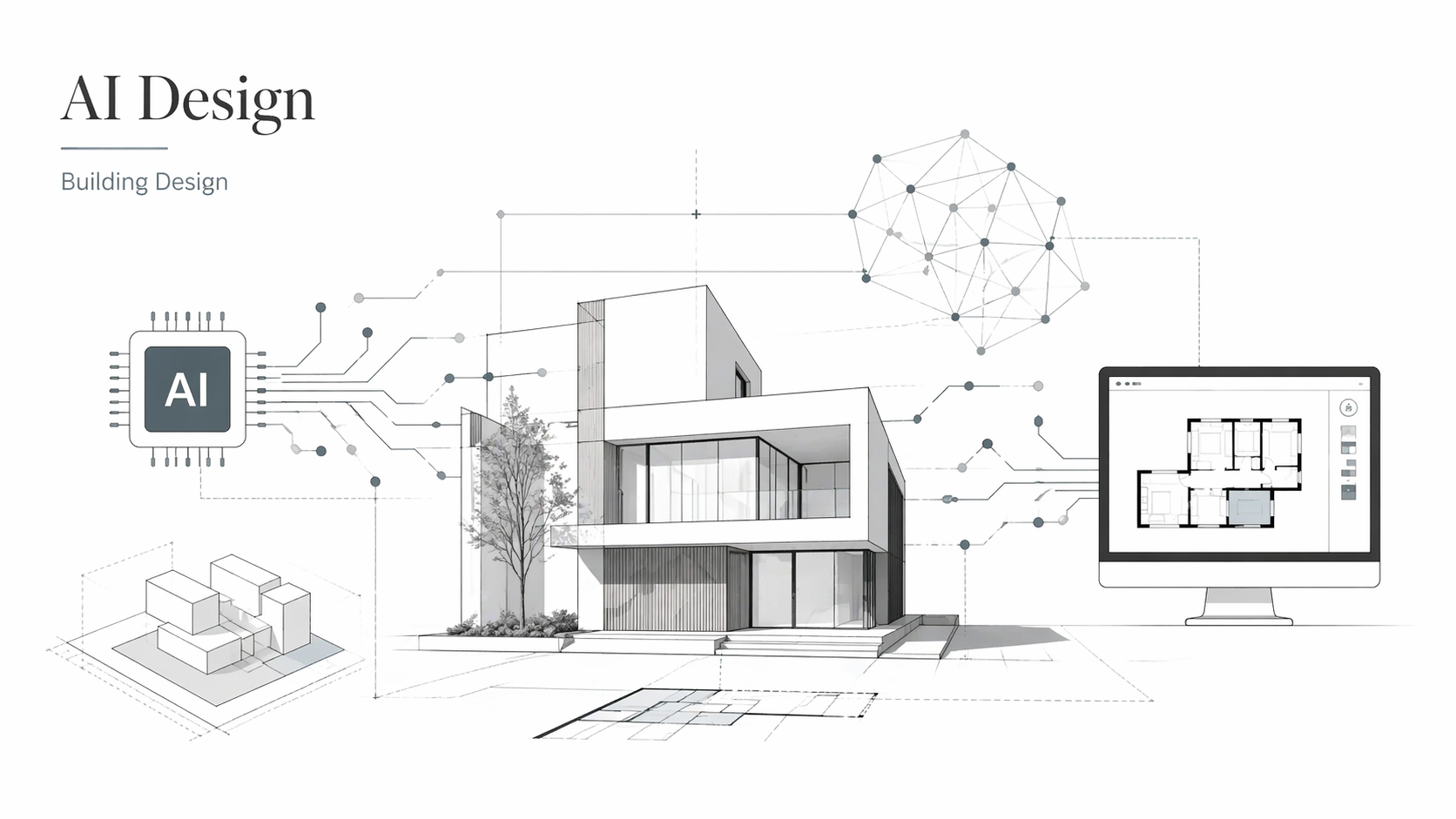
AI in Architecture
The firms that adopted AI early are not ahead because they predicted the future. They are ahead because they stopped doing by hand what a machine can do faster, and spent the saved time on the work that actually requires an architect. That gap between firms that adopted and firms that did not is measurable now in project turnaround, iteration speed, and the complexity of what they can bid on.
This page covers what AI is doing in architecture right now — not as a concept, but as a set of specific tools, specific applications, and specific failure modes. The hype around AI in design is substantial. The useful version is narrower than the hype and more practical than the vision decks.
AI in architecture: See how AI-powered tools like generative design and BIM are changing the future of building design.
Worth reading first: The Future of Architecture in 100 Buildings by Marc Kushner — a sharp, visual look at how technology and big ideas are reshaping what architects design. Check it out on Amazon →
What AI Means in Practice
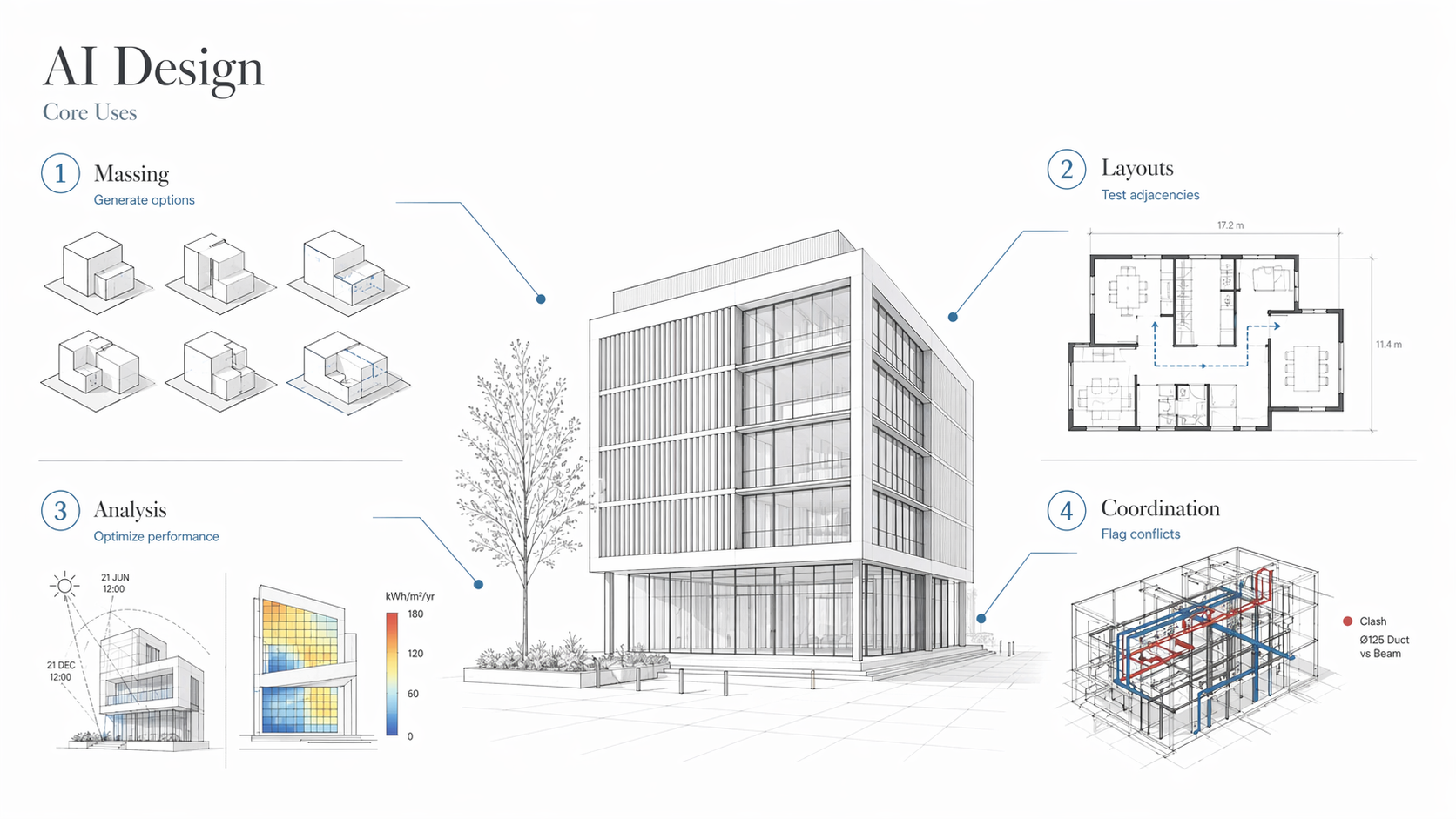
Illustration by ArchitectureCourses.org. AI in building design shown through massing studies, layout testing, performance analysis, and coordination workflows.
In architecture, AI refers to software that learns from patterns, applies constraints, and generates outputs — floor plan options, structural scenarios, energy models, clash reports — faster than a person working manually. It is not a single tool. It is a category of capability that has been built into a range of platforms architects already use, and into standalone tools built specifically for design work.
The applications that are producing measurable results right now:
- Generating and comparing massing options against site constraints, budget, and performance criteria — in minutes rather than days
- Predicting building energy performance before construction documentation begins
- Flagging code violations, structural clashes, and coordination conflicts in BIM models automatically
- Running climate simulations — daylight, wind, shadow, heat island — on live models
- Producing feasibility studies and unit-count analyses for development sites in a fraction of the time required manually
None of that removes the architect. All of it shifts what the architect spends time on. The manual iteration work goes to the machine. The judgment about which output is right for the project stays with the person.
For students and early-career architects: AI tools speed up studio iteration, make portfolio work more defensible, and signal a working knowledge of where the profession is heading. All three matter in hiring conversations.
See also: AI in Construction: What Robots Can—and Can't—Do Yet
AI Across the Design Process
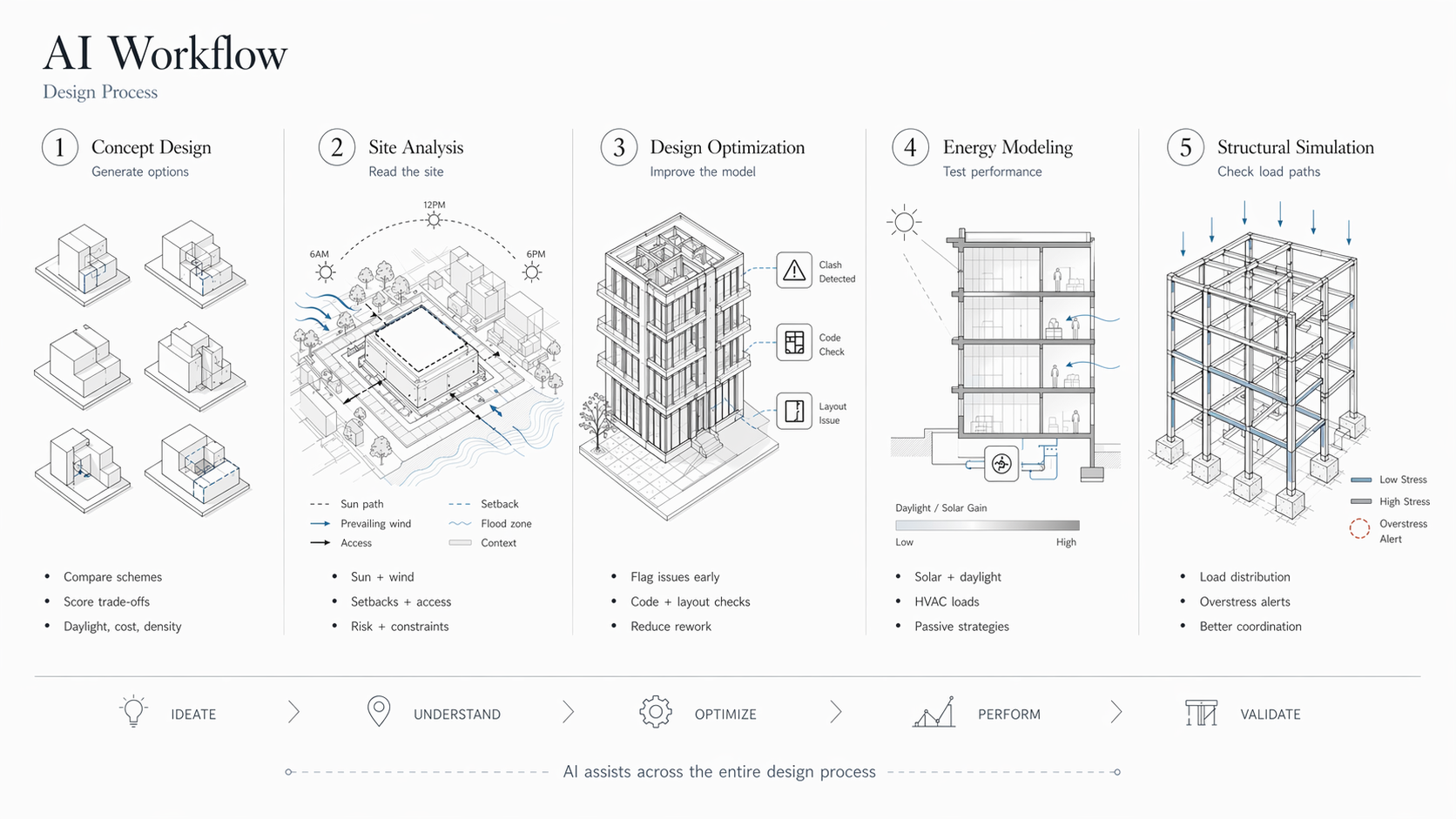
Illustration by ArchitectureCourses.org. AI workflow across the architectural design process, from concept design to structural simulation.
Concept Design
This is where AI has the most immediate impact on how architects work. Feed in site boundaries, program requirements, budget constraints, and performance targets — tools like Autodesk Generative Design produce multiple massing options scored against those inputs. The value is not that the AI makes the design decision. The value is that you are comparing outcomes rather than defending a single scheme you happened to develop first.
Early-stage AI tools also allow clients to see the trade-offs between options — more units versus better daylight, lower cost versus better orientation — as a visual comparison rather than a verbal explanation. That changes client conversations in measurable ways.
Site Selection and Analysis
Picking a site involves more variables than any manual analysis handles quickly: sun angles across seasons, prevailing wind, shadow from adjacent buildings, zoning envelope, flood risk, soil conditions, access constraints. Spacemaker and similar tools run environmental and spatial analysis on a site in the time it would previously take to set up the analysis.
The practical result is fewer bad site decisions — layouts that get built before someone notices the western facade gets afternoon glare all summer, or that the setback requirement makes the program unworkable.
Design Optimization
Once a scheme direction is established, AI tools can scan the model for material inefficiencies, structural problems, layout issues, and code violations — automatically, as the model develops. This is more useful than it sounds. The traditional alternative is catching these issues during coordination, during permit review, or on site — each of which is more expensive than the last.
Common applications at this stage: massing studies against zoning envelopes, load path analysis, envelope performance simulation, preliminary cost modeling.
Energy and Sustainability Modeling
AI-driven energy tools can simulate how a building performs across seasons before construction documentation begins — HVAC loads, daylighting distribution, solar exposure by facade, passive strategy effectiveness. The Google DeepMind work on data center cooling — a 40% reduction in cooling energy — used the same underlying logic that building energy tools now apply to occupied spaces.
The practical implication for architects: sustainability claims become defensible with data early in the process rather than tested late. That matters for LEED certification, energy code compliance, and client confidence.
Structural Simulation
AI-assisted structural tools simulate load distribution, identify where members are overstressed, and flag geometry that creates structural problems — without waiting for a structural engineer to review a set. This is not a replacement for structural engineering. It is a check that runs during design development, which means the conversation with the structural engineer starts from a better-coordinated model. AI-powered tools can analyze load-bearing walls, beams, and other structural components in ways that used to require dedicated software and specialist knowledge.
The Ethics of AI in Design
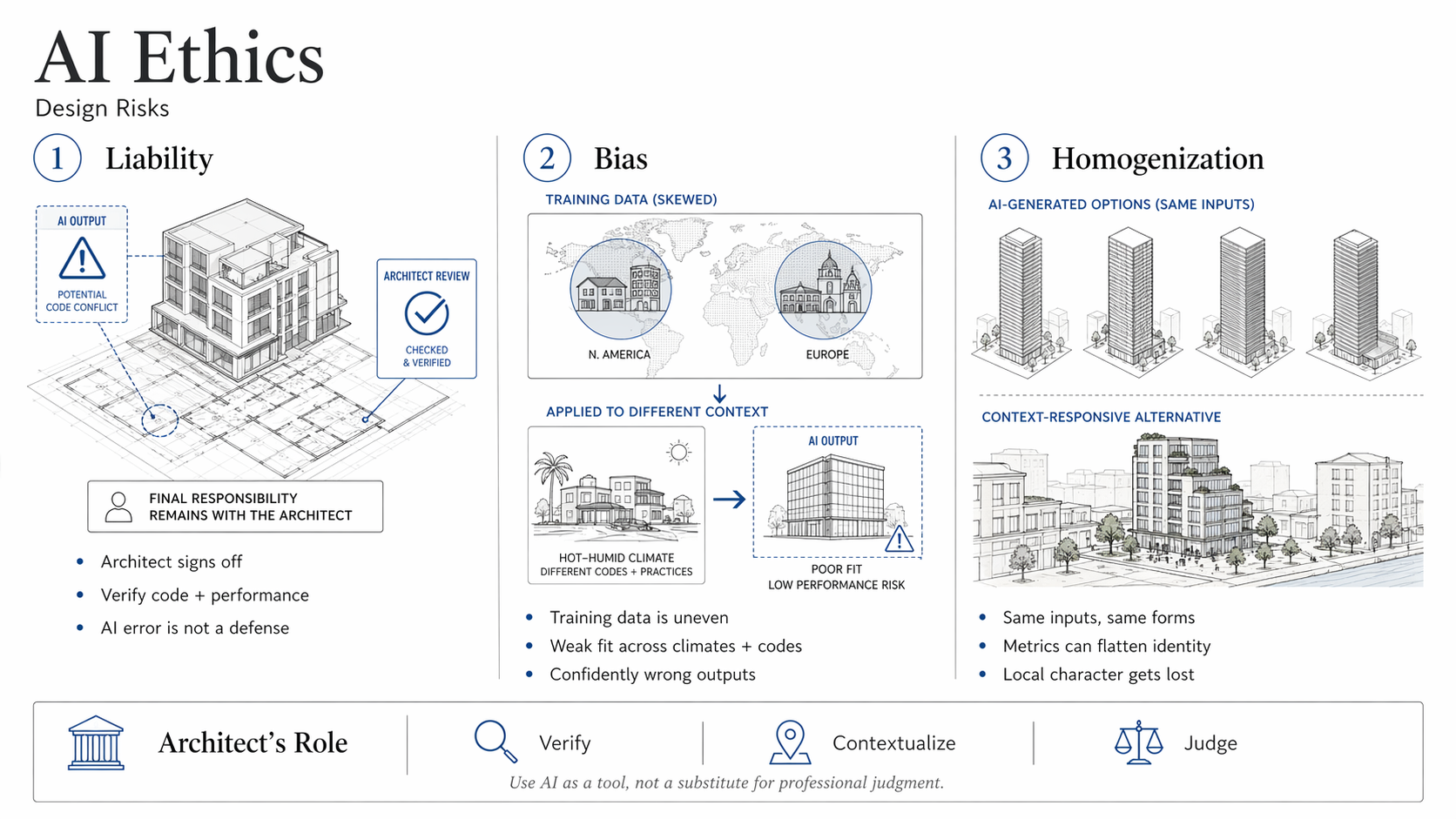
Illustration by ArchitectureCourses.org. Ethical risks of AI in architecture, including liability, biased training data, and homogenized design output.
Liability When AI Gets It Wrong
This is the question the profession has not resolved. When an AI-assisted layout contributes to poor ventilation, a code violation that gets missed, or a structural problem — who is responsible? The architect who signed off, the engineer, the firm that built the tool?
Current professional liability frameworks hold the architect responsible for the design. AI tools do not change that. Using an AI output without verifying it is not a defense. It is a workflow failure. Architects need to check what the tool gives them, which requires understanding the constraints well enough to know when the output is wrong.
Bias in the Training Data
Most AI design tools were trained on data that skews heavily toward Western building stock — North American and European housing typologies, climate zones, construction methods, and building codes. When these tools are applied to design problems in South Asia, sub-Saharan Africa, or informal urban settlements in Latin America, the outputs can be poorly calibrated to the actual conditions.
Bad training data produces confidently wrong outputs. The tool does not flag uncertainty. It generates something that looks like an answer. Architects working outside the contexts these tools were trained on need to weight that limitation explicitly.
Homogenization of Output
When large numbers of architects run the same tools with similar inputs, the outputs start to converge. Optimized glazed towers. Curved facades generated by the same algorithmic logic. Massing decisions that score well on the tool's metrics and look indistinguishable from each other at street level.
This is already visible in commercial development in several European and Asian markets. The buildings check the performance boxes and fail to respond to local context, street character, or the cultural specifics of the people who will use them. AI tools optimize for what you measure. If you do not measure local character or cultural appropriateness, the tool ignores it.
The architect's job is to bring back what the tool cannot measure. That requires knowing what the tool is missing, which requires understanding the place and the people before running the software.
AI in Team Workflows
One of the more practical benefits of AI in architecture has nothing to do with design generation. It has to do with coordination.
With platforms like NVIDIA Omniverse, BIM 360, and AI-augmented Revit, architects, engineers, and contractors can review the same live model simultaneously, with automated clash detection running in the background. Changes propagate across the model. Conflicts get flagged before they reach the construction site.
The alternative is the traditional coordination process: exchange of drawings, manual clash checking, RFIs generated on site when the mechanical duct runs through the structural beam. That process produces mistakes that cost money. The AI coordination workflow does not eliminate coordination problems, but it catches them earlier and more consistently.
Some AI tools can also check a proposed change against zoning, daylight requirements, or structural constraints in real time during a design meeting. The feedback loop that used to run on a delay of days or weeks runs during the conversation instead.
AI and Parametric Design
Parametric design — defining a building through rules and relationships rather than fixed dimensions — used to require proficiency in scripting. Grasshopper in Rhino made it more accessible. AI tools have taken another step: the system learns from iterations rather than requiring the architect to define every relationship explicitly.
In practice, this means a hospital project can test fifty facade configurations against daylighting requirements and energy loads in the time it would previously take to model three by hand. A housing project can test unit mix, circulation, and structural grid simultaneously against a cost target, rather than sequentially. The output is not a design — it is a set of options scored against the objectives you define. Defining the right objectives is still the architect's work.
The tools doing this in current practice: Hypar and Spacemaker AI for site and massing, Wallacei for Grasshopper for evolutionary optimization, and Autodesk Generative Design for structure and layout. These are being used in housing, healthcare, and educational buildings — not just experimental or cultural projects.
The relevant discipline: know what the tool is optimizing for before you trust what it generates. A tool optimizing for unit count produces a different building than one optimizing for daylight access, even on the same site. Both can look equally confident in the output.
AI and Career Trajectory
Firms using AI at scale — Zaha Hadid Architects, BIG, ARUP — are not ahead because of the tools. They are ahead because they built workflows around the tools early enough to develop genuine competency. The tools accelerated what they could already do. They did not substitute for it.
Zaha Hadid Architects used Grasshopper to push geometry and fabrication logic in ways that manual modeling could not keep up with. The Beijing Daxing Airport and Generali Tower reflect that — not AI-generated buildings, but buildings whose complexity was manageable because of parametric and AI-assisted workflows.
ARUP's AI work on the Sydney Opera House Renewal optimized energy performance against heritage constraints that could not be relaxed. The AI helped them find solutions within a tight set of requirements, not replace the judgment about what the requirements should be.
What those examples have in common: AI was used to solve a specific, well-defined problem within a broader project where the architects and engineers still drove the design logic. That is the productive version of AI integration. The unproductive version is using AI to generate outputs without understanding what the tool is optimizing for, then delivering those outputs as design work.
Architects should read: Architectural Intelligence by Molly Wright Steenson — explains how architecture and machine intelligence have intersected for longer than most people realize. View on Amazon
Mistakes Architects Make With AI
The most common problems are not technical. They are about how architects position AI in their own process.
Treating the first output as the answer. AI tools generate options. They do not generate decisions. The option the tool produces is a starting point that needs to be evaluated against the brief, the site, the client, and the architect's judgment about what the project needs. Accepting the first output skips the work the tool was supposed to support.
Using default settings. Most AI tools produce results that reflect their default parameters — which reflect their training data, which reflects the projects and contexts the tool was built around. Running a tool on default settings for a project with different climate, typology, or cultural context produces results calibrated to someone else's brief.
Skipping code verification. AI tools do not know your local building code. They know what they were trained on, which may or may not match current local requirements. Structural outputs, clearance dimensions, egress calculations, and accessibility requirements all need manual verification against the applicable code. The tool generates plausible-looking numbers. That is different from correct numbers.
Confusing renders with design. Image generation tools produce compelling visuals quickly. A Midjourney render is not a design. It is a visual tone that may or may not correspond to anything buildable, anything appropriate for the site, or anything that responds to the client's program. Using image generation as the primary design output rather than as an early-stage communication tool produces portfolios that look impressive and projects that cannot be built.
Letting AI carry weak concepts. AI amplifies what you put into it. A weak brief, a poorly defined site analysis, or a vague design intent produces AI outputs that are well-optimized versions of a weak starting point. The tool cannot fix the concept. It can only iterate on it.
Most AI failures in architecture are not tool failures. They are judgment failures about when and how to trust the output.
Five Tools Worth Learning
Cost matters for smaller firms and sole practitioners deciding where to start. Grasshopper is free with a Rhino license. Midjourney runs $10–$30/month depending on usage tier. Spacemaker/Forma and Autodesk Generative Design are subscription-based through Autodesk, often included in AEC Collection licenses. NVIDIA Omniverse has a free individual tier and enterprise pricing. TestFit charges per seat. Most have trial periods — enough to know whether the tool fits your workflow before committing.
1. Autodesk Generative Design
Performance-based option generation against real constraints: site, budget, program, structural logic. The most established tool for massing studies and layout optimization with data-driven output. Best used at early design stages when the brief is well-defined enough to set meaningful objectives.
2. Rhino + Grasshopper + Ladybug/Honeybee
Still the most flexible combination for parametric modeling with environmental analysis. Daylight, energy, and thermal comfort can be modeled against complex geometry. Not beginner-friendly, but the investment in learning it has a long payback period. Widely used in firms doing complex geometry, adaptive facades, and passive design work.
3. Spacemaker / Autodesk Forma
Early-stage site analysis and massing optimization. Sun, wind, shadow, and unit feasibility run against zoning constraints. Particularly useful for urban projects where the site analysis would otherwise take significant manual effort. Strong for client presentations at the feasibility stage.
4. NVIDIA Omniverse
Real-time collaboration and AI-driven visualization for multi-disciplinary teams. The value is in coordination — architects, engineers, and contractors working in the same live model. More relevant on large projects with complex coordination requirements than on smaller residential work.
5. Midjourney (with manual follow-through)
Useful for concept moodboarding and early-stage client communication — showing a design direction rather than a design. The discipline required is using it for what it does well (quick visual tone-setting) and not using it as a substitute for design development. Firms that use Midjourney outputs as portfolio pieces without follow-through design work are using it wrong.
Will AI Replace Architects?
The more useful question is: which parts of architectural practice does AI change, and in what direction?
Production drafting, repetitive iteration, clash detection, energy simulation, and feasibility modeling are all moving toward automation. Architects who built their value on those tasks will find that value diminishing. Architects who built their value on judgment — which design approach fits this client, this site, this community, this budget — are in a different position.
The risk is not that AI replaces architects. The risk is that AI makes visible which architects were doing judgment work and which were doing process work. Process work is replaceable. Judgment work is not, but it also requires actually knowing the subject well enough to exercise judgment rather than just approving outputs.
The architects who will have the most difficulty are the ones who cannot explain why their design decisions are right — who relied on process and time invested to demonstrate value rather than the quality of the reasoning. AI shortens process. It does not shortcut reasoning.
FAQ
Will AI replace architects?
It will replace workflows that do not require architectural judgment. Drafting, basic coordination, repetitive option generation — those are already being automated. Design decisions that require understanding a client, a site, a community, and a set of competing constraints are not being automated. The architects most at risk are those who cannot show that what they do requires judgment.
Which AI tools should I learn first?
Start with Autodesk Generative Design or Spacemaker if you work on urban or residential projects. Add Grasshopper with Ladybug if you want to do environmental analysis at a more sophisticated level. Learn Midjourney for client communication but understand what it can and cannot do. NVIDIA Omniverse is worth knowing if you work on large coordination-heavy projects.
Can AI make a building more sustainable?
It can model the factors that affect sustainability — energy use, HVAC loads, solar exposure, daylight distribution — with more speed and detail than manual methods. Tools like Insight and Autodesk Forma have demonstrated measurable reductions in predicted energy use. The Google DeepMind work on cooling systems cut energy use by 40% using the same underlying optimization logic. What AI cannot do is decide that sustainability matters for a given project. That is still a human decision.
What are the main risks with AI in design?
Accepting outputs without verification. Using tools outside the contexts they were trained on. Homogenization of output when many firms use the same tools with similar inputs. Liability for AI-assisted work that has not been checked against code requirements. These are not arguments against using AI — they are arguments for understanding what the tool does and does not know before relying on it.
Which firms are leading in AI integration?
Zaha Hadid Architects, BIG, and ARUP have built AI and parametric workflows into their core practice rather than treating them as supplementary. Their output reflects it — more complex geometry, better coordination, faster project delivery. The distinction between those firms and others using the same tools is that the tools are integrated into the design process rather than applied after the fact to produce better-looking outputs.
Recommended Reading
Artificial Intelligence and Architecture
- Life 3.0: Being Human in the Age of Artificial Intelligence by Max Tegmark — A comprehensive look at how AI is affecting society and industries, including design and construction.
- The Age of Em by Robin Hanson — Explores futuristic scenarios involving AI and human-computer overlap. More speculative, but useful for thinking about where automation in design work is heading.
- The Second Machine Age by Erik Brynjolfsson and Andrew McAfee — How digital technology and AI are transforming the economy and creative fields. Relevant for understanding what automation displaces versus what it amplifies.
- The Future of Architecture in 100 Buildings by Marc Kushner — Visual and direct. What technology is making possible in built form right now.
- Smart Cities: Big Data, Civic Hackers, and the Quest for a New Utopia by Anthony M. Townsend — How AI and data intersect with urban design. Essential for architects working on city-scale or planning-adjacent projects.
Affiliate Notice:
We've selected these books based on their relevance to AI and architecture. If you make a purchase through our links, you'll support our work at no extra cost to you.
Sources
- Autodesk Generative Design — autodesk.com
- NVIDIA Omniverse — nvidia.com
- Google DeepMind + Buildings — deepmind.com