
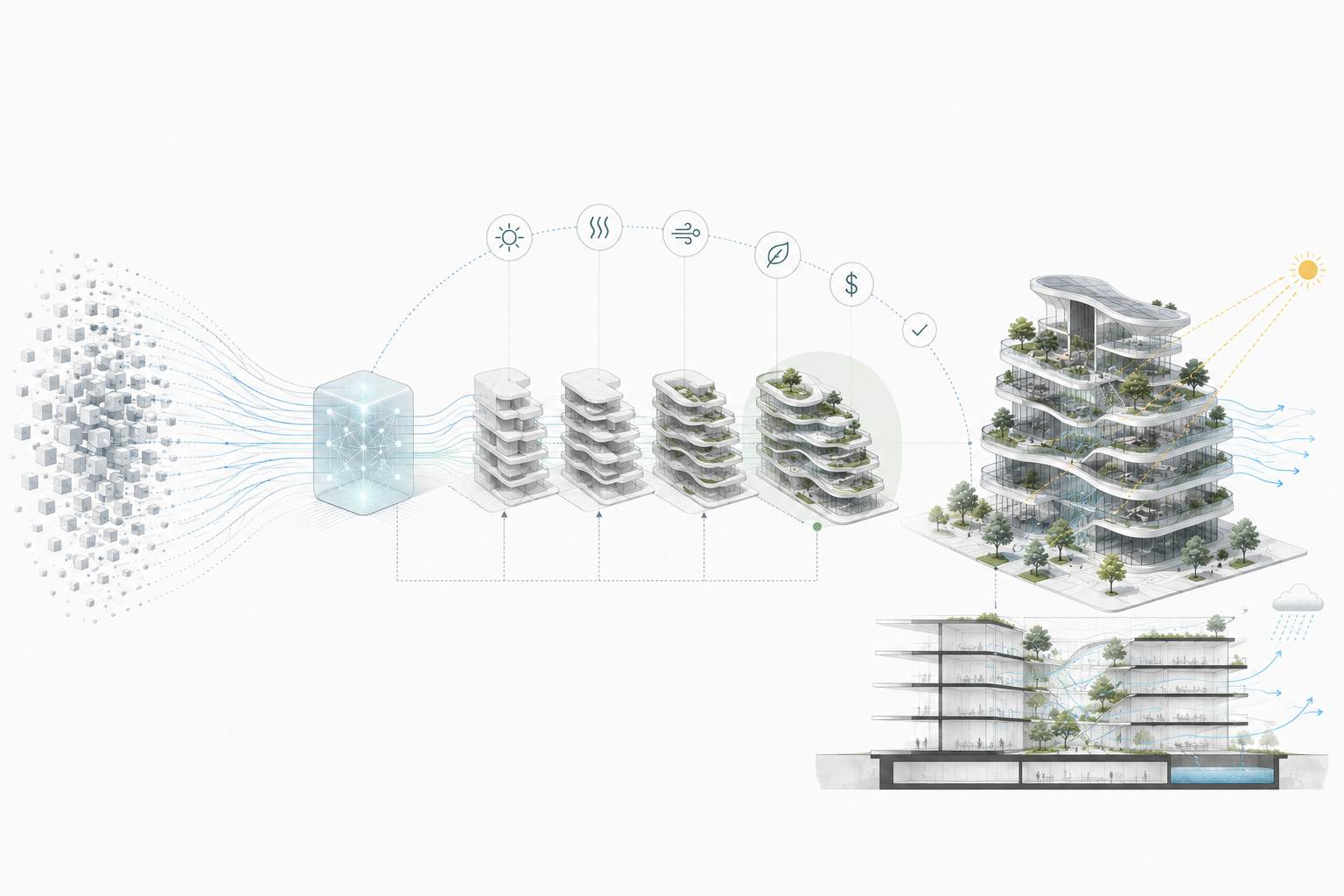
A render is not architecture.
That is the first problem with most AI architecture coverage. It shows wild images, names a few famous firms, and acts as if software is now designing buildings on its own.
The useful change is quieter. AI helps architects test options, compare trade-offs, catch weak assumptions earlier, reuse project knowledge, check performance, and hand cleaner information to construction teams.
Less exciting than a glowing concept image. More important.
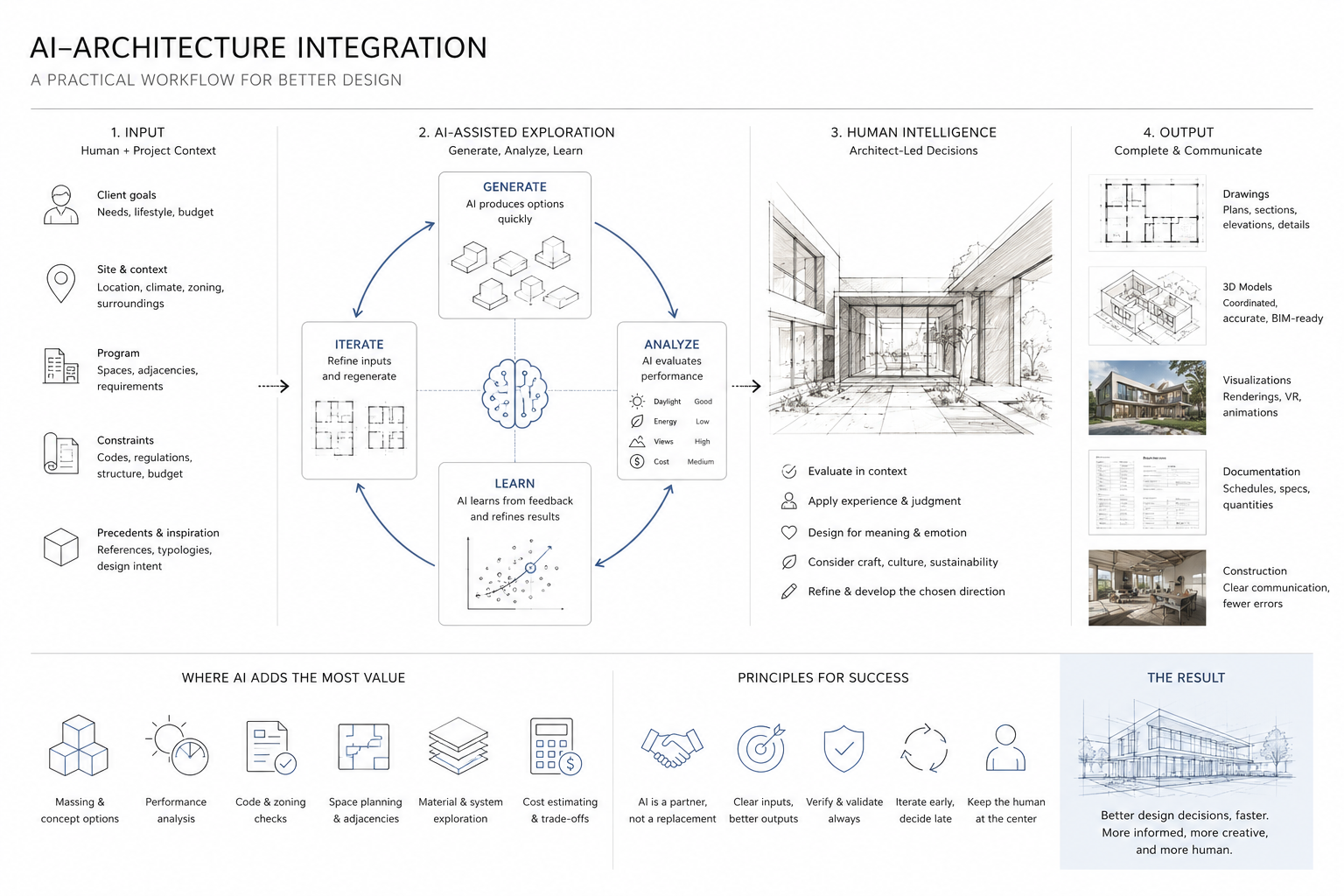
A useful AI workflow gives the architect better evidence. It does not remove judgment. Someone still has to decide what matters, what can be compromised, what should be checked again, and what should never leave the screen until a human has questioned it.
The Useful Test
Do not start with, “Was AI used?”
That question is almost useless now.
Ask this instead: Did AI change a decision that mattered?
If it only made an image, it may help with mood, speed, or communication. If it changed the plan, the façade, the carbon strategy, the accessibility route, the construction sequence, or the way the building performs after handover, then it belongs in a serious architecture discussion.
| Weak AI Use | Stronger AI Use | What the Architect Still Owns |
|---|---|---|
| Generate a dramatic concept image. | Test options against daylight, cost, carbon, code, access, or program rules. | Deciding which constraints matter and which output is buildable. |
| Make a building look futuristic. | Compare layouts that solve real circulation, density, and comfort problems. | Choosing the plan that works for people, not just the highest-scoring option. |
| Write a generic project description. | Use project data to find risk, delay, conflict, or repeated mistakes. | Turning signals into action before the issue becomes rework. |
| Call every smart building “AI.” | Separate passive design, sensors, automation, and machine learning. | Being honest about what the system actually does. |
Examples Worth Reading Differently
These projects are useful only if you look past the headline.
| Example | What AI Changed | What It Did Not Solve |
|---|---|---|
| Autodesk Toronto office | Turned workplace planning goals into measurable layout options. | The human judgment of which plan felt usable, fair, and buildable. |
| The Phoenix housing project | Helped compare cost, carbon, livability, and repeatable construction logic. | Land, financing, policy, permitting, and the politics of housing. |
| Daedalus Pavilion | Connected digital geometry to robotic fabrication and assembly. | The need for material logic, joints, tolerance, and physical testing. |
| DeepMind data-center cooling | Used live operating data to cut cooling energy. | The basic architectural work of envelope, zoning, shading, and system design. |
| Wayfindr | Used audio navigation standards to support movement through complex spaces. | The physical legibility of the building itself. |
AI Images Are Not AI Architecture
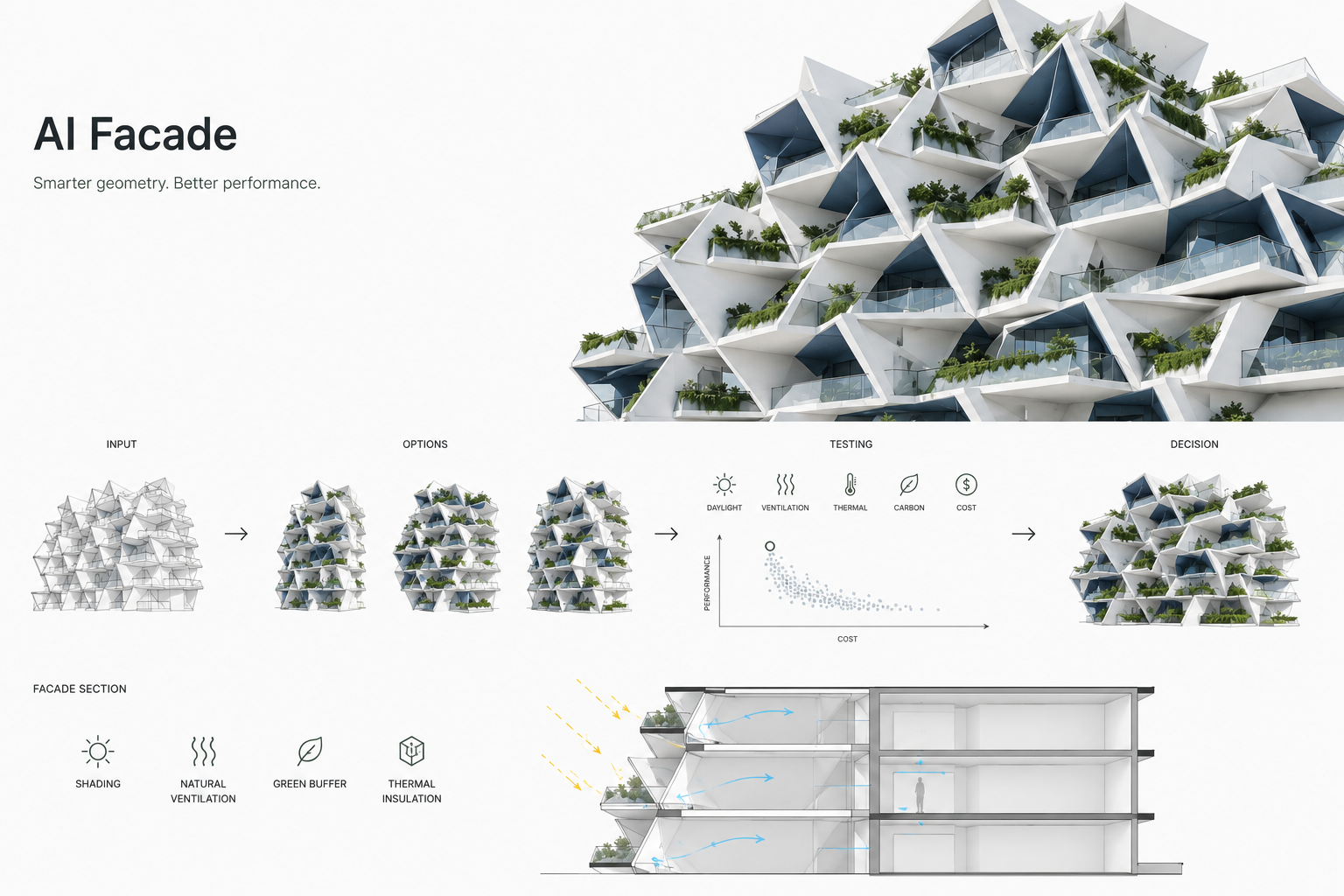
Illustration by ArchitectureCourses.org. AI facade work is useful when it compares geometry against daylight, heat, ventilation, cost, carbon, and buildability instead of stopping at a dramatic render.
AI concept images can help with early atmosphere and visual direction, but they do not prove that the architecture works.
AI image tools are useful. They are also easy to overrate.
A generated image can suggest massing, light, mood, façade rhythm, material direction, or a way to explain an idea to a client. A quick image can loosen up a stuck studio conversation.
But image generation does not solve the plan. It does not check the section. It does not know whether the stair fits. It does not understand local code unless the workflow is built to check it. It does not know the contractor’s sequencing problem, the acoustic rating, the fire separation, the slab edge, or the budget pressure hiding behind the render.
This is where students and young designers can get pulled off course. They mistake visual novelty for architectural progress.
Use AI images for exploration. Do not let them become the design.
For a more practical tool view, see AI design software tools for architects and designers and how AI tools improve rendering speed and realism.
The AI Decision Loop
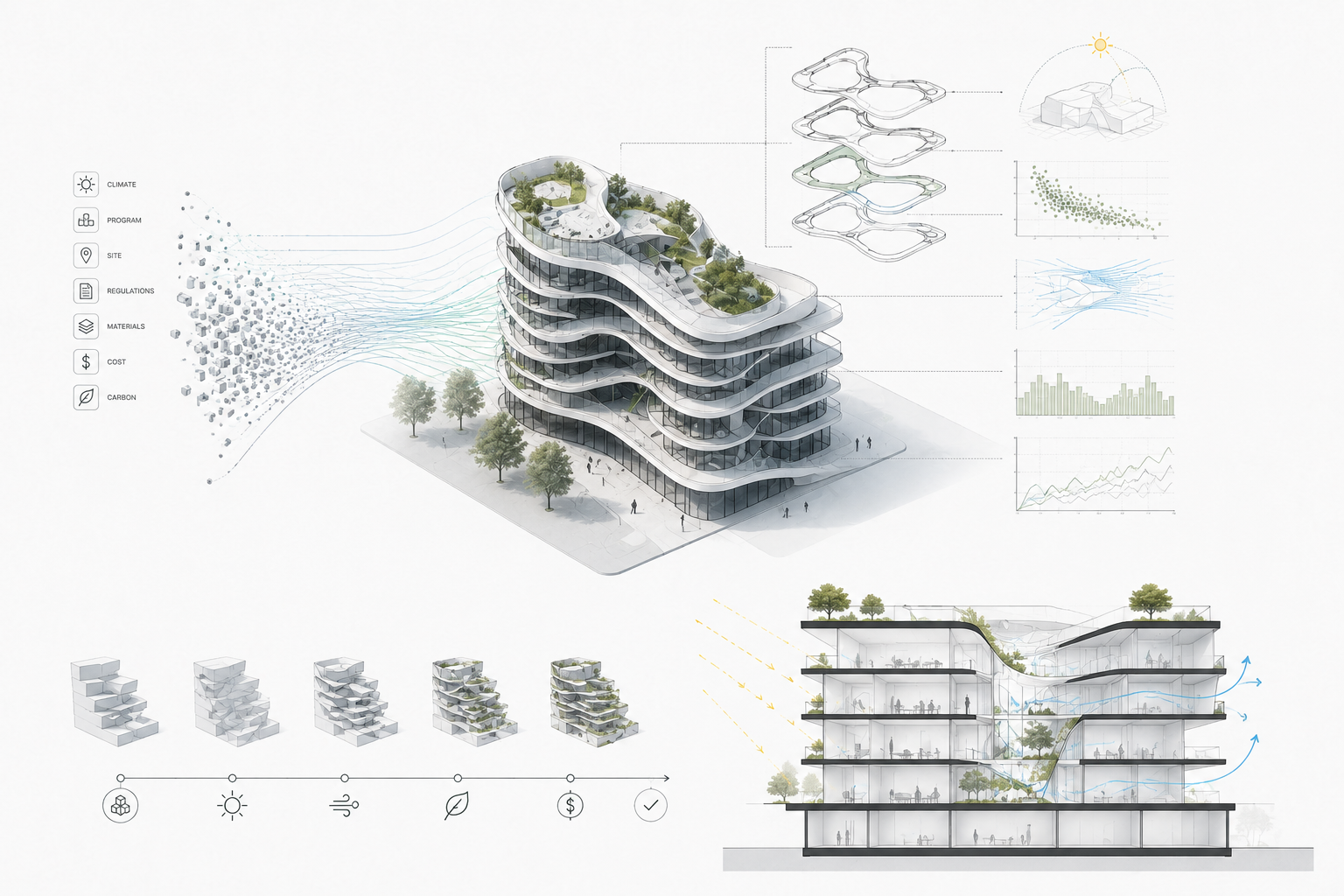
Illustration by ArchitectureCourses.org. AI design is most useful when it turns constraints into options, tests performance, and helps the architect choose a buildable direction.
The strongest AI projects usually follow the same loop.
They start with constraints. They generate options. They score those options against measurable goals.
Then a human decides what the score missed.
That last step matters. AI can rank options, but it cannot fully understand why a plan feels mean, why a courtyard is too dark, why a lobby sequence feels awkward, or why a “high-performing” option creates a maintenance problem ten years later.
| Step | What AI Can Help With | What Can Go Wrong |
|---|---|---|
| Set the rules | Turn goals into parameters: area, daylight, access, cost, carbon, adjacencies. | If the wrong rules are entered, the best output is still the wrong answer. |
| Generate options | Explore many layouts, forms, façade studies, or schedule paths quickly. | More options can create more confusion if the team has no decision criteria. |
| Score the options | Compare measurable performance across many variants. | Soft architectural qualities may be ignored because they are harder to measure. |
| Check the winner | Flag risks, conflicts, missing data, or underperforming areas. | A clean dashboard can hide a bad assumption. |
| Hand it off | Connect the decision to BIM, documentation, fabrication, or operations. | If the model does not survive handoff, the AI work becomes a presentation trick. |
AI is not magic. It is a pressure test.
Autodesk Toronto: Layout as a Negotiation
One of the cleaner examples is Autodesk’s Toronto office project in the MaRS district.
Autodesk’s Project Discover explored generative design for architectural space planning. The important part was not that software produced a floor plan. The useful part was that the team translated workplace needs into measurable goals: daylight, adjacency, traffic, work style, collaboration, privacy, and physical limits of the existing floors.
That changes the role of early planning.
Instead of drawing one “good” plan and defending it, the team could test many possible plans against competing goals. A department could be near the group it works with. A quiet team could be away from the loud zone. Daylight could be measured, not guessed. Circulation could be compared, not argued over only from a marked-up plan.
The architectural judgment did not disappear. It moved upstream.
The better question became: which goals are worth optimizing, and which human qualities will the software miss?
This matters for ordinary architecture work too. Most offices do not need a famous generative-design research project. But many projects do need better early testing. A school, clinic, office, apartment building, or library can waste weeks because adjacencies are discussed in vague language instead of tested as rules.
Before you build an AI workflow around space planning, the basics still matter. If you are weak on drawing logic, start with the architecture design process, components of a construction document set, and AutoCAD basics for architects and engineers.
Autodesk Forma and The Phoenix
Autodesk Forma is a useful sign of where the profession is moving because it brings AI-powered analysis closer to pre-design and schematic design.
That is the right phase for many AI tools. Early decisions are cheap to change and expensive to ignore.
The Phoenix project in West Oakland shows why this matters. Autodesk describes The Phoenix as a 316-unit affordable and sustainable housing project using the Autodesk Design and Make Platform to make trade-offs across cost, operational carbon, embodied carbon, and livability. The larger goal was not a prettier render. It was a faster, lower-carbon, lower-cost housing delivery model.
Be careful with the headline version. “AI solves affordable housing” is nonsense.
Housing is land, financing, policy, labor, materials, permitting, politics, and time. AI does not remove those constraints. What it can do is help a team test options faster and reuse proven building logic instead of treating every project as a one-off.
That is a serious architectural lesson.
| What The Phoenix Suggests | Why It Matters |
|---|---|
| Reusable unit logic can reduce delay. | Housing does not need every apartment layout invented from scratch. |
| Cost and carbon need to be tested together. | A cheap option that increases long-term energy use may not be cheap. |
| Design data has to connect to construction. | If the factory, site, and model do not share the same logic, speed disappears. |
| AI works best when the building system is repeatable. | Repeated units, modular parts, and standard assemblies give AI something useful to optimize. |
For the broader design side, see Artificial Intelligence in Building Design. For practical office workflow, How Architects Use AI is the better handoff.
Daedalus: The Toolpath Test
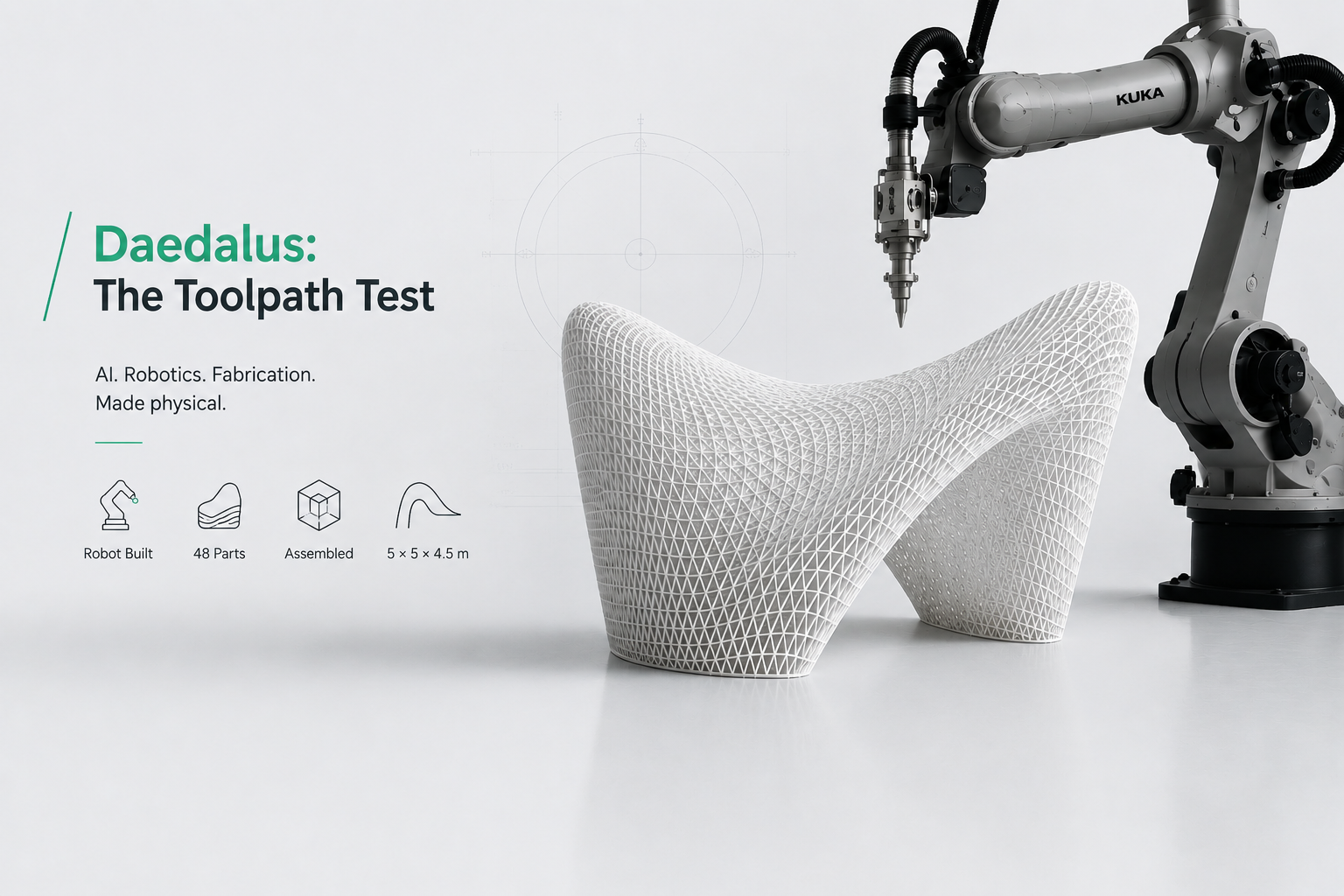
Illustration by ArchitectureCourses.org. The Daedalus Pavilion is more useful as a fabrication and assembly lesson than a futuristic AI image. The geometry only works because the robotic toolpath, printed parts, joints, and construction sequence were physically buildable.
The Daedalus Pavilion is a better example than many “AI-designed building” claims because it had to become physical.
Ai Build and Arup used robotic 3D printing with a KUKA industrial robot to create a pavilion made from 48 printed pieces. Reports from the original launch describe a 5 meter by 5 meter by 4.5 meter installation, printed in parts and assembled as a physical structure.
The lesson is not “AI makes wild shapes.” That is too easy.
The better lesson is that AI, robotics, and fabrication only become architectural when the output survives constraints: printer reach, material behavior, joint logic, structural performance, assembly order, tolerance, and repairability.
A form that looks impossible can still be dumb. A form that looks strange but has a clean toolpath, clear assembly sequence, and honest material logic is more interesting.
Use Daedalus as a student lesson in reverse. Do not start with the final image. Start with the fabrication limits. Ask what the robot can actually print, where the pieces break, how the joints work, and what part of the geometry is carrying load instead of just showing off.
For the construction side of this shift, see AI in Construction: What Robots Can and Can’t Do Yet.
Energy: AI Is Stronger After Handover

Image by ArchitectureCourses.org. Google’s AI cooling system shows how machine learning can monitor building systems, reduce waste, and improve energy performance.
Google’s DeepMind data-center cooling work is not a normal architecture project, but it is one of the clearest examples of AI changing building operations.
DeepMind reported that its machine-learning system reduced the energy used for cooling Google data centers by 40 percent, with a 15 percent reduction in overall PUE overhead after accounting for other losses.
The architectural lesson is not that every building should copy a data center. Most buildings are not data centers. A school, library, apartment building, hospital, office, or house has different patterns, different comfort demands, and different control limits.
The lesson is that performance does not stop at handover.
A building can keep learning from occupancy, weather, heat gain, equipment loads, user behavior, and system drift. That does not make the architect less important. It makes early coordination more important because the building must be designed with sensors, zones, access, mechanical logic, and maintenance in mind.
A smart control system cannot save a bad envelope forever. It can only work with the building it has.
AI can trim energy waste, but architecture still sets the baseline: orientation, envelope, shading, daylight, glazing, air movement, thermal bridges, and mechanical zoning.
Marina One Is a Warning

Image by ArchitectureCourses.org. Singapore’s AI-smart skyscrapers use sensors, environmental controls, and planted interior spaces to connect building performance with daily use.
Marina One in Singapore is often pulled into “smart building” conversations. It is an important high-performance urban project, with a large Green Heart, landscape, shading, ventilation logic, and climate-aware form.
But be careful calling it an AI architecture example unless the source clearly says which AI system is doing what.
This is where many online articles get sloppy. They mix passive design, IoT, building management systems, sensors, automation, simulations, and AI under one shiny label.
Those are not the same thing.
| System | What It Means | Why the Difference Matters |
|---|---|---|
| Passive design | Form, shading, orientation, ventilation, mass, and landscape reduce loads before machines help. | This is architecture doing its job. |
| Sensors | Devices measure occupancy, temperature, light, CO2, humidity, or system conditions. | Data is not intelligence by itself. |
| Automation | A system follows rules, schedules, setpoints, or programmed responses. | Useful, but not always AI. |
| AI control | A model predicts, learns, or optimizes based on changing conditions. | This is where performance feedback can improve over time. |
The point is not to downplay Marina One. The point is to stop treating every advanced building as “AI” when the better lesson may be climate form, shading, garden microclimate, and disciplined environmental design.
AI can support that work. It should not take credit for all of it.
Accessibility Has to Work at Human Speed
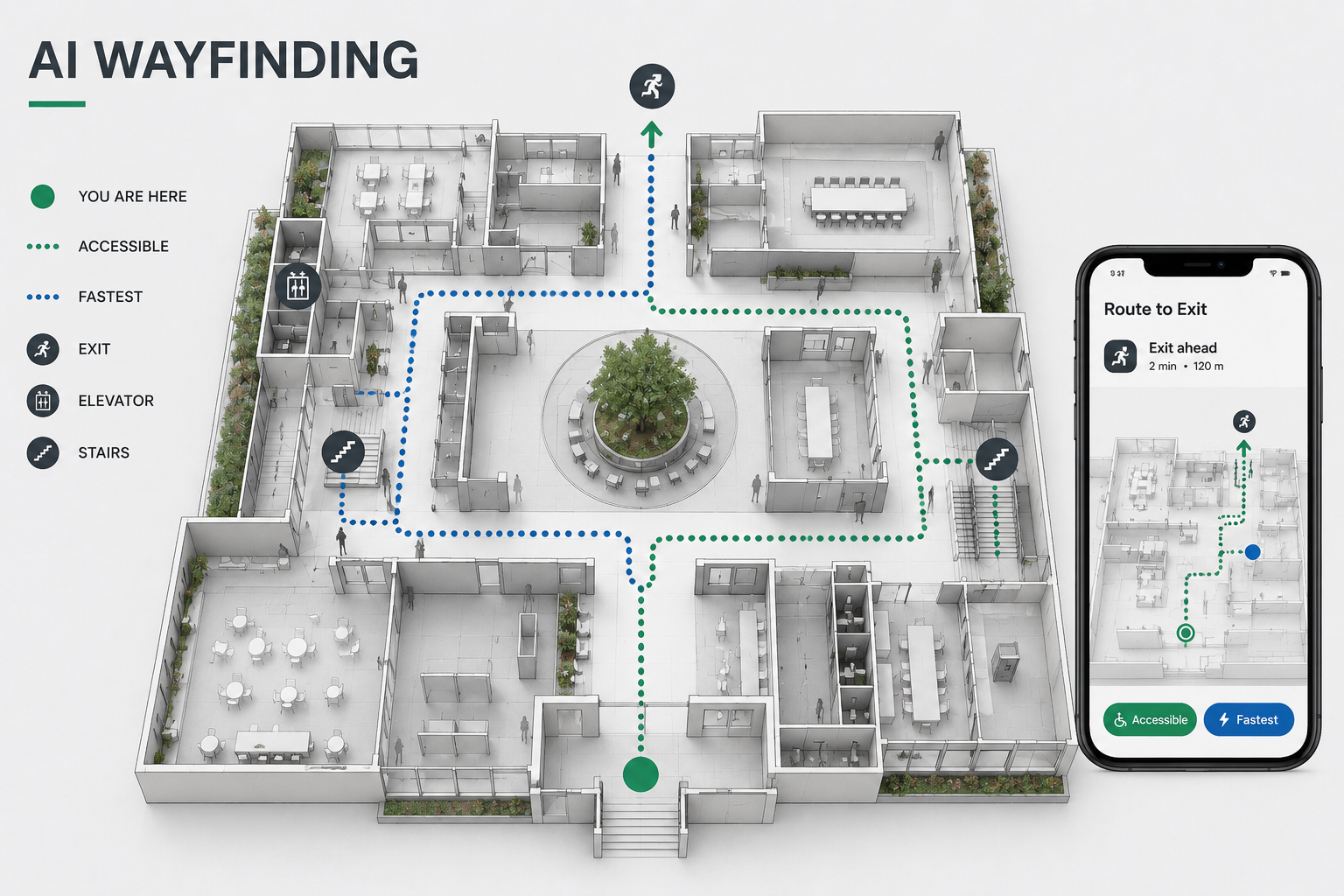
Illustration by ArchitectureCourses.org. AI wayfinding can compare indoor routes by access, speed, exits, stairs, elevators, and user needs.
Wayfindr is useful because it shows a different kind of AI-adjacent design problem: indoor navigation.
Wayfindr developed an open standard for accessible audio navigation to help blind and vision-impaired people move through complex spaces more independently. The important architectural lesson is not “add an app.”
The lesson is that a building has to be legible in more than one way.
A visually clear lobby may still be confusing for someone who navigates by sound, tactile cues, memory, cane contact, service patterns, or step-by-step audio directions. A corridor that looks clean in a render may fail because the acoustics are muddy, the route has too many ambiguous turns, or the decision point is placed after the user has already committed to the wrong path.
AI and accessible design can work together, but the architect cannot push the problem onto the technology.
The layout still matters. The route still matters. The edge conditions still matter.
Use AI here to test decision points, map confusing routes, compare circulation options, and check whether the building gives enough confirmation as a person moves through it. A system that says “turn left” is not enough if the physical environment gives no reliable cue that the left turn is safe, open, and intended.
Universal Design Still Needs Judgment

AI can help test circulation and access, but universal design still depends on layout, dignity, maintenance, and how people actually use the space.
Universal design is another area where AI sounds stronger than it is.
Yes, AI can help simulate movement patterns, flag route conflicts, analyze crowding, test visibility, and compare accessibility paths. That is useful.
But accessibility is not only route length or ramp placement. It is dignity, predictability, rest, acoustics, glare, door force, surface changes, washroom location, staff behavior, maintenance, and whether the accessible route feels like the main route or a hidden service path.
A spreadsheet can miss that.
The expensive mistake is treating accessibility as a compliance pass after the design is already emotionally and spatially fixed. AI should be used early, while the plan can still change.
If the accessible route is worse than the standard route, the building is telling the truth about its priorities.
BIM, Digital Twins, and Old Buildings
AI becomes much more useful when it has a trustworthy model to work from.
That is why BIM, scan-to-BIM, reality capture, digital twins, and building operations data matter. They give AI something closer to the actual building, not just a clean fantasy model.
Existing buildings are where this gets hard.
Old buildings do not care what the model says. Walls are out of plumb. Renovations are undocumented. Services move. Structural assumptions are wrong. Moisture damage hides behind finishes. A ceiling cavity might be full of things the drawing never showed.
This is where AI can help with pattern recognition, scan comparison, anomaly detection, and documentation. It can help a team ask better questions before demolition or retrofit work starts.
But it cannot replace opening the wall, checking the condition, and making a judgment on site.
For deeper coverage, read AI for existing buildings and past projects.
Construction Is the Reality Check
AI architecture that cannot survive construction is just presentation work.
The handoff matters: BIM coordination, sequencing, tolerances, material lead times, site logistics, RFIs, inspections, fabrication files, and construction quality control.
This is why AI design work should connect to construction planning earlier than most design articles suggest. A generated façade option may look efficient until the panelization is strange. A perfect-looking unit plan may fail because the plumbing stacks do not line up. A beautiful structural concept may become expensive because the connection logic is awkward.
AI should not only ask, “Can we design it?”
It should help ask, “Can we build it without creating avoidable waste, delay, and rework?”
For the construction side, see construction planning and scheduling, construction project management workflow, and construction quality management.
What to Copy From These Projects
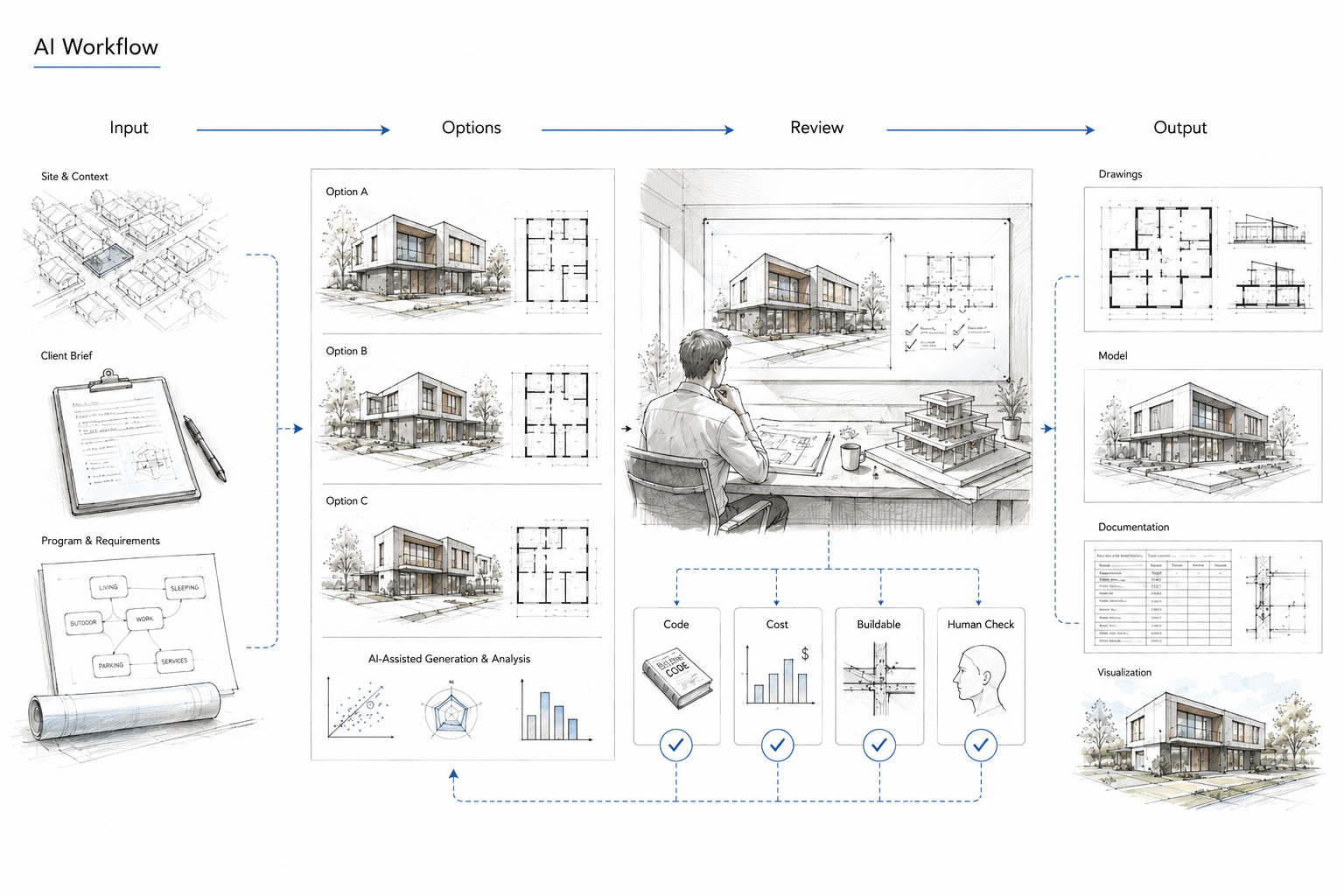
Illustration by ArchitectureCourses.org. AI can help generate and compare design options, but architects still check code, cost, buildability, and human fit before a design moves forward.
The strongest lessons are not tied to one brand or one famous building.
| Project or Workflow | What to Copy | What to Avoid |
|---|---|---|
| Autodesk Toronto office | Turn vague planning goals into measurable constraints before generating options. | Letting the highest-scoring layout override human comfort and use. |
| The Phoenix housing project | Use AI to compare cost, carbon, livability, and construction logic together. | Claiming AI solves housing without land, policy, financing, and delivery systems. |
| Daedalus Pavilion | Make geometry answer to fabrication, toolpath, material, and assembly. | Using AI to make shapes that cannot be built cleanly. |
| DeepMind data-center cooling | Design buildings so performance can be monitored and improved after handover. | Expecting controls to compensate for a weak envelope or poor mechanical zoning. |
| Wayfindr | Use AI and standards to support legible, inclusive movement through complex interiors. | Treating accessibility as an app layer added after the building is planned. |
Where AI Architecture Pages Fail
The internet is full of AI architecture content because the topic is easy to make dramatic.
That is also why so much of it is weak.
The common failure is not bad grammar. It is bad judgment. The article praises a tool without saying what decision improved. It calls a render a project. It calls automation AI. It calls a smart building intelligent without explaining what learns, what senses, what adjusts, and what remains fixed.
Cut any AI architecture claim that cannot answer these questions:
- What was the input?
- What did the AI generate, rank, predict, or optimize?
- Who checked the output?
- What architectural decision changed?
- Did the result affect cost, carbon, comfort, access, construction, or operations?
- What could the tool not see?
If those answers are missing, the claim is probably just marketing.
The Skills That Matter Now
Do not chase every AI tool.
Learn the parts of architecture that make the tool useful.
You need enough BIM knowledge to understand model structure. You need enough environmental design to know when a “green” option is just visual decoration. You need enough construction logic to see when a form creates bad joints or expensive sequencing. You need enough accessibility knowledge to know that a route is not inclusive just because software says it is connected.
Prompting is a small skill. Architectural judgment is the larger one.
| Skill | Why It Matters With AI |
|---|---|
| Constraint writing | Bad inputs produce polished bad options. |
| BIM literacy | AI needs structured project data, not loose drawings and guesswork. |
| Environmental analysis | Energy, daylight, shading, comfort, and carbon need real criteria. |
| Construction sequencing | A design option is not better if it creates avoidable rework. |
| Accessibility thinking | AI can test movement, but people still experience space with bodies, senses, and limits. |
| Critical review | AI makes confident outputs even when the assumptions are weak. |
For students, this connects to architectural technology, software every new architecture student should learn, and essential AI skills for architects.
What AI Still Does Badly
AI is weak where the data is weak, the values are unclear, or the condition is physical and messy.
That includes existing buildings, unusual sites, local code interpretation, cultural meaning, maintenance reality, construction tolerance, craft judgment, and the parts of design that depend on lived experience rather than measurable performance.
It also struggles when teams use it too early without a brief or too late after the important decisions are already fixed.
The safer move is to use AI as a questioning tool. Ask it to expose options, trade-offs, conflicts, blind spots, and performance issues. Do not use it as an authority.
A bad architect with AI is still a bad architect, just faster.
FAQ
Is AI already used in architecture?
Yes. It is used for concept studies, layout generation, environmental analysis, rendering, BIM workflows, construction coordination, reality capture, and building operations.
What is the best real-world example of AI in architecture?
There is no single best example. Autodesk’s Toronto office is useful for generative space planning. The Phoenix is useful for housing, cost, carbon, and industrialized construction. DeepMind’s data-center work is useful for operations. Wayfindr is useful for accessibility and navigation. Each one shows a different kind of decision loop.
Will AI replace architects?
No, not as a complete role. It will replace some drafting, rendering, option-generation, and analysis tasks. Architects who understand constraints, construction, code, human use, and design judgment will still matter.
Is AI rendering the same as AI architecture?
No. AI rendering is visual communication. AI architecture affects the plan, performance, access, cost, construction, or operation.
What should architecture students learn first?
Learn design process, drawings, BIM basics, environmental logic, and construction before obsessing over every new AI tool. The tool is stronger when you know what to ask it and how to reject bad output. A student who understands sections, stairs, wall assemblies, daylight, circulation, and basic code logic will use AI better than someone who only knows prompt tricks.
What is the biggest danger of AI in architecture?
Polished false confidence. AI can make weak assumptions look professional.
Read This Next
- How Architects Use AI
- Artificial Intelligence in Building Design
- AI Design Software Tools for Architects and Designers
- AI Tool Stacks for Architects
- AI for Existing Buildings and Past Projects
- AI in Construction: What Robots Can and Can’t Do Yet
- Future Building Design
Sources and References
- Autodesk University: Hands-on with Project Rediscover
- Autodesk Research: Project Discover
- Autodesk Forma Site Design
- Autodesk: The Phoenix housing project
- Autodesk: AI in architecture and The Phoenix
- DeepMind: AI reduces Google data-center cooling energy
- Wayfindr Open Standard
- Wayfindr: Accessible indoor audio navigation
- ITU: Wayfindr open standard and accessible navigation
- Computer Graphics World: Ai Build Daedalus Pavilion
- Foster + Partners: Technology and Research
- Foster + Partners: Applied R+D
- NBBJ: Beyond dramatic imagery
- Christoph Ingenhoven Architects: Marina One
- ingenhoven associates: Marina One infographic