
Intro to Architectural Technology: Tools, Methods, and Materials
From Sketches to Buildings
Architectural technology is about how buildings stand, function, and survive real-world use. If you want to go beyond pretty sketches and understand how real structures hold together, this is the starting point: structure, systems, services, and safety.
Below, we break down the core elements of architectural technology and why they matter: from your first concept to long-term maintenance on a live site.
📘 MUST READ BOOK
Intro to Architectural Technology: How Buildings Actually Work
Architectural technology isn’t about theory. It’s about how buildings stand, function, and survive real-world use.
If you want to understand architecture beyond aesthetics, this is where it starts—structure, services, systems, and safety.
How to Actually Learn Architectural Technology (Not the Classroom Way)
What Every Student Should Know
Most students graduate knowing how to talk about buildings—but not how they work.
If you want to master architectural technology, here’s your real-world roadmap:
STEP-BY-STEP LEARNING PATH (Field-Focused)
-
Start with Structure, Not Software
Before you open Revit, walk through a site and ask:
→ What holds this up? Where does the weight go?
Study how load-bearing walls, columns, slabs, and joints actually look in real construction. -
Track a Building Being Built
Pick any local construction site. Go weekly. Watch from foundation to finish.
Sketch what changes. Learn the order—formwork, rebar, MEP, walls, cladding.
→ Real tech is in sequencing, not just design. -
Look Up, Look Down
In lobbies, basements, and stairwells—notice the vents, ducts, drains.
→ Ask: Where does air flow? How is water moving? How does light reach this space? -
Master One Tech System at a Time
Don’t cram everything. Focus.
● One week: HVAC (watch diffusers, intake vents)
● Next: Fire protection (look for sprinklers, strobe alarms)
● Next: Curtain walls (check for brackets, gaskets, weep holes) -
Use Buildings Like an Engineer
When you enter a room, decode it:
→ Where’s the fresh air coming from?
→ How do the lights stay cool?
→ What materials were used to fireproof that shaft? -
Follow Building Failures
Read case studies. Visit bad retrofits.
→ Look for sagging floors, cracked joints, water stains. Learn what went wrong. -
Model Smarter, Not Fancier
Use Revit, Rhino, or ArchiCAD—but always ask:
→ Could a contractor build this?
If not, you’re just doing sculpture. -
Talk to the Trades
Ask real electricians, HVAC installers, site supers:
→ What do architects always miss?
They’ll teach you more in 5 minutes than a semester can. -
Read Building Sections Like Comics
Pick a real detail section. Follow each line from roof to foundation.
→ Understand insulation, vapor barriers, waterproofing, joinery. -
Never Ignore MEP Drawings
If you avoid MEP (Mechanical, Electrical, Plumbing), you’ll never become a tech leader.
→ Overlay the systems. Understand the logic. Memorize duct types and pipe runs.
THINGS TO NOTICE WHEN WALKING BY A SITE
● Where are the cranes? That tells you the staging strategy.
● How many floors framed? You can guess the concrete cure cycle.
● Which trades are on site? That tells you what phase they’re in.
● Any prefabs lying around? That’s modular tech in action.
● Is there a temporary HVAC unit? That hints at system staging or retrofit.
📘 MUST READ
"Architectural Technology" by Stephen Emmitt
Simple, clean breakdown of systems thinking in real-world design.
What Architectural Technology Really Covers
Intro to Architectural Technology: The Bridge Between Ideas and Reality

Architectural technology is the engine room of a building. It deals with:
-
Structural support (how the building holds itself up)
-
Enclosure systems (walls, roofs, insulation)
-
Services like HVAC, plumbing, electrical
-
Lighting and how it affects function and comfort
-
Acoustics and sound control
-
Fire safety and compliance
It connects architecture with engineering and building science. Without it, a beautiful building is just a pretty shell waiting to fail.
Structural Support: The Backbone of Every Building
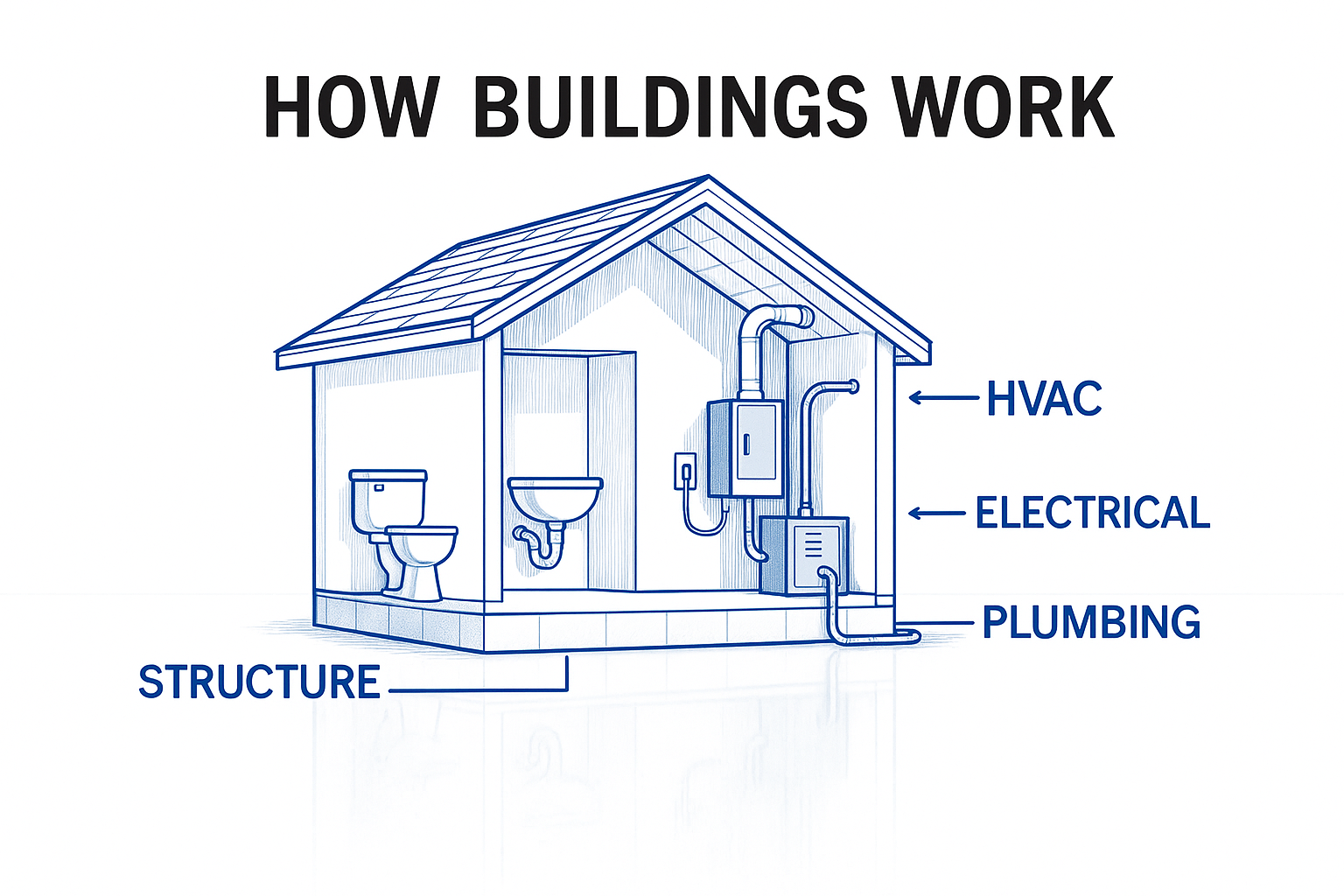
The frame, foundation, and load-bearing elements carry everything. Structural engineers figure out:
-
Where the loads go
-
What materials hold up best
-
How to keep the building standing through wind, weight, people, snow, and earthquakes
If this part fails, nothing else matters.
Enclosure Systems: What Keeps the Inside In
This includes walls, floors, roofs, and anything separating inside from outside. Done right, it blocks:
-
Water
-
Air drafts
-
Noise
-
Heat loss
Good building envelopes are airtight, insulated, and long-lasting. Bad ones cost you heat, comfort, and money.
Climate Control & Utility Services
Every building needs to breathe, heat up, cool down, flush, and power up.
-
HVAC keeps air moving and temperatures stable
-
Plumbing moves water in and waste out
-
Electrical runs lighting, appliances, tech
These systems must be integrated into the design early. Bad coordination means costly retrofits or failures.
Lighting: Function and Feel
Lighting affects how we work, live, and feel in a space. Good lighting design blends:
-
Natural daylighting (for energy and mood)
-
Artificial lighting (for flexibility and visibility)
-
Smart systems (to save energy and adapt use)
Bad lighting makes a beautiful building feel lifeless.
Acoustics: Silence Isn’t Accidental
From schools to theaters to offices, poor acoustics can wreck a space.
Architectural acoustics deals with:
-
Echoes
-
Speech clarity
-
Noise transmission between rooms
It’s technical, but crucial. You feel it when it’s done wrong.
Fire Safety: Non-Negotiable
Fire safety isn’t optional—it’s coded into every part of the design. It includes:
-
Fire-rated materials
-
Alarm and sprinkler systems
-
Escape routes and emergency access
If this fails, people die. That’s the real weight of architectural responsibility.
Related: Timber Frame Beams and Posts: Architecture Student Guide
What Happens When You Ignore the Tech
Systems That Make Buildings Work

Looks Good, Falls Apart: Where Architecture Fails Without Warning
It’s not background noise. It’s the stuff that makes buildings work—or fail.
Nice render? Doesn’t matter if the roof leaks.
Cool concept? Worthless if the floors sag or HVAC breaks down in 3 years.
Here’s the blunt truth:
● If it can’t stand, it’s not architecture.
● If it can’t breathe, drain, heat, or cool, it’s not done.
● If it can’t adapt, it’ll be obsolete fast.
Architectural technology is what ties it all together:
structure + envelope + systems + safety + long-term maintenance.
Get it right, and your building lives a full, useful life.
Miss one part, and it’ll cost the client—and your reputation.
This is the real work behind the walls:
● What keeps the mold out
● What stops the fire from spreading
● What holds the beam in tension
● What keeps the occupants comfortable in -30°C or +40°C
● What gets repaired after 15 years instead of torn down after 5
Design is vision.
Architectural technology is how that vision survives gravity, climate, people, and time.
📘 MUST READ
“How Buildings Work” by Edward Allen
Still one of the most no-nonsense books about real architecture systems. Zero fluff.
IN FOCUS
The Building That Diagnoses Itself
In Singapore, a smart hospital does more than serve patients—it monitors itself. Yes, really!
Every system inside—from HVAC to lighting to water pressure—is tied to a central AI brain. When a filter clogs, it alerts maintenance before anyone notices.
When a room is unoccupied, lights and airflow auto-adjust to conserve energy. If a fire alarm triggers, the system unlocks exits, reroutes elevators, and notifies emergency services—all in under 3 seconds.
This isn’t science fiction. This is architectural technology at full scale.
Why it matters:
Architectural tech isn't just about tools—it’s about making buildings that think, adapt, and protect. This is the future every student needs to prepare for.
See also: Introduction to Construction: How We Actually Build Things
Intro to Architectural Technology: A Beginner’s Guide to Building Science
15 Technologies Changing How We Design and Build
The Tools Behind Modern Architecture and Construction
Construction Technology in Architecture: What Actually Matters
Architecture today is about systems, data, automation, and real-time control. Here are the technologies actually changing how buildings get designed, built, and run—what matters on real projects.
1. Building Information Modeling (BIM)
Every serious firm uses BIM. Revit leads, but Archicad and Vectorworks are growing. It’s not just 3D—it connects structure, systems, and specs in one live file.
2. Computational Design
Algorithm-based design tools like Grasshopper and Dynamo create smarter, rule-driven geometry—not just flashy shapes. Useful in facades, structure, and performance tuning.
3. 3D Printing in Construction
Still niche, but gaining ground. Printed homes, facades, and custom parts cut labor and material waste. Especially useful for fast prototyping and emergency shelters.
4. Modular Construction
Prefab rooms built in factories, then stacked onsite. Cuts waste, speeds timelines. Used in housing, hotels, and hospitals. Code compliance still a bottleneck.
5. Green Building Tech
Passive house, solar skin, algae facades, hempcrete. This isn’t optional anymore—it’s code. Energy modeling is now baked into early-stage design.
6. Smart Materials
Self-tinting glass, crack-healing concrete, and phase-changing insulation. Most are still pricey, but expect fast adoption in climate-sensitive zones.
7. AI + Design Simulations
AI handles solar orientation, code checks, and energy loads in seconds. It doesn’t replace architects—it accelerates decisions.
8. Digital Twins
Real-time digital clones of actual buildings. Used for airports, data centers, and hospitals to monitor systems, energy, and wear.
9. VR + AR for Design
VR walkthroughs are now client standard. AR helps contractors see MEP layouts inside walls before cutting anything.
10. GIS + Site Intelligence
Used to map flood zones, soil data, sun paths, and traffic patterns before design even begins. Now essential for large sites and climate-risk planning.
11. Smart Buildings + IoT
Sensors track temp, occupancy, air, and light—then adjust systems in real time. Used heavily in offices, hospitals, and smart homes.
12. Construction Robotics
From brick-laying bots to drywall and painting drones. Still limited to certain site types, but scaling quickly with labor shortages.
13. Predictive Maintenance Systems
Smart buildings now alert you before systems break. Saves money, cuts downtime. Common in commercial and healthcare.
14. Energy Modeling Tools
Tools like IESVE and Sefaira simulate HVAC loads, daylight, and passive gain. Now part of concept phase—not just post-design.
15. Retrofitting + Adaptive Reuse Tech
Laser scanning, AR overlays, and energy upgrades help breathe life into old buildings without gutting them. Huge in Europe and cities with aging stock.
You might like: House Foundations & Groundworks: Guide to Construction
Construction Technology in Architecture Schools
Schools need to stop teaching software in isolation and start treating tech like part of the design brain. Here’s how schools should actually teach it.
Curriculum Must-Haves
1. Digital Fabrication
-
3D printing, CNC milling, laser cutting.
-
Students should model their ideas physically—not just draw them.
2. BIM (Building Information Modeling)
-
Mandatory. Not optional.
-
Students must learn to model structure, systems, and scheduling in one file.
3. VR + AR Tools
-
Students should present designs in VR.
-
AR overlays help them test site fit, scale, and visibility.
4. Sustainable Construction
-
Teach life-cycle thinking, passive design, and embodied energy.
-
Simulation tools like Sefaira or DesignBuilder should be used in class.
5. Construction Management
-
Tools like Primavera, Procore, or MS Project should be taught alongside design.
-
Teach budgeting, sequencing, and time management—not just design deadlines.
Hands-On Experience
-
Real Projects: Let students build mock-ups, test materials, or construct small structures.
-
Cross-Disciplinary Studios: Mix architects, engineers, and builders in one team.
-
Industry Links: Bring in real firms, run real-world design challenges, and offer internships.
Why It Matters
-
Job-Ready Skills: You leave school knowing the tools the industry actually uses.
-
Design Confidence: You stop guessing what will work—you simulate, test, and prove it.
-
Collaboration Skills: You can speak with engineers and contractors like a pro.
-
Problem Solving: You’ll know when design ideas clash with real-world limitations—and fix them.
FAQs
JOB & CAREER QUESTIONS
1. What does an architectural technologist actually do?
They focus on the technical side of architecture—turning design ideas into buildings that can actually be built. They handle construction details, materials, codes, and building systems.
2. Is an architectural technologist the same as an architect?
No. Architects design. Technologists make sure it works. One is concept-heavy, the other is detail-heavy.
3. Can an architectural technologist design houses?
In some countries, yes—especially for residential or low-rise projects. Depends on local laws and licensing.
4. What’s the difference between an architectural technologist and a technician?
A technologist has more training, usually a degree, and handles more complex design, coordination, and project leadership. A technician supports them, often with drafting or CAD work.
5. Do architectural technologists work on construction sites?
Sometimes. Especially during site inspections, quality checks, or resolving technical problems.
6. What jobs can I get with an architectural technology degree?
-
Architectural technologist
-
BIM specialist
-
Construction project manager
-
Technical designer
-
Building envelope consultant
-
Sustainability coordinator
7. Is architectural technology a good career?
Yes—if you like problem-solving, construction, and tech. Pay varies, but demand is growing in sustainability, BIM, and modular building.
EDUCATION & SKILLS
8. What degree do you need to be an architectural technologist?
Usually a diploma or bachelor’s degree in architectural technology or building design.
9. What skills do architectural technologists need?
-
Construction knowledge
-
Building codes and regulations
-
CAD/BIM software
-
Problem-solving
-
Attention to detail
10. Is math required for architectural technology?
Yes—but not theoretical math. You’ll need geometry, measurements, building physics, and cost calculations.
11. Is architectural technology hard to study?
It’s technical and practical. You need to understand structure, materials, building science, and software—but not abstract design theory like in architecture school.
12. Can I study architectural technology online?
Some programs exist online, especially for diplomas or part-time learners. Hands-on training is still needed for full certification.
TOOLS & TECH
13. What software do architectural technologists use?
-
AutoCAD
-
Revit (BIM)
-
SketchUp
-
Rhino
-
Bluebeam
-
Energy modeling tools (e.g. DesignBuilder, Sefaira)
14. What is BIM, and why do technologists use it?
BIM (Building Information Modeling) is 3D modeling with data. It helps plan, coordinate, and build better, faster, and smarter.
15. Do technologists use AI or automation in design?
Increasingly, yes. AI tools help with simulations, performance checks, and even early-stage layouts. Still emerging.
LICENSING & GLOBAL ROLES
16. Do architectural technologists need to be licensed?
Depends where you live. In the UK, CIAT membership is common. In Canada, registration with provincial bodies helps. In the US, the role is often handled by licensed architects.
17. Can architectural technologists become architects later?
Yes—but they usually need to go back to school and complete a professional architecture program and licensing exams.
18. How is architectural technology viewed in different countries?
It’s stronger in the UK, Ireland, and Canada. Less formal in the U.S., where architects cover both design and technical roles.
REAL WORK & DAILY LIFE
19. What’s a typical day like for an architectural technologist?
-
Reviewing drawings
-
Fixing technical issues
-
Coordinating with engineers
-
Writing specs
-
Visiting sites
-
Meeting with contractors or architects
20. Do technologists attend client meetings?
Yes, especially when explaining technical issues, regulations, or construction phases.
21. Can an architectural technologist run their own firm?
Yes—depending on legal limits in your country. Many run consultancies focused on detailing, BIM, or building science.
SUSTAINABILITY & FUTURE
22. How do architectural technologists help with green building?
They select materials, optimize insulation, design passive systems, and ensure code compliance with energy standards.
23. Is sustainable design part of the job?
Yes—it’s a growing part. Technologists are often the ones who make sustainability work technically, not just look good.
24. Will this job still exist in 10 years?
Absolutely. As buildings get more complex and automated, technologists will be even more essential.
25. What’s the future of architectural technology?
More BIM, more prefab, more AI, and more responsibility. The job is evolving from ‘support role’ to key player in real-world design and build.