

A nice drawing is useless if nobody can read what it means.
Architects draw to test ideas, fix problems, and show other people how a building is supposed to work. A quick sketch can solve a layout issue. A clean section can explain height, structure, light, and the part of the building that would fail if nobody drew it clearly.
The real skill is not drawing pretty lines. It is making the decision clear.
If you are brand new, start with what architecture actually is. If your drawings already look decent but still feel messy, tighten the basics: line weight, scale, symbols, sections, and drawing order.
A drawing set has to survive real questions. Where is the cut? What is load-bearing? What is being built? What is only shown for context? If the drawing needs you standing beside it to explain every move, it is not ready yet.
Sketching, Drafting, and Rendering Are Not the Same Thing
Beginners often call everything a drawing. In architecture, that gets confusing fast.
Sketching is for speed. It is loose, quick, and often messy. You use it to test massing, layout, circulation, proportion, and the basic move before you waste time polishing the wrong idea.
Drafting is for precision. Plans, sections, elevations, and details need scale, line weight, dimensions, symbols, and notes. This is where the drawing starts carrying real instructions.
Rendering is for atmosphere and persuasion. It can show light, mood, materials, and how a space might feel. But a perfect render can still hide a broken plan.
Sketching helps you think. Drafting helps others build. Rendering helps people imagine. Mixing them up is how students end up with pretty work that explains almost nothing.
What “Drawing” Means in Architecture
Drawing is a working language

Image by ArchitectureCourses.org. Architectural drawing is a working language: sketches, plans, and details help architects think through problems before the work becomes precise.
In architecture, drawing is not about being gifted.
Architects draw to think through problems, explain ideas, coordinate with other people, and get approvals. A drawing can be rough and still useful. It can also be beautiful and completely useless.
Most good architectural drawings are readable first. Strong line weight, clear hierarchy, correct scale cues, and the right amount of information do more work than fancy shading.
If you want a practical starting point on hand skills, see basic architect sketching skills.
Why hand sketching still matters
Hand sketching survived because it is fast.
A 30-second sketch can save a three-hour model revision. It shows up in meetings, redlines, site walks, trace overlays, desk crits, and quick “here’s the fix” moments.
- Sketching is speed, options, and thinking out loud on paper.
- CAD is precision, dimensions, and clean control.
- BIM is coordination, change management, and consequences across a full set.
If deadlines keep wrecking your studio work, do not brute-force it. Use better triage: studio survival habits.
Drawing Basics

Line, hierarchy, clarity
Forget the fake “laws of drawing” lists. Architectural drawing has one job: make decisions readable.
Hierarchy decides what the viewer sees first, second, and third. If everything screams, nothing reads. Proportion keeps rooms, openings, and volumes believable. Alignment keeps the page from feeling accidental. Negative space gives the drawing room to breathe.
Contrast is where legibility starts. Heavy cut lines, lighter background lines, quiet hatches, and clear emphasis. If someone needs five seconds just to understand what is cut, the drawing is already fighting them.
If proportion keeps failing, start here: scale and proportion basics.
Linework is where weak drawings show first
Architects are not better because they draw more beautifully. They control line hierarchy better.
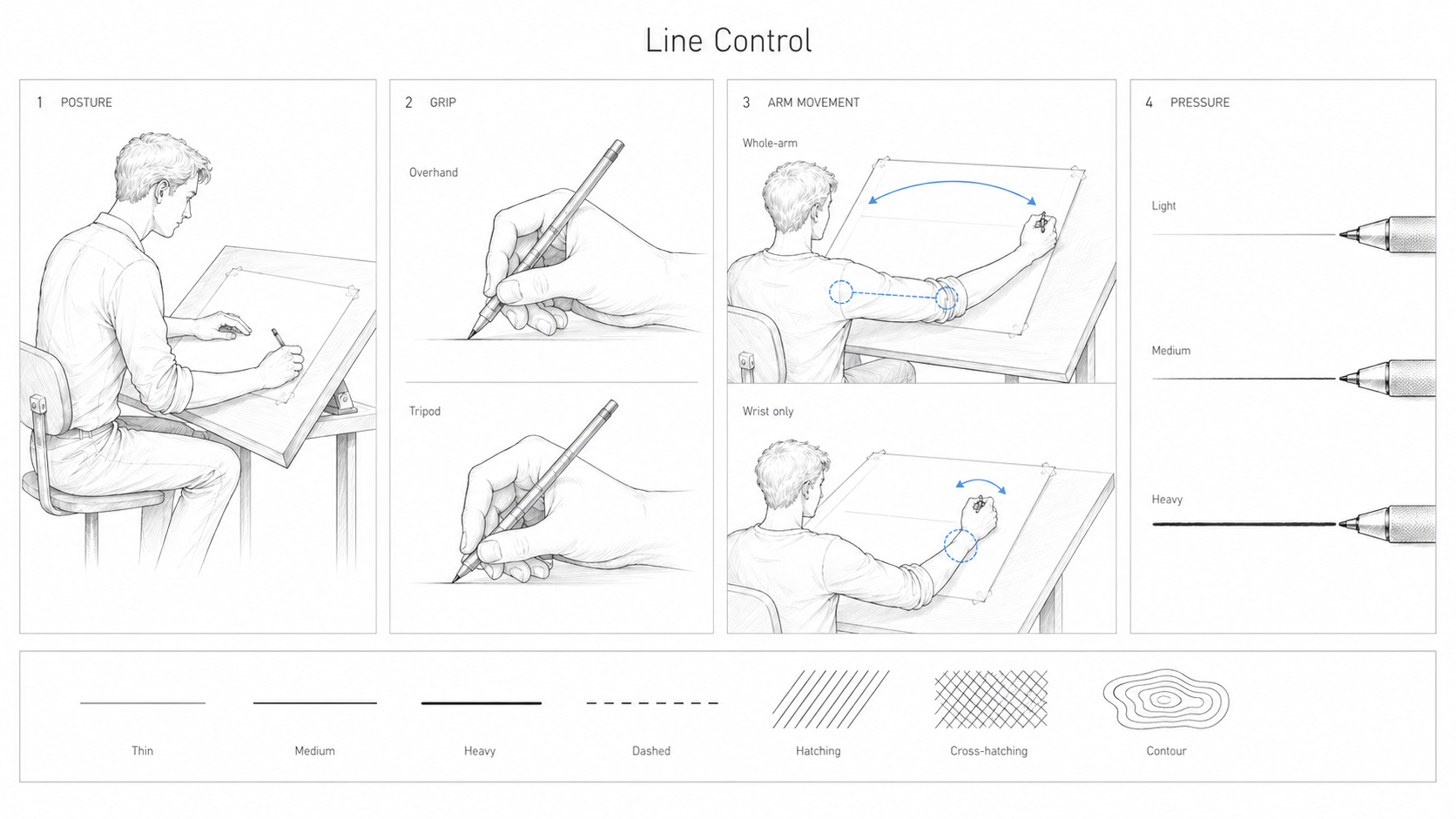
- Section cuts should read first.
- Main outlines sit in the middle.
- Background, texture, and entourage stay quiet.
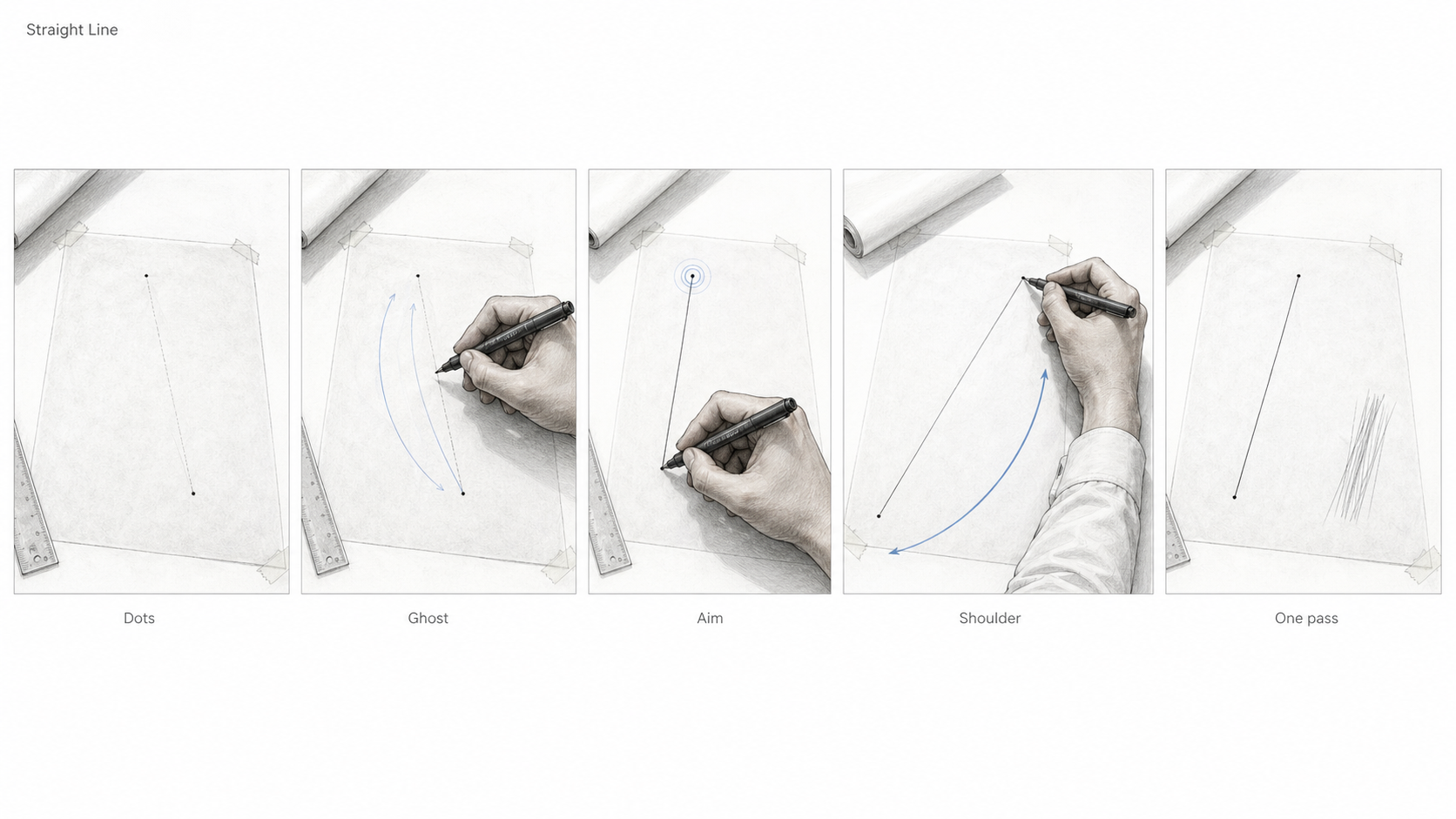
Then it is craft: clean corners, straight runs, confident curves, and overlaps that do not turn into fuzzy knots.
The boring drills help. Parallel lines. Rectangles. L-shapes. T-junctions. Ten minutes a day does more than another saved Pinterest board.
Big shape first
Beginners usually draw details too early.
- Block the mass. Get the big shape and footprint working.
- Check proportion. Wall height, openings, room size, and overall balance.
- Add openings. Doors and windows come after the main read works.
- Add detail last. Mullions, texture, fixtures, trim, and joinery.
Perfect little windows do not save a building with broken proportions.
Plans, sections, elevations, axons, perspectives
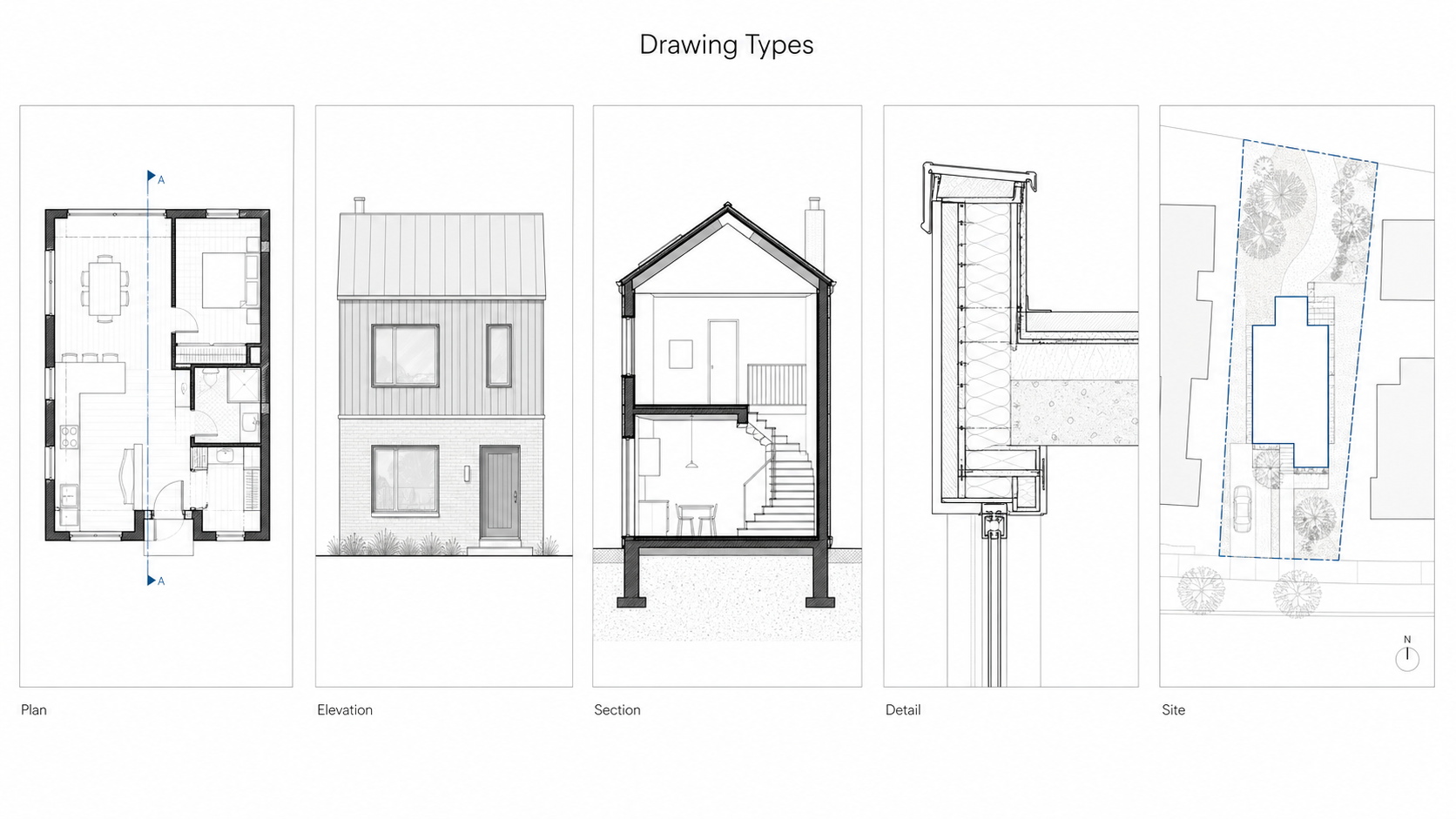
Architectural drawing is a system. One view never explains the whole building.
- Plans show layout, movement, and relationships.
- Sections show height, structure, envelope, and how things stack.
- Elevations show exterior faces, alignment, openings, and material intent.
- Axons explain systems and assemblies without perspective distortion.
- Perspectives help people understand space and experience.
Same project. Different tools. Different jobs.
The Main Architectural Drawing Types
Plans
A plan is not just a top view. It is a horizontal cut through the building, usually looking down.
That cut-plane logic matters. It explains why doors, windows, walls, stairs, and objects below the cut do not all read the same way.
- Layout and circulation: where people move and where spaces connect.
- Wall thickness: walls are not single lines in real drawings.
- Control points: grids, stairs, key dimensions, and anything that must land correctly on site.
Door swings are where weak plans fall apart fast. A bathroom door that hits the vanity is still a design mistake even if the linework looks clean.
Sections
Plans hide height. Sections expose it.
A good section shows structure, floor levels, stairs, roof build-up, daylight, insulation depth, and the junctions that usually cause trouble later.
The cut line should read first. Anything cut gets heavier weight. Everything beyond goes lighter. If the section takes too long to read, it is usually a hierarchy problem, not a style problem.
Elevations
Elevations are not portfolio wallpaper.
They show height, openings, cladding, material changes, datums, soffits, parapets, flashing lines, and façade order. Someone may need that drawing to price the exterior, review the permit, coordinate the envelope, or build the wall.
- Openings: head heights, sill logic, and spacing.
- Datums: floor lines, window heads, parapets, soffits.
- Material cues: enough hatch or tone to show what changes without turning it into a render.
Axonometric and isometric drawings
Axons are explainers.
They are useful when a plan or section is too flat to explain the system. Structure, circulation, program stacking, envelope layers, and exploded assemblies often read faster in an axon than in a full technical detail.
If people’s eyes glaze over during a section detail, an exploded axon may be the fix.
Perspectives
Perspectives are useful when they explain space quickly.
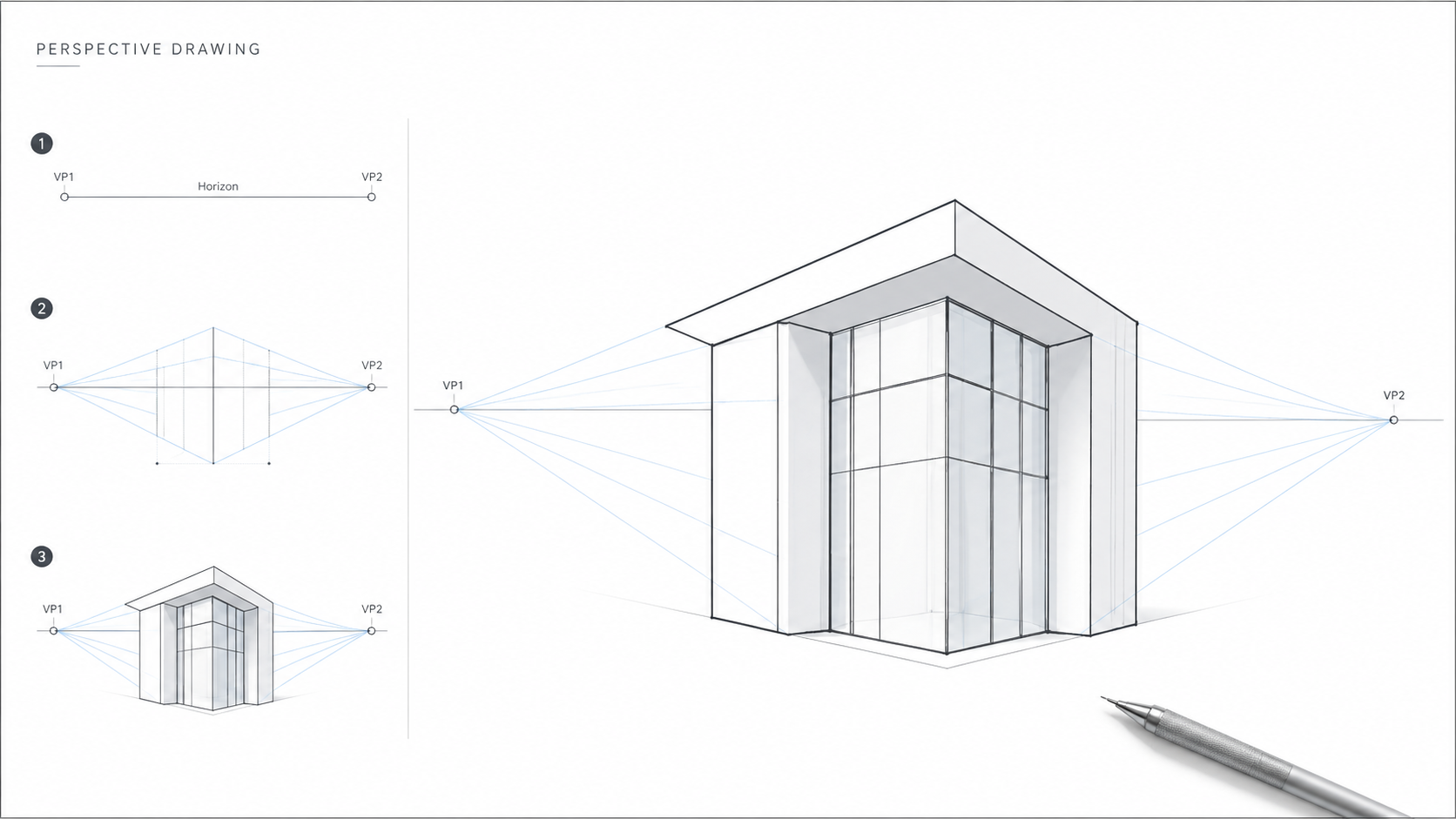
- 1-point perspective works well for interiors, corridors, and strong axial views.
- 2-point perspective works well for exterior corners, massing, and building proportion.
The trap is spending hours rendering a weak idea. Use perspective to test scale, depth, and proportion. Then stop.
For a deeper breakdown, use drawing techniques for plans and sections. For baseline rules, see core drawing rules for architects.
Drawings You See on Real Projects
Site plans, roof plans, and RCPs
A site plan ties the building to the land. Setbacks, grading, access, utilities, services, and context all show up here. A sloppy site plan makes everything downstream harder.
A roof plan is where drainage becomes visible. Slopes, roof edges, penetrations, parapets, skylights, equipment, scuppers, drains, and overflow paths all matter because water always finds the weak spot.
A reflected ceiling plan is the one students ignore until it hurts them. Lights, sprinklers, diffusers, bulkheads, access panels, ceiling grids, and structure all collide above your head. If you do not draw it, the clash still exists.
Details are risk drawings
Details are where design stops being a nice idea and starts carrying blame.
A good detail answers one question clearly: how does this get built without failing?
- Water: where it goes, where it exits, and what protects the joint.
- Structure: load path, bearing, fastening, and movement.
- Sequence: what gets installed first and what must stay protected.
- Buildability: what the trade can actually do on site.
Vague lines imply magic. Details need layers, laps, fixings, dimensions where they matter, and short notes a builder can use.
If structural thinking feels weak, start with basic structural thinking.
Permit sets and construction sets
This vocabulary confuses people because the drawings look similar from far away.
- Schematic drawings test the idea. They are not enough to build.
- Permit sets prove enough for review: zoning, life safety, code, accessibility, and basic compliance.
- Construction documents carry the detail, coordination, notes, and dimensions needed to price and build the work.
People still say “blueprints,” but the real term is construction documents. “Issued for Construction” means the set is being used as the basis for work on site.
Redlines, shop drawings, and as-builts
These are the drawings that show what happened after the clean design drawing left the desk.
- Redlines are markups showing corrections, changes, and coordination issues.
- Shop drawings are made by trades or fabricators to show how they will build specific parts.
- As-builts record what was actually installed after field changes.
Future renovation work gets much harder when as-builts are missing or wrong.
If shop drawings make no sense yet, start with structural systems for beginners.
Sketching Like an Architect
Clear beats pretty
Architects do not need to draw like fine artists. They need to draw clearly.
If a sketch communicates scale, intent, and relationships, it works. If it is beautiful but confusing, it failed the job.
Meeting sketches
This is the sketching that keeps projects moving.
- Massing thumbnails: small, fast boxes before anyone gets precious.
- 30-second diagrams: circulation, program, adjacency, and simple movement logic.
- Quick sections: one slice through the building to test height, daylight, and structure.
- Trace overlays: the same base drawing, with one new option per layer.
For drills and starter tools, use an architect sketching starter guide.
Perspective without making it painful
You do not need much math. You need discipline.
- Box first, then carve.
- Keep verticals vertical.
- Use one horizon line.
- Do not drift your vanishing points halfway through.
Most beginner perspectives fail because the building slowly starts leaning.
Entourage without taking over
People, trees, furniture, and cars are scale cues. They are not the project.
Keep them lighter, simpler, and quieter than the building. One person or one chair can do more than a page full of tiny decorative noise.
Shadows and texture
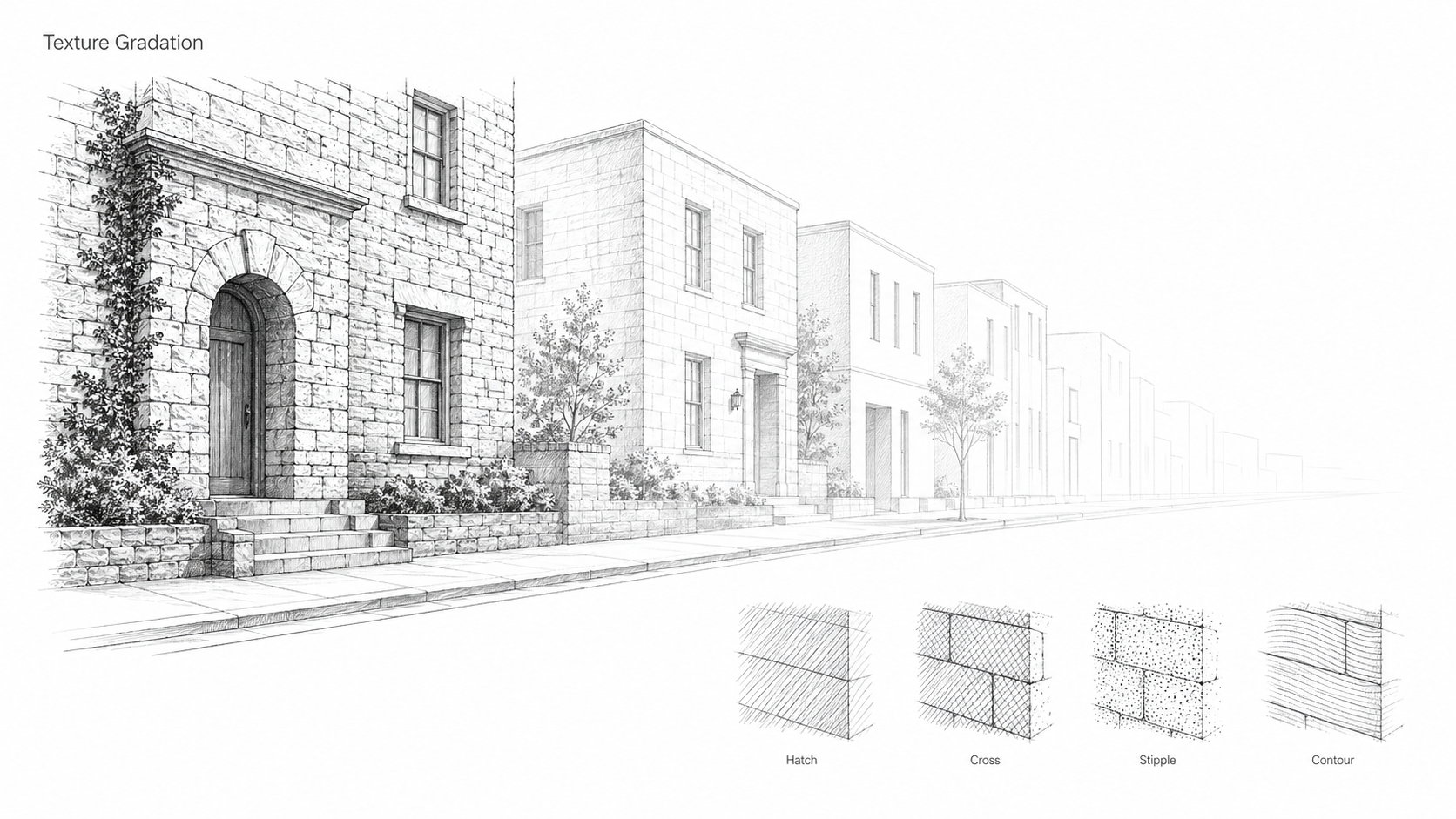
Shadow can make a drawing read fast. It can also turn it into mud.
Pick one light direction. Use cast shadows to clarify overhangs, recesses, steps, and depth. Texture should signal material, not become a pattern contest.
- Concrete: light speckle, not dirty noise.
- Wood: a few grain lines, not every board.
- Metal: sharp edge, clean tone.
- Glass: light reflection, not heavy crosshatching.
If texture keeps cluttering your work, see how to use texture without clutter.
Digital Drawing, CAD, and BIM
Tablets are fast, not magic
Tablets remove friction. They do not make weak drawing judgment disappear.
- Procreate works well for clean linework, simple shade, and presentation sketches.
- Morpholio Trace fits architects who think in layers and markups.
- Concepts works well for infinite-canvas diagrams.
- Sketchbook keeps sketching simple.
Use one clean liner, one soft shade, and one marker wash. That is enough for most sketch communication.
CAD, BIM, and quick 3D
These are tools, not religions.
- AutoCAD is strong for crisp 2D drafting and line control.
- BIM is strong for coordination, schedules, consistency, and managing change.
- Quick 3D tools like SketchUp or Rhino are strong for massing and early spatial testing.
A clean set needs good modeling and good drawing judgment. One does not replace the other.
A sane workflow
- Hand sketch: intent, options, circulation, massing.
- CAD: geometry, dimensions, clean plans.
- BIM: coordination and changes across drawings.
- Sheets: the human-readable output that people actually review, price, and build from.
For the newer tool layer, see AI tools architects actually use. For drafting basics, start with AutoCAD basics for architecture.
Diagrams
Say one thing clearly
A diagram is a controlled simplification.
It strips away most of the building so one idea can read fast: site pressure, circulation, program, structure, sun, wind, noise, or massing logic.
A diagram is not a final drawing. It is not a render. It is closer to a sentence. It says one thing and stops.
Common diagram types
- Site: access, slope, sun, noise, views, neighbors.
- Circulation: movement, friction, public/private flow.
- Program: what goes where and why.
- Massing: how the form changed and what each move solved.
- Structure: grids, spans, supports, and load paths.
What makes diagrams look professional
The best diagrams are usually restrained.
- Simple shapes. Rectangles, circles, clean polygons.
- Limited palette. Too many colors kill the point.
- One hierarchy. One dominant idea, everything else quiet.
- Consistent labels and arrows. Same meaning, same style, every time.
If your diagrams fall apart, check the planning first: circulation planning basics. For the human side, see design around real human use.
Learning Architectural Drawing
Good enough for architecture school
Good enough means clear, controlled, fast enough, and consistent under pressure.
You do not need art-school realism. You need drawings that hold proportion, show intent, and do not collapse the moment someone asks what they mean.
What improves fast, and what takes longer
Some skills improve in weeks: line confidence, simple boxes, basic proportion, and usable one-point or two-point perspective.
Sections take longer. So do details, annotation habits, and drawing sets that stay coherent across several sheets. Those are not just hand skills. They are thinking skills.
The longest part is knowing what to leave out.
Practice that does not waste time
- Daily: 15 minutes of lines, boxes, and one mini perspective.
- Weekly: draw one real building from life or a photo. Focus on proportion.
- Monthly: redraw one plan or section clean, then do a second pass for hierarchy.
If studio is already eating your life, use how to stay ahead of studio.
Resources without drowning yourself
Too many resources become procrastination.
- One drawing-language reference for line weight, plans, sections, and conventions.
- One perspective guide that teaches repeatable construction.
- One technical drawing reference for annotation, scale, and sheet clarity.
- One CAD or BIM path you actually finish.
For the classic student reading list, start with Francis Ching books list.
Drawing Standards Used in Practice
Line weights
Most offices use some version of thick, medium, and thin.
- Thick: section cuts, major profile edges, things being cut through.
- Medium: primary outlines and main objects beyond.
- Thin: secondary information, hatches, textures, notes, and leaders.
The key is simple: cut things read heavier. Background things read lighter. Reverse that and the drawing becomes noise.
Scales
Scale is not decoration. It decides how much information belongs on the drawing.
- Plans use broader scales so layout reads.
- Sections and elevations need enough scale to explain height and alignment.
- Details need tighter scale so layers, fixings, and junctions are clear.
Symbols and conventions
Drawings are shared code. Inventing your own symbols slows everyone down.
North arrows, section markers, grids, tags, legends, and keynotes exist so other people can navigate without guessing.
For a working reference, see architectural symbols cheat sheet.
Annotation that reads on site
Site people do not have time for essays.
- Tags identify things.
- Notes instruct.
- Leaders should not cross all over the page.
- Text should be short, direct, and impossible to misread.
If scale still feels vague, use scale explained simply.
Clients, Permits, and Contractors
What clients need at each stage
Clients usually do not need more drawings. They need the right drawing at the right time.
- Early: sketches and diagrams that test options.
- Middle: schematic plans that stabilize layout and scope.
- Approval: permit drawings that prove compliance.
- Build: construction documents that reduce guessing.
Permit set vs construction set
A permit set proves code compliance and basic intent.
A construction set carries the coordination, detail depth, and instructions needed to build. Confusing those two is how cheap drawings become expensive site problems.
Shop drawings
Shop drawings come from the contractor, trade, or fabricator. Steel, glazing, millwork, waterproofing, precast, and specialty systems often need them.
They matter because they bridge the gap between design intent and what actually gets fabricated.
What affects drawing cost
Drawing cost follows the work.
- Scope: number of sheets, details, and coordination points.
- Complexity: structure, envelope, geometry, and tricky junctions.
- Revisions: late changes cost money.
- Site conditions: existing buildings, unknowns, and survey issues.
Missing information does not disappear. It gets solved in the field with time, money, and conflict.
Architecture Drawing vs Other Drawing
Sketching vs drafting
Sketching finds the move. Drafting locks it into geometry.
Both matter. One helps you think quickly. The other helps someone else understand the decision without guessing.
Drawing vs rendering
Rendering sells atmosphere. Drawings communicate decisions.
A render can persuade. A drawing can be priced, checked, approved, coordinated, and built from.
Architectural vs engineering drawings
Engineering drawings focus on performance, sizing, loads, reinforcement, compliance, and liability.
Architectural drawings focus on space, envelope intent, layout, interfaces, coordination, and how the project reads as a whole.
For structural basics, start with load path basics for non-engineers. For design language, see design elements explained.
Advanced Sketching Habits
Urban sketching
Urban sketching is not drawing every brick. It is reading street proportion fast.
Start with the width of the street, the height of the buildings, the sidewalk edge, tree canopy, and where human scale actually sits.
Interior sketching
Interior sketches fail when the box stops being believable.
Draw the room volume first. Then place counters, cabinets, fixtures, and furniture as simple blocks. Add doors, pulls, tile, lights, and texture last.
Kitchens and bathrooms punish weak sketching because clearances are not optional.
Landscape and site sketching
Site sketching is about ground, access, slope, movement, and edges.
Trees are usually masses first, not individual leaf drawings. Paths should connect like people actually walk. Contours need consistent logic or they turn into decoration.
Structural sketching
A better architect quietly sketches structure.
Mark the grid. Draw the spans. Ask where the load goes next. That habit stops you from designing impossible openings and floating masses without realizing it.
MEP and coordination drawings
Architects do not draw MEP the same way engineers do, but they have to coordinate around it.
The clash zones are predictable: soffits, shafts, wet walls, tight corridors, ceiling cavities, and anywhere structure meets ducts.
When you sketch a ceiling or section, ask two simple questions: where does the air go, and where does the water go?
For layout practice, see layout tips for real living. For stability thinking, keep seismic logic in simple terms nearby.
A Real Sketching Workflow
Site, massing, diagram, refine
Good drawings usually start ugly.
- Site sketch: access, grades, views, constraints, adjacent edges.
- Massing: simple volumes that test footprint, height, and daylight.
- Diagrams: circulation, program, and one or two environmental forces.
- Refinement: proportion, openings, section logic, and clearer hierarchy.
This keeps you from polishing the wrong idea.
Trace paper method
Trace paper works because it lets you keep what is working and replace what is weak.
Test one move per layer: entry shift, stair change, window rhythm, room swap, wall line. If you change five things at once, you lose the logic.
Desk crit workflow
Good feedback turns into specific drawing changes. Bad feedback turns into panic.
After a crit, force the comments into three edits:
- one plan change
- one section change
- one clarity change
For better study habits, see study habits that actually stick. For deadlines, use deadline systems that work.
The 15-Second Site Read Test
Most drawings do not fail because the design is bad. They fail because the important information is hard to find when someone is tired, rushing, and standing on site.
Print the drawing or zoom out. Squint. Give yourself 15 seconds.
- Can you find north, scale, and the drawing title?
- Can you spot the section marker without hunting?
- Do the cut elements read first?
- Are key dimensions grouped where decisions happen?
- Can someone find the notes fast?
If the drawing fails, do not redraw everything. Fix the hierarchy.
- Flat line weights: everything has the same visual volume.
- Inconsistent symbols: tags, grids, arrows, and leaders do not feel like one system.
- Notes doing the drawing’s job: if a paragraph is needed to explain the wall, the wall is not drawn clearly enough.
For symbols, use architectural drawing symbols explained.
FAQ
Do architects need to be good at drawing?
They need to draw clearly. Art skill helps, but readability matters more.
What is the fastest way to learn architectural drawing?
Short daily drills for line control and boxes. Weekly building sketches for proportion. Monthly redraws of plans and sections for discipline.
What are the main types of architectural drawings?
Plans show layout. Sections show height, structure, and envelope logic. Elevations show exterior alignment, openings, and material intent.
What is line weight in architecture?
Line weight is hierarchy. Heavy lines show what is cut or primary. Light lines show what is behind or secondary.
What scale do architects use?
It depends on the drawing. Plans need a scale that shows the layout clearly. Details need a scale tight enough to show layers, fixings, and junctions without guessing.
What is the difference between a sketch, a draft, and a rendering?
A sketch tests ideas quickly. A draft locks decisions into measured geometry. A rendering shows atmosphere, light, material, and feeling.
Do architects still draw by hand?
Yes. Hand sketching is still used in meetings, redlines, site walks, desk crits, quick sections, and early options because it is fast.
What is a working drawing?
A working drawing is part of the construction drawing set. It carries dimensions, notes, details, and coordination information that the project can be priced and built from.
What is the difference between shop drawings and as-builts?
Shop drawings show how a trade or fabricator plans to make and install a specific component. As-builts record what was actually installed after construction changes.
What is the best pen for architectural sketching?
One reliable fineliner and one softer pencil or marker are enough to start. Consistency matters more than brand.
For a student reality check, see things students should know early. For studio patterns, use common student patterns in studio.
Glossary
- Line weight: line thickness used to create hierarchy.
- Hatch: repeated pattern used to show material or cut condition.
- Poché: filled cut area in plans or sections.
- Datum: reference line or level used to align elements.
- Axonometric: measured 3D drawing without perspective distortion.
- RCP: reflected ceiling plan.
- Fenestration: window and opening arrangement.
- IFC: issued for construction.
- As-built: record drawing showing what was actually constructed.
- Shop drawing: contractor or fabricator drawing submitted for review.
- Parti: the core organizing idea of a design.
- Circulation: movement routes through a plan.
For the big-idea concept, use parti explained simply. For movement and planning language, use circulation basics.
Practice Sheets
These are the useful ones to keep nearby while practicing.
- Line weight chart: thick, medium, and thin examples for plans and sections.
- Perspective grids: one-point and two-point templates.
- Plan symbols sheet: doors, windows, stairs, grids, and section markers.
- Diagram templates: circulation, program, sun, wind, and structure overlays.
- 15-minute drill sheet: lines, boxes, and one mini scene.
Pair these with tools students actually use and extra learning resources.
References
Accreditation, codes, permit portals, CAD/BIM standards, and accessibility references belong here. Keep them collapsed so they do not interrupt the article.
Accreditation & Licensure
- NCARB — National Council of Architectural Registration Boards
- NAAB — National Architectural Accrediting Board
- AIA — American Institute of Architects
- CACB — Canadian Architectural Certification Board
- RAIC — Royal Architectural Institute of Canada
- ARB — Architects Registration Board
- RIBA — Royal Institute of British Architects
- AACA — Architects Accreditation Council of Australia
- NZRAB — New Zealand Registered Architects Board