
A weak architecture portfolio usually fails before anyone studies the drawings. The pages look busy, the project order feels random, and the reviewer cannot tell what problem the student was trying to solve.
A strong portfolio does a simpler job. It proves you can think through space, make decisions, show process, and explain your role without making the reader dig for it.
The reader changes. The test stays the same: can this person show architecture work clearly?
Proof, Not Scrapbook
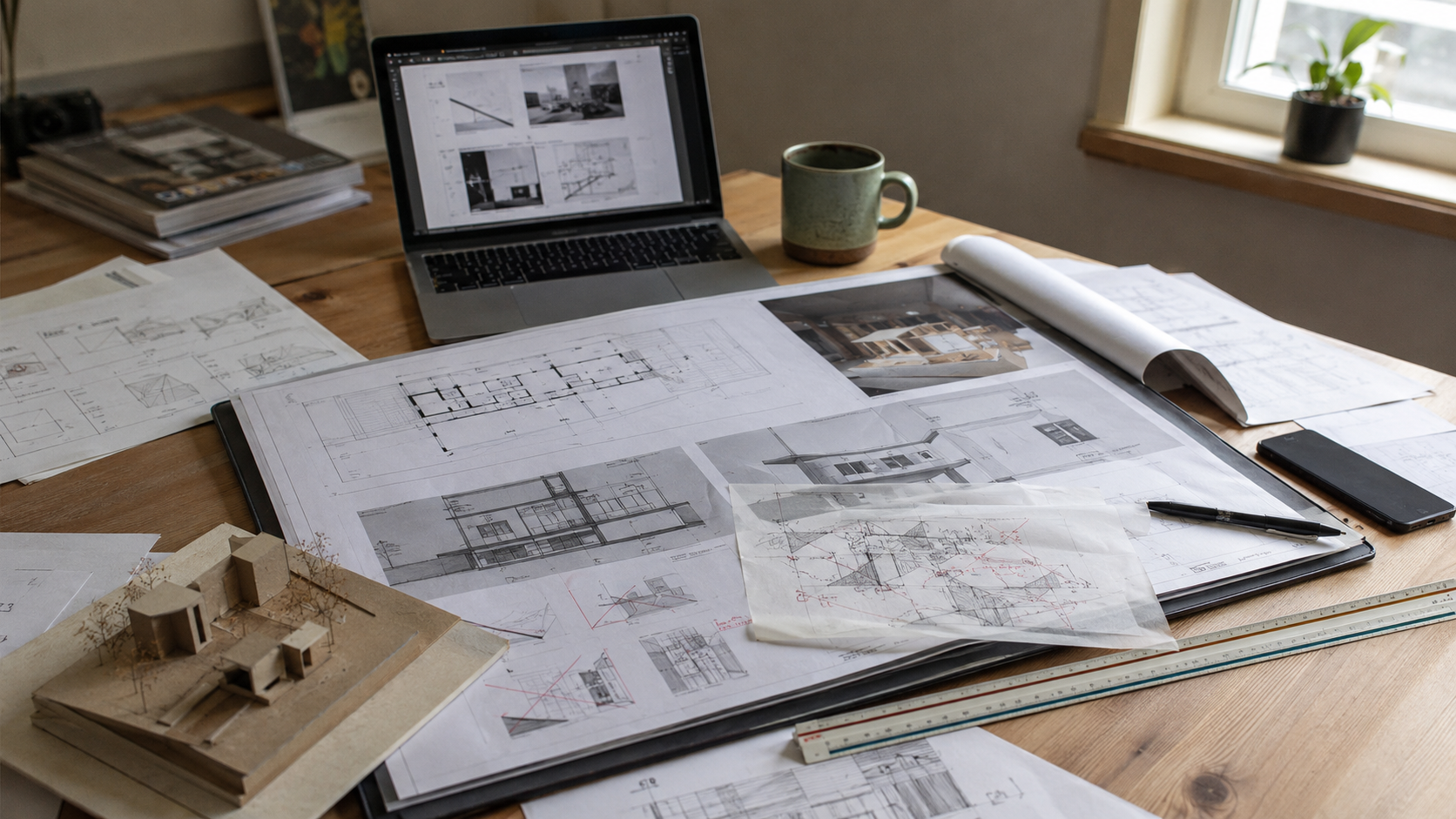
An architecture portfolio is not a scrapbook of everything you have made. It is a selected proof document.
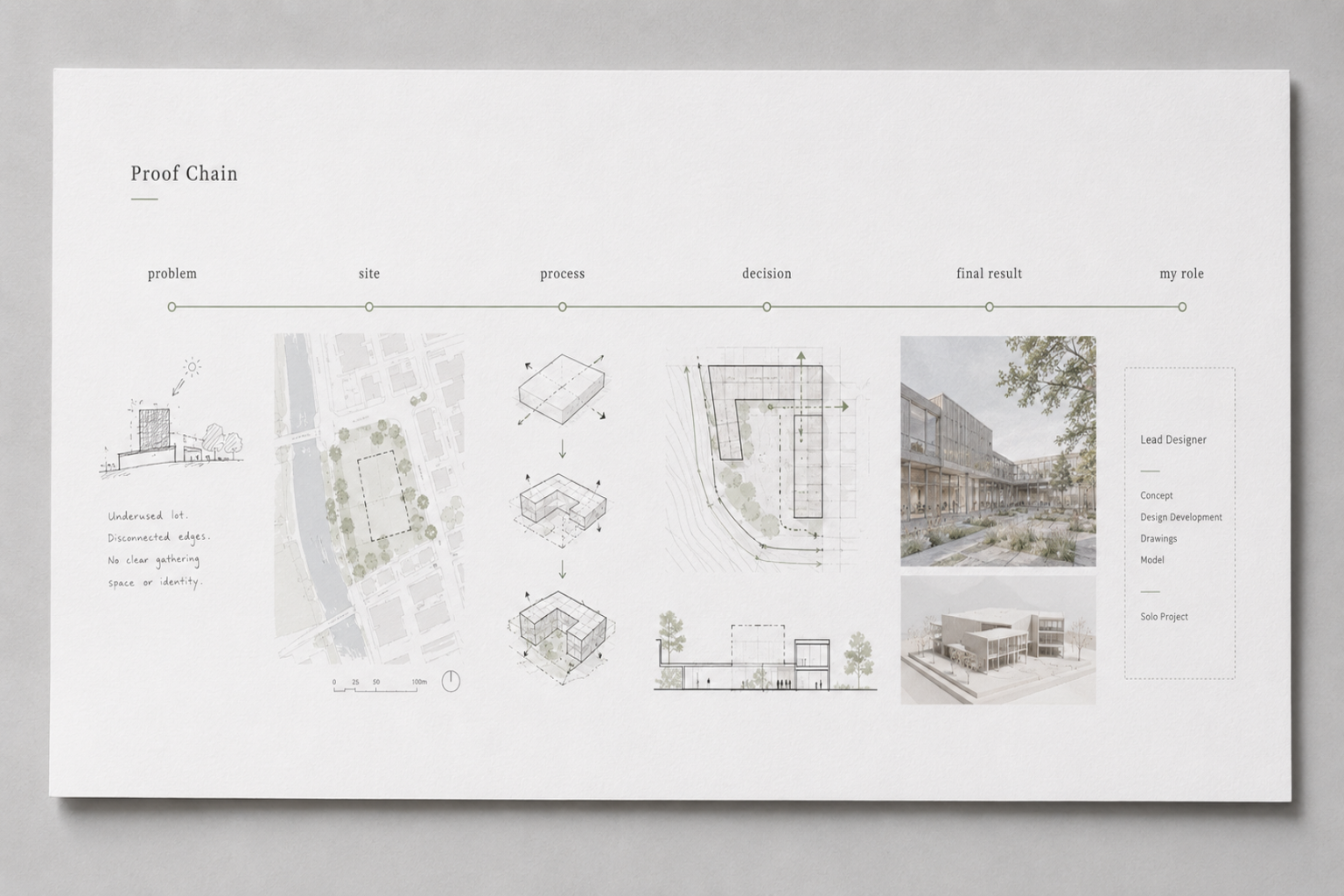
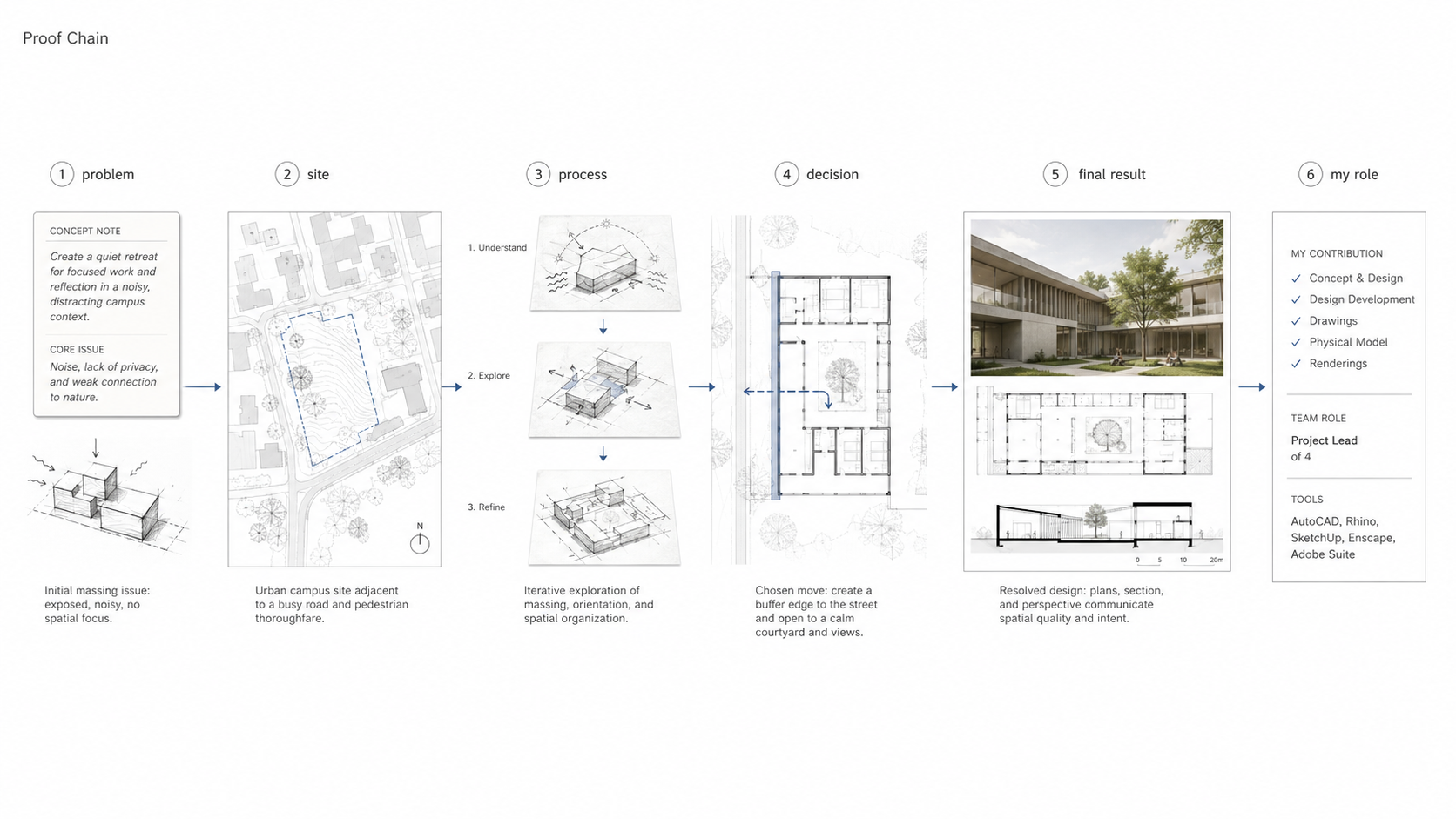
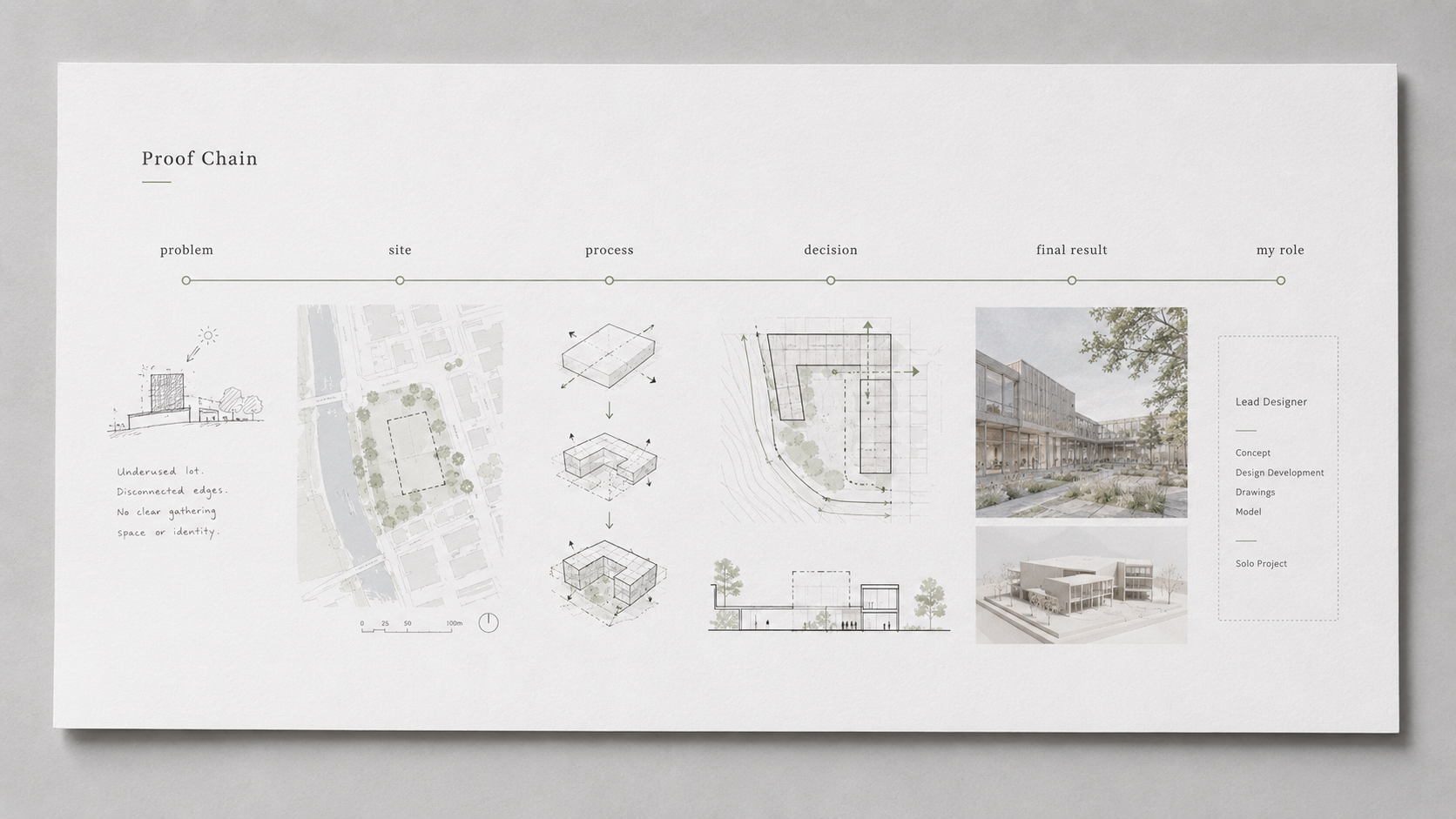
Each project should answer a few basic questions without drama:
- What was the problem?
- Where was the site or context?
- What did you test?
- What decision changed the design?
- What did the final result become?
- What part did you do?
If a project cannot answer those questions, it is probably not ready for the portfolio. A beautiful render with no site, no process, no plan logic, and no role label is decoration. It may look impressive for two seconds. Then it starts to feel empty.
The best portfolios do not make the reader guess. They show the line between problem, process, decision, and final work.
What Reviewers Notice First
Most reviewers do not start by reading your captions. They start by scanning the page.
They notice whether the layout feels calm or crowded. They notice whether one drawing leads the page or whether everything fights for attention. They notice whether the project looks like a real design study or just a collection of pretty images.
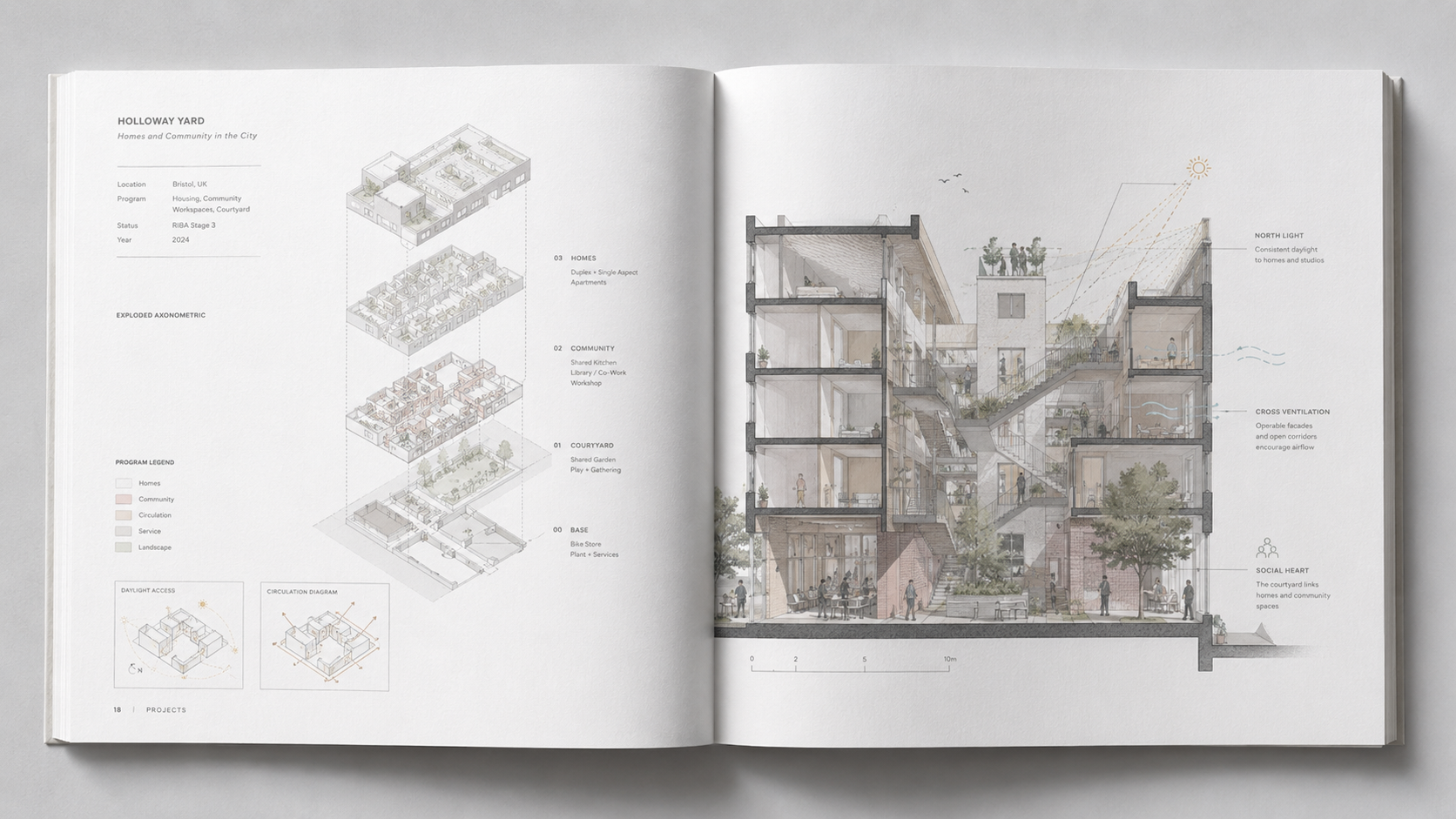
That first impression is not shallow. It is a fast test of judgment.
If the page feels confused, overloaded, or vague, the reviewer starts with doubt. If the page feels clear, ordered, and purposeful, the reviewer keeps going.
The 30-Second Read
Reviewers move fast. A school committee, hiring manager, professor, or firm principal may spend less than a minute on the first pass.
That does not mean your portfolio should be shallow. It means the first read must be clear.
Open one project spread and give yourself 30 seconds. Do not explain it out loud. Just look. By the end of that half minute, the page should make three things clear: the project type, the main design problem, and the strongest drawing or image.
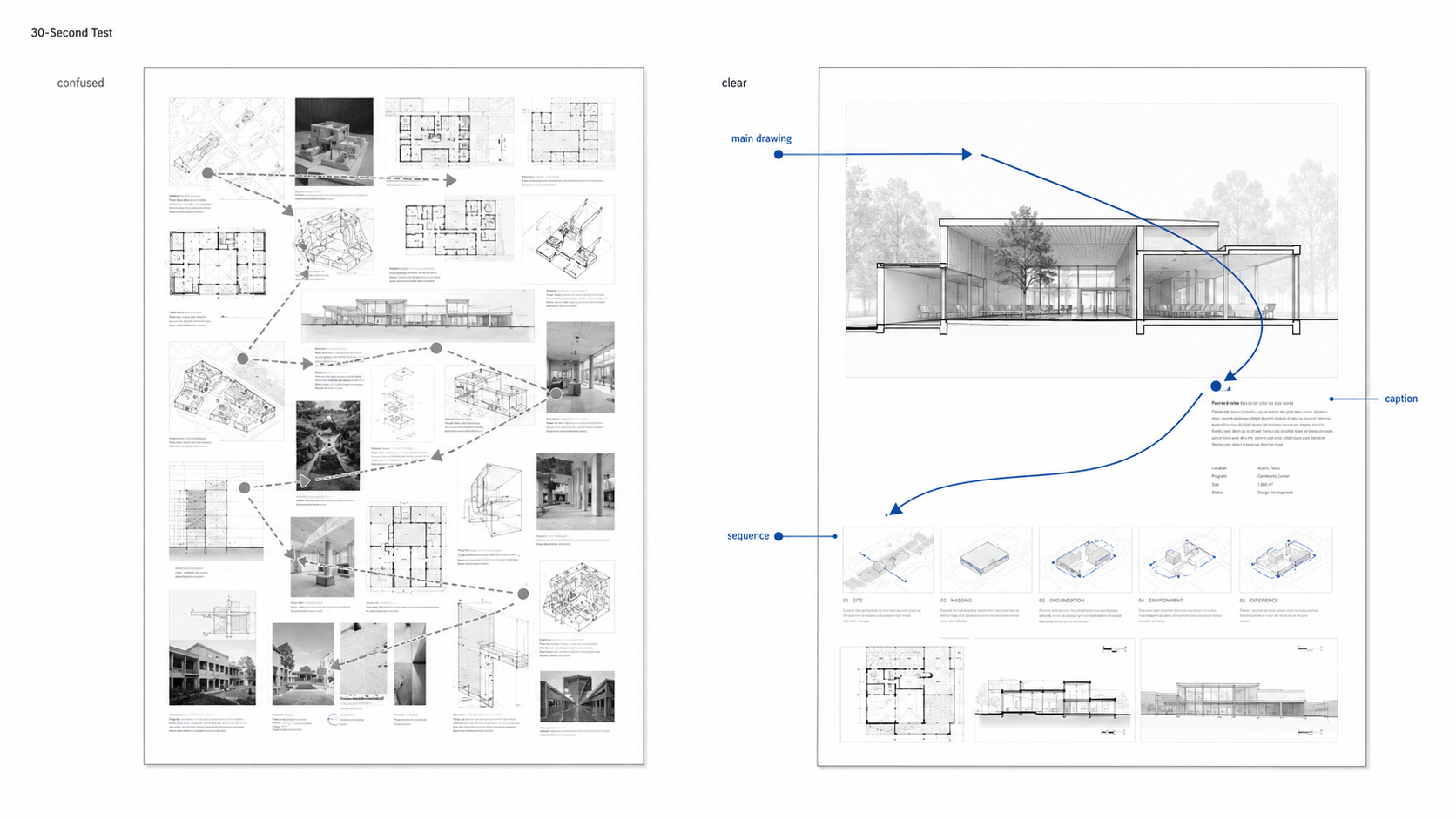
If the page needs a paragraph before the work makes sense, the page is doing too little visual work.
The Blackout Test
The blackout test is simple. Cover the text on one project spread. Leave only the drawings, photos, models, diagrams, and sequence visible.
Then ask what the project is about.
If the answer is impossible, the portfolio is leaning too hard on captions. Captions help. They cannot carry a broken visual sequence.
A good spread should still show direction without words. The site plan should lead somewhere. The process diagrams should build a chain. The final plan, section, model, or render should feel connected to the earlier decisions.
This test exposes weak diagrams fast. It also exposes fake process work: sketches added at the end only to make the project look thoughtful.
What To Include
Include work that proves judgment. Not every project has to be beautiful, but every project has to do a job.
| Portfolio Piece | Why It Belongs | What To Show |
|---|---|---|
| Best studio project | Shows design ability under a full brief | Problem, site, concept, plans, sections, process, final result |
| Process sketches | Shows how the idea changed | Early options, rejected moves, key decision sketches |
| Physical model photos | Shows spatial thinking beyond the screen | Clean photos, scale, material study, model purpose |
| Technical drawing | Shows discipline and construction awareness | Wall section, detail, structure diagram, assembly logic |
| Independent work | Shows initiative outside assigned studio work | Self-directed study, site analysis, sketch project, competition, repair study |
| Group project | Can show collaboration if labeled honestly | Clear role label, team context, your exact contribution |
A beginner portfolio may not have built work. That is normal. Show the strongest thinking you have: drawings, models, site notes, diagrams, study work, visual research, and one project that shows you can stay with a problem long enough to improve it.
For more on how design work develops from idea to drawing, see Architecture Design Process.
MUST READ: If you want one portfolio-specific book beside you while editing, The Portfolio: An Architecture Student’s Handbook is a useful fit for this stage. Use it as a layout and selection reference, not as an excuse to copy someone else’s portfolio structure.
What To Cut
Cut anything that weakens trust.
One bad project can hurt five good ones because the reviewer starts questioning your eye. If you cannot tell that a page is weak, the page says something about your judgment.
- Old work that no longer represents your level
- Travel photos with no design argument
- Mood boards that never turn into decisions
- Generic renders with no plan, section, or process
- Software screenshots that only prove you opened the program
- Group work with no role label
- AI images where your authorship is unclear
- Pages added only because the portfolio feels short
This is the one that will matter more every year: AI images where your role is unclear. If the image looks impressive but the design decisions are hidden, the page may raise more doubt than confidence.
A short clear portfolio is stronger than a long one full of filler. The reader should feel that every page survived a hard edit.
Build Each Project Around One Decision
A project spread gets clearer when it is built around a decision instead of a theme.
Weak page idea: “Community Center Project.”
Stronger page idea: “How the building turns toward the shaded courtyard.”
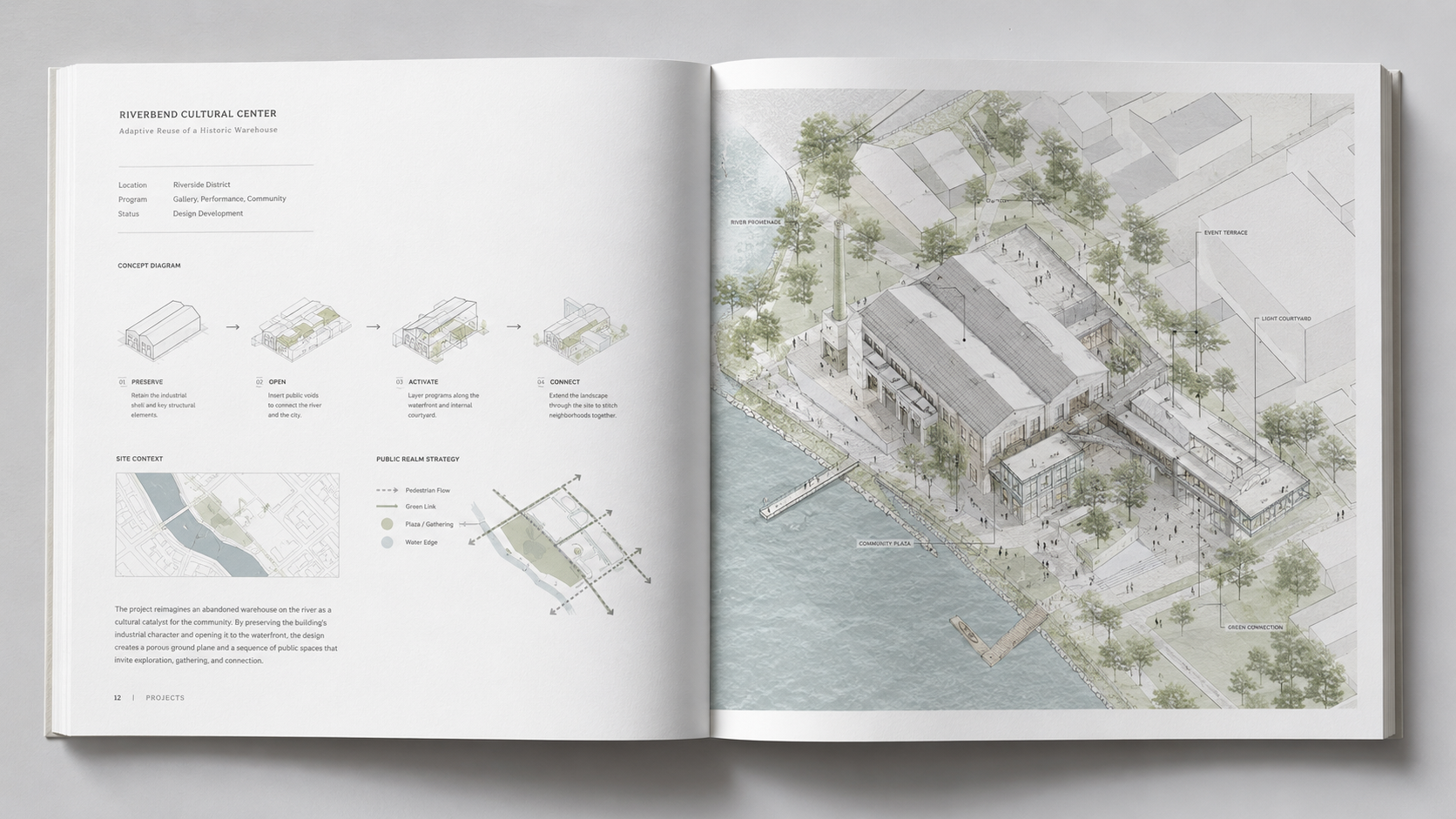
That second version gives the reader something to follow. The site diagram has a purpose. The massing studies have a purpose. The plan and section can prove whether the idea worked.
For each project, write one private sentence before layout begins:
This project is about...
Then finish the sentence with a design decision, not a vague concept. Examples:
- moving public circulation to the street edge
- using section changes to separate quiet and loud spaces
- turning a narrow site into a daylight problem
- testing how a courtyard can organize housing
- repairing a weak corner with structure, entry, and light
Once that sentence is clear, the page order becomes easier. Keep drawings that support the sentence. Cut drawings that compete with it.
School Portfolio vs Job Portfolio
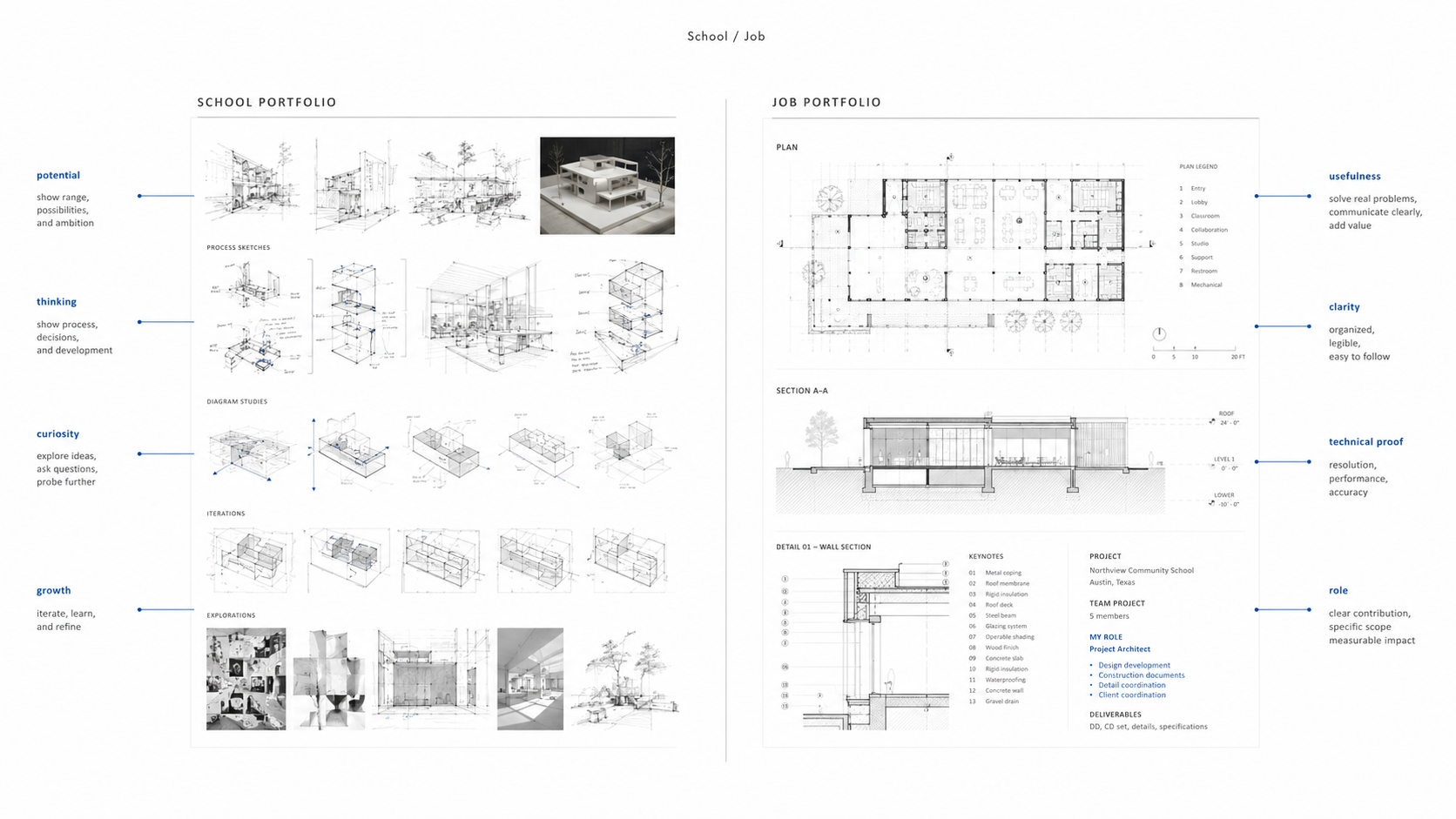
A school portfolio and a job portfolio should not be the same file with a different cover.
| Reader | They Are Checking | Portfolio Should Emphasize | Cut Back On |
|---|---|---|---|
| Undergraduate admission | Potential, curiosity, visual thinking | Sketches, models, creative studies, careful observation | Over-polished fake professional work |
| M.Arch admission | Design maturity and direction | Process, research interest, stronger project sequence, prior design growth | Random early work that does not support your path |
| Internship | Usefulness, trainability, software discipline | Clean drawings, models, diagrams, role labels, layout control | Long theory text and vague concept pages |
| Job interview | Can you help the office? | Technical drawings, team work, built or documented constraints, coordination thinking | Purely academic pages with no role or outcome |
The school version can show potential. The job version has to show usefulness.
For school-specific advice, use the architecture school portfolio page. Keep the main portfolio broad, then narrow the file for each application.
M.Arch Applicants Need More Control
A graduate portfolio has to do more than show that you like architecture. It should show direction.
M.Arch reviewers may be looking at applicants from different backgrounds: pre-professional architecture programs, art programs, engineering, environmental design, interior design, or unrelated degrees. Your portfolio has to explain where you are starting from and what kind of design mind you are bringing into graduate studio.
Do not pad it with every undergraduate project. Pick the work that shows development.
A strong M.Arch portfolio often needs three layers:
- one or two complete design projects with process and final drawings
- supporting work that shows drawing, making, research, or visual discipline
- a clear signal of the design questions you want to keep working on
If your background is not a traditional architecture degree, the portfolio should make your transferable skills obvious. Spatial thinking, drawing, making, site observation, material study, photography, construction work, or visual research can all matter when they are organized well.
For the broader graduate application path, see Preparing a Strong Graduate School Application.
Process Work Has To Earn Space
Process work is not a pile of sketches. It is the evidence trail.
A good process sequence shows what changed. It might show three massing options, one failed circulation idea, a site constraint, and the move that fixed the project. That is useful.
A bad process page shows ten random images with no order. That only tells the reader you had files on your computer.
Use process work where it explains a decision:
- before and after massing
- site force to building move
- circulation problem to plan correction
- section test to daylight strategy
- model study to final form
Label process lightly. One short caption can do more than a paragraph. The drawing should carry the main idea.
RECOMMENDED TOOL: A small drawing tablet can help clean sketch scans, mark up portfolio spreads, and redraw rough diagram lines without pretending the tool solves the design. Wacom Intuos Small is enough for many students who only need cleanup, trace work, and diagram editing.
Group Work Needs Role Labels
Group work is fine when the role is clear. Unlabeled group work creates doubt.
Do not hide the team. Do not overclaim. Put a role label near the project title or first spread.
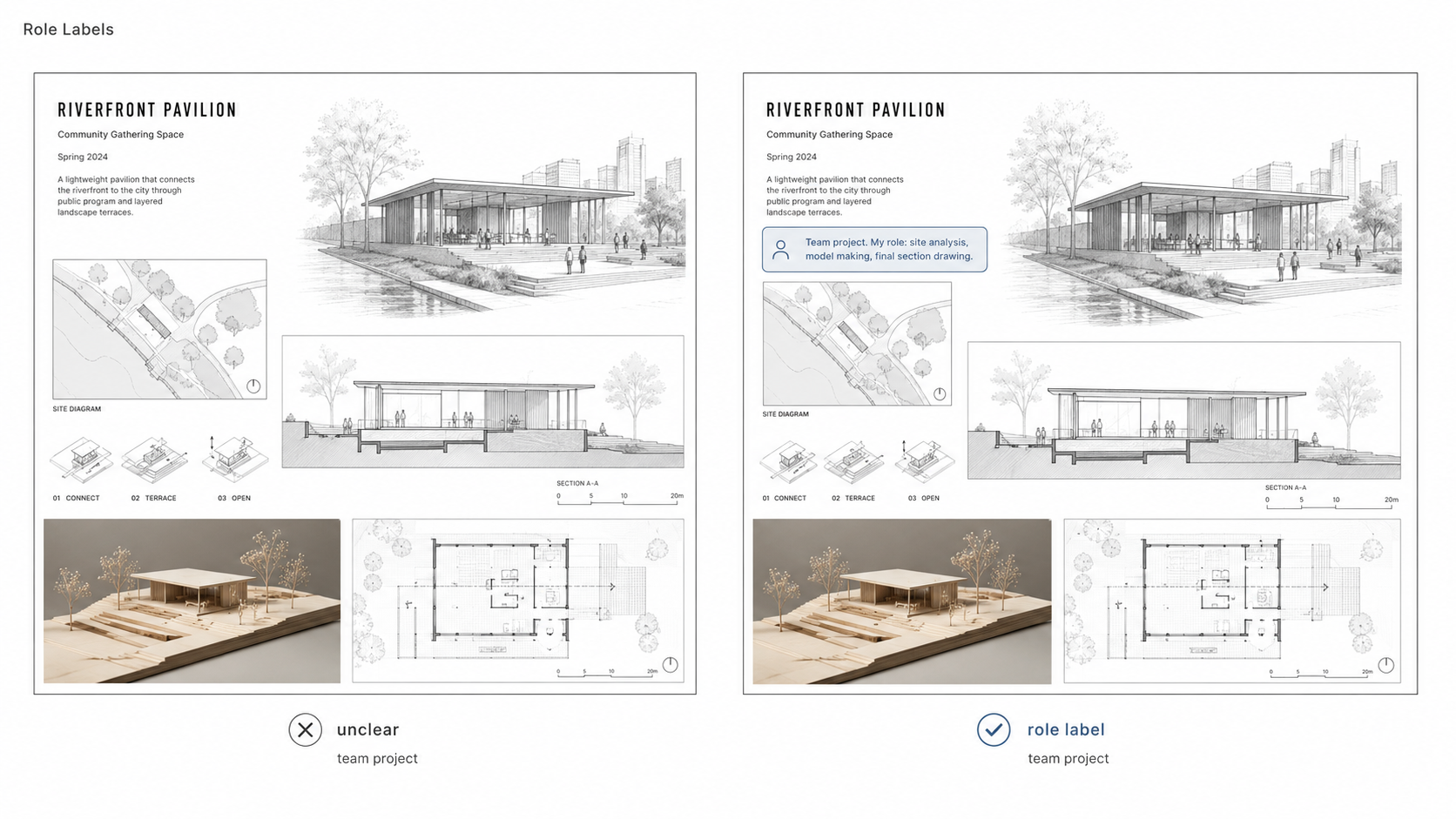
Use plain labels:
Team project. My role: site analysis, physical model, plan cleanup, final section drawing.
Team project. My role: concept diagrams, circulation study, presentation layout, model photography.
Team project. My role: facade study, wall section, material research, final board editing.
This is especially important for job portfolios. Firms are not only asking whether the project looks good. They are asking what you can do on Monday morning.
AI Work Needs Authorship
AI work can belong in an architecture portfolio only when your authorship is clear.
Do not drop an AI image into the portfolio as if it proves design skill. It does not. The portfolio needs to show what you controlled, corrected, rejected, redrew, modeled, tested, or developed after the tool produced something.
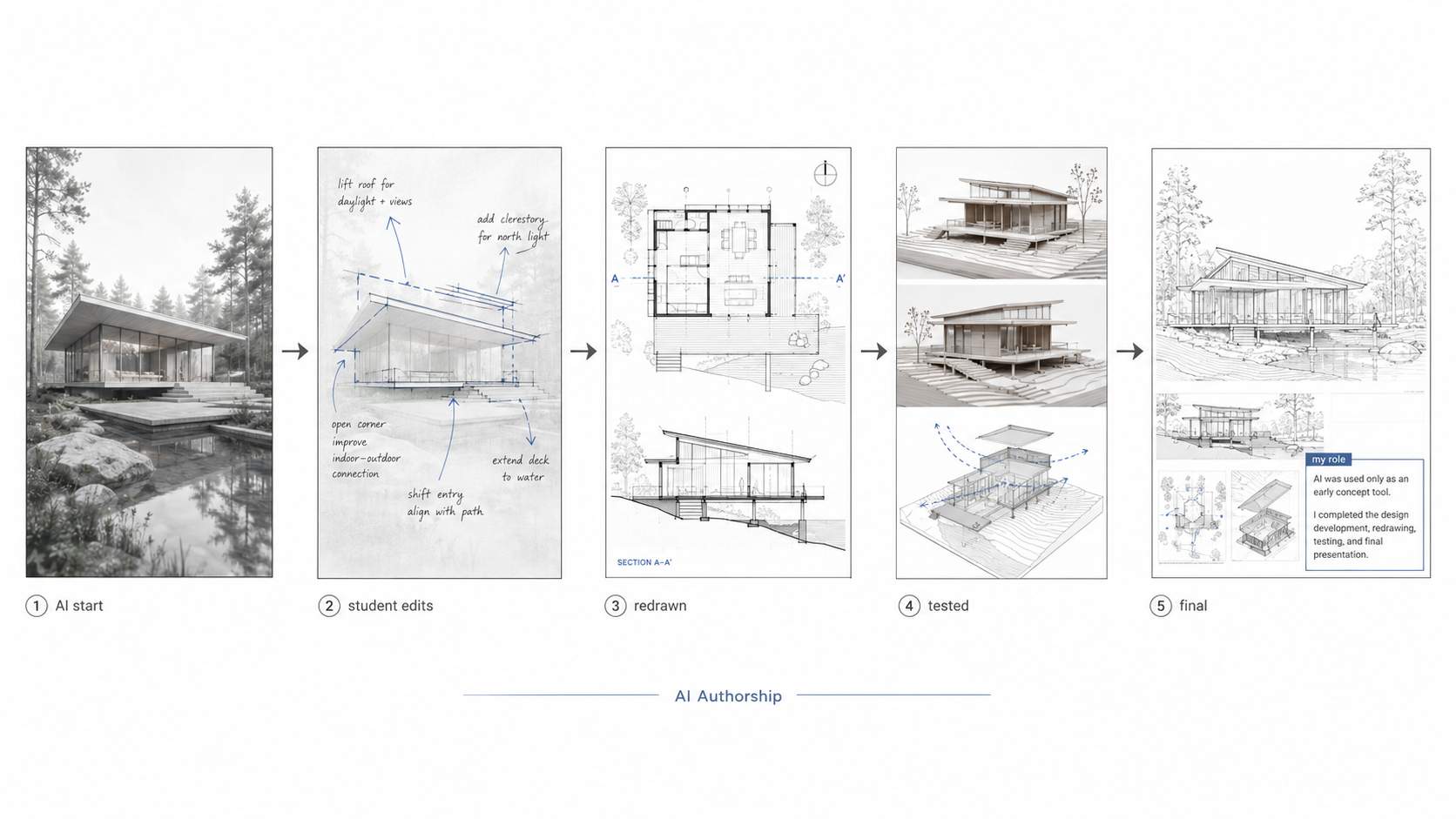
Use a simple disclosure line when needed:
AI-assisted concept image used for early mood and massing study. Final plan, section, model, and layout by applicant.
Or:
AI used for first visual prompt only. Structure, site response, circulation, and drawings developed manually.
If the AI image is doing all the work, cut it. If it helped you start and you clearly took over, show the takeover.
That means sketches over the image, corrected plans, redrawn sections, model studies, or a final design that proves architectural judgment.
Digital PDF vs Printed Portfolio
For most applications, the PDF is the main file. It should open fast, read cleanly on a laptop, and survive email, upload portals, and interview screens.
Follow the school or firm instructions first. If they ask for a specific size, page count, orientation, or file limit, obey that before any design preference.
When no rule is given, 16:9 landscape usually works well for screens. A3 landscape can work for print and review tables. Portrait can work, but it often makes plans and spreads feel cramped unless the layout is handled carefully.
A printed portfolio is still useful for in-person reviews, interviews, and final checks. Printing exposes problems the screen hides: weak contrast, small text, bad margins, muddy model photos, and diagrams that looked clear only because you were zoomed in.
Print at least a few spreads before sending the final PDF.
Layout Should Stay Quiet
The layout should help the work read. It should not become a second project fighting for attention.
Use one grid. Keep margins consistent. Limit fonts. Make captions short. Give important drawings room to breathe.
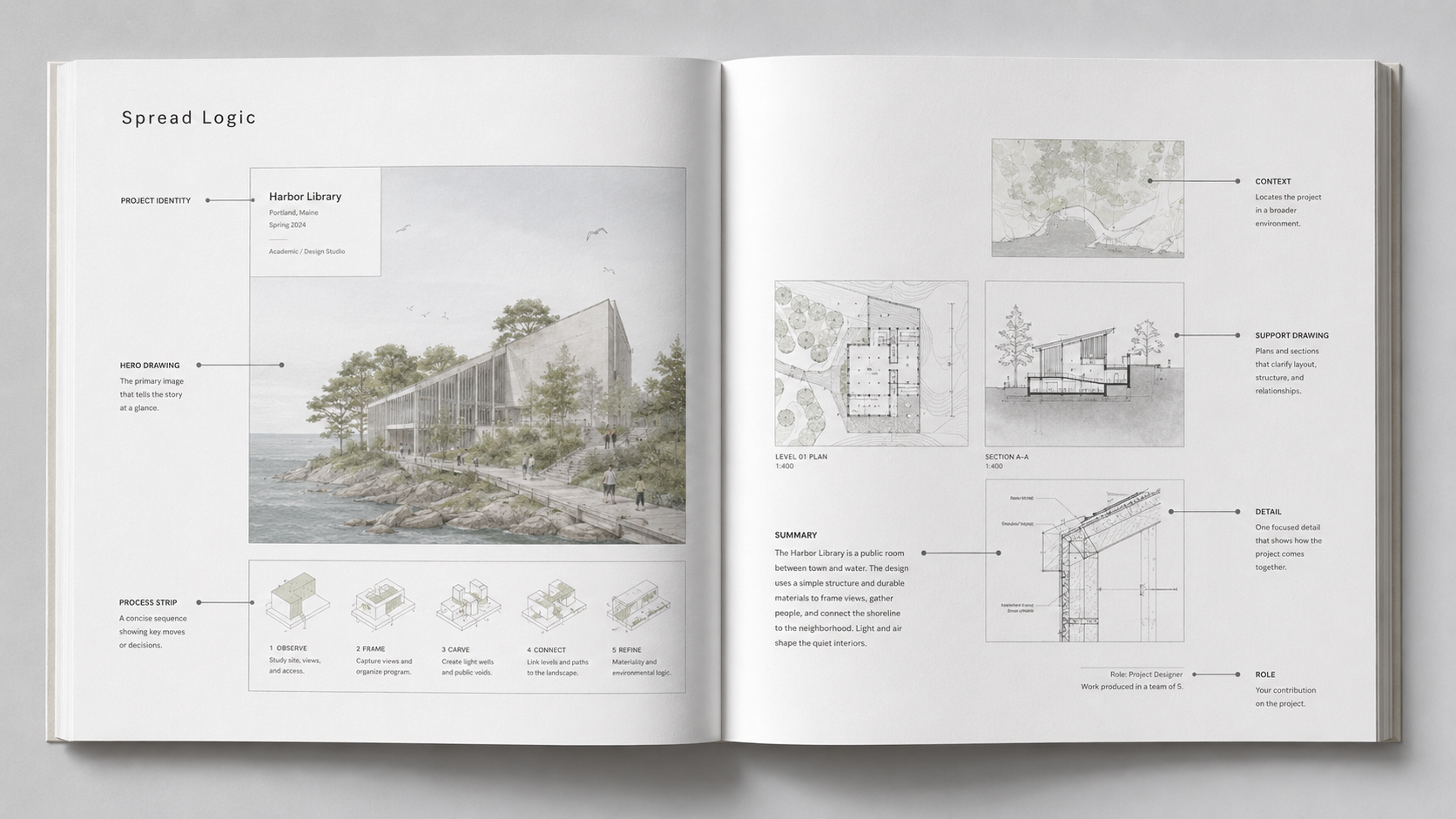
Do not make every image the same size. Hierarchy matters. The strongest drawing on the page should look like the strongest drawing on the page.
A common mistake is filling every empty space because the page feels unfinished. Empty space is not wasted when it helps the reader understand the work.
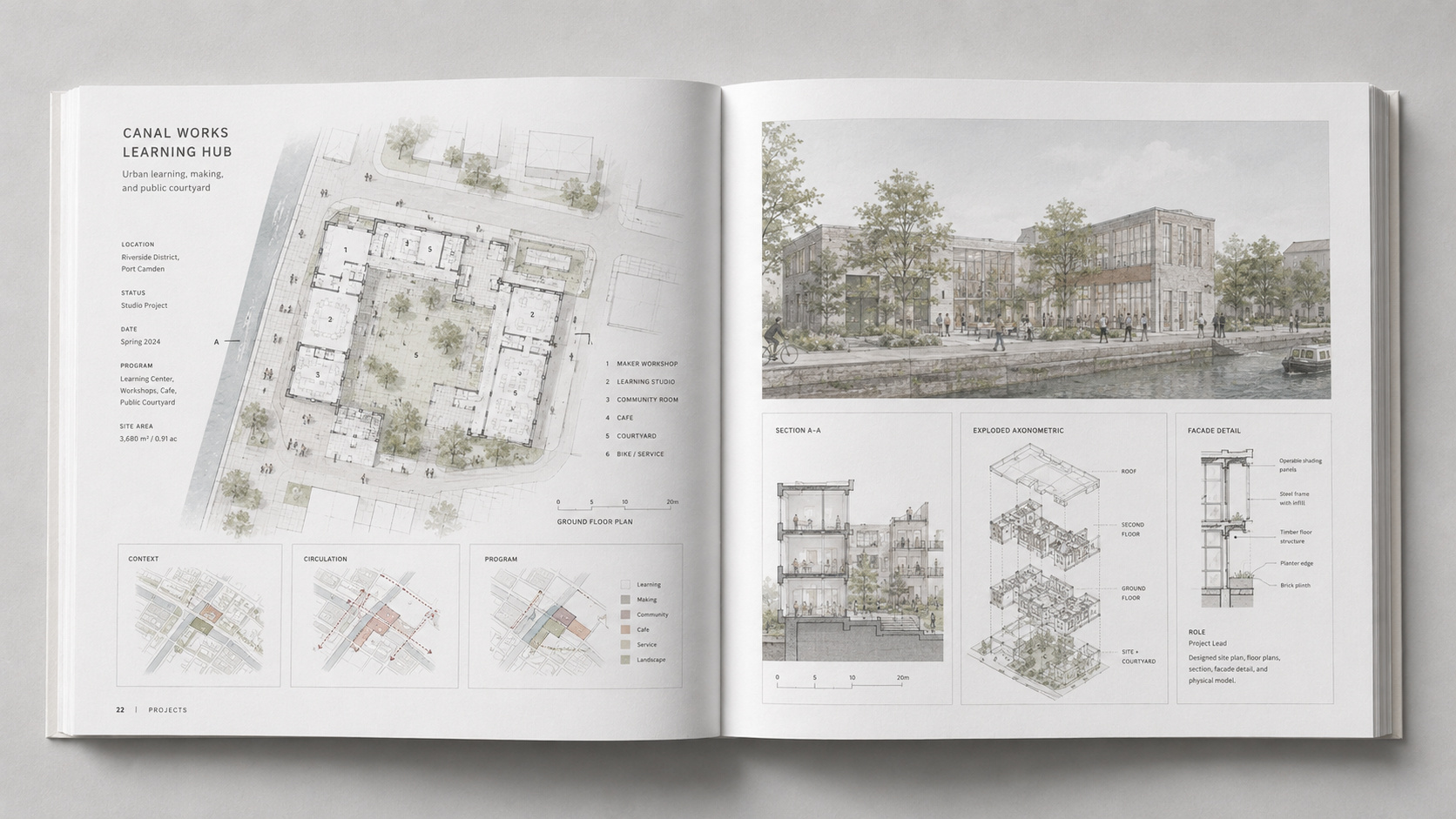
If your diagrams are getting ignored or misunderstood, read why good architecture diagrams fail in review.
The Page Order
Do not start with a weak project because it came first in school. Start with strength.
A safe order is:
- strongest complete project
- second strong project with a different skill
- technical or process-heavy project
- smaller project, model, competition, or independent study
- final strong project that leaves a clear impression
Put your weakest acceptable work in the middle only if it adds a skill the other projects do not show. If it adds nothing, remove it.
The last project matters. It is the work the reviewer carries out of the file.
Project Captions
Captions should clarify the decision, not describe the obvious.
Weak caption: “Final render of community center.”
Better caption: “Final view showing the public stair as the main circulation spine between street and courtyard.”
Weak caption: “Site analysis diagram.”
Better caption: “Site diagram showing noise, sun, and pedestrian pressure along the west edge.”
The better caption tells the reader what to see. It does not decorate the page.
FIELD PICK: If weak drawings are the main portfolio problem, Drawing for Architects is a better support buy than another generic portfolio book. It helps with the drawing language behind plans, sections, diagrams, and visual explanation.
Before You Send It
Run the portfolio through a hard check before sending it.
- Open the PDF on a different computer.
- Check file size and upload rules.
- Print two or three pages at actual size.
- Do the 30-second read test.
- Do the blackout test on one project.
- Check every role label.
- Remove one weak page.
- Make sure your name and contact information are easy to find.
The last step is important: remove one weak page. Almost every portfolio has one page that stayed because the applicant was tired of editing. That page is usually the one that should go.
FAQ
How many projects should an architecture portfolio include?
For many student and early career portfolios, five to eight strong projects is enough. Ten can work if every project earns its place. More than that usually starts to feel padded.
Should I include process sketches?
Yes, but only when they explain how the design changed. Random sketches do not help. A clear sketch that shows a decision can be stronger than another final render.
Can I use the same portfolio for school and jobs?
Use the same base work if needed, but edit the file. Schools care more about potential and design thinking. Firms care more about usefulness, role, technical clarity, and whether you can communicate work cleanly.
Should my portfolio be a website or PDF?
Use a PDF first unless the school or firm asks for something else. A website can support your work, but the PDF is easier to submit, review, save, and discuss in an interview.
Can I include group work?
Yes. Label your role clearly. Group work without role labels creates doubt.
Should I include AI-generated work?
Only if your role is clear. Show what you changed, corrected, redrew, tested, or developed. If the AI image is the whole project, leave it out.
What is the biggest mistake in architecture portfolios?
The biggest mistake is unclear work. The reviewer should not have to guess the project problem, your role, or why a drawing matters.
Read This Next
For school-specific admissions work, use Preparing an Impressive Architecture Portfolio for Architecture School Admission.
If the portfolio is part of a graduate application, read Preparing a Strong Graduate School Application before finalizing the file.
For presentation quality, drawing order, and render clarity, the next useful page is Architectural Presentation and Rendering.