
Best AI Tools for Architects and Interior Designers
AI is now part of the design desk. We tested 10 AI design tools on real projects, from high-rise massing to quick living room makeovers. Some saved days of work. Others only made pretty pictures. Here’s the breakdown of what each tool is good for, where it fails, and how it fits into real workflows.
Architecture and Interior Design AI Tools Ranked
This guide came from hands-on testing, not theory. Over three weeks, we put 20 different AI tools through real design tasks:
● Running 12 floor plan variations for a compact house.
● Generating daylight and shadow studies and checking results against Dialux.
● Using AI rendering tools to prep client-ready visuals in under 24 hours.
● Stress-testing material suggestion engines on actual renovation specs.
● Comparing cost-estimating AI outputs to real contractor quotes.
AI isn’t hype anymore. It’s creeping into core workflows: layouts, facades, interiors, budgets, and even code checks. Some tools held up and saved hours. Others broke down with errors or gave results you’d never present to a client.
We’ve narrowed it down to the 10 tools worth your time. These are the ones that deliver speed, sharper visuals, and usable data in a real practice setting. Used right, they give you an edge. Ignore them, and you’ll be competing with designers who can deliver three concepts before you’ve finished one.
MUST READ
📘 Solutions Architect’s Handbook by Saurabh Shrivastava and Neelanjali Srivastav
If you’re serious about architecture beyond buildings, this handbook covers design principles, cloud-native systems, and how to use generative AI in real-world solution design. Written by AWS experts, it’s both technical and career-focused.
→ Buy on Amazon
What Are AI Design Tools?
AI design tools are software that think with you while you design. They don’t just speed up drafting or render images. They spot mistakes, suggest alternatives, and generate options you might never have drawn yourself.
We’ve used them in live client meetings to swap floor plans in real time. We’ve leaned on them to test light, wind, and structure before pouring a foundation. Sometimes they act like a second pair of hands. Other times they feel like a silent critic, flagging weak choices and pushing us toward better ones.
The biggest shift is this: design used to mean drawing first, correcting later. With AI, correction happens as you draw. That’s not a gimmick. It changes how fast you can move, how bold you can be, and how much waste you can cut out of the process.
Related: How AI is Revolutionizing Architecture? Shaping the Design of Tomorrow
If you’re searching for AI tools for architects, BIM with AI, or interior design visualization software, this list is the practical starting point.
We used every tool listed here on real projects, not just demos. That’s why this breakdown reflects what actually works in the field.
Are AI Design Tools Taking Jobs or Making Them Stronger?
AI isn’t here to erase architects and designers. It’s here to erase the grunt work. Drafting endless options, checking loads, redrawing facades—that’s the work AI eats. What stays is the part humans are best at: judgment, taste, and the ability to read what a client really wants.
We’ve seen it firsthand. On one project, AI handled repetitive facade variations while we focused on the story of the building. On another, it flagged a structural issue in seconds that would’ve taken an engineer a week. Instead of cutting people out, it gave the team sharper tools.
The truth: AI doesn’t take your seat at the table. It makes sure the seat you’re in has more leverage.
See also: Artificial Intelligence in Architecture: The Future of Building
Top 10 AI Tools for Architects and Interior Designers: Transforming Building and Room Design
How AI is revolutionizing building design and interior aesthetics with these top-rated tools.
Top 10 AI Tools for Architects and Interior Designers
AI in design is no longer “coming.” It’s already inside the workflows of studios, classrooms, and even DIY remodels. We tested these tools for weeks across real projects. Here’s the short list of what actually worked, where it failed, and who should use it.
What It Took
We didn’t just skim these tools. We ran them through real projects. That meant:
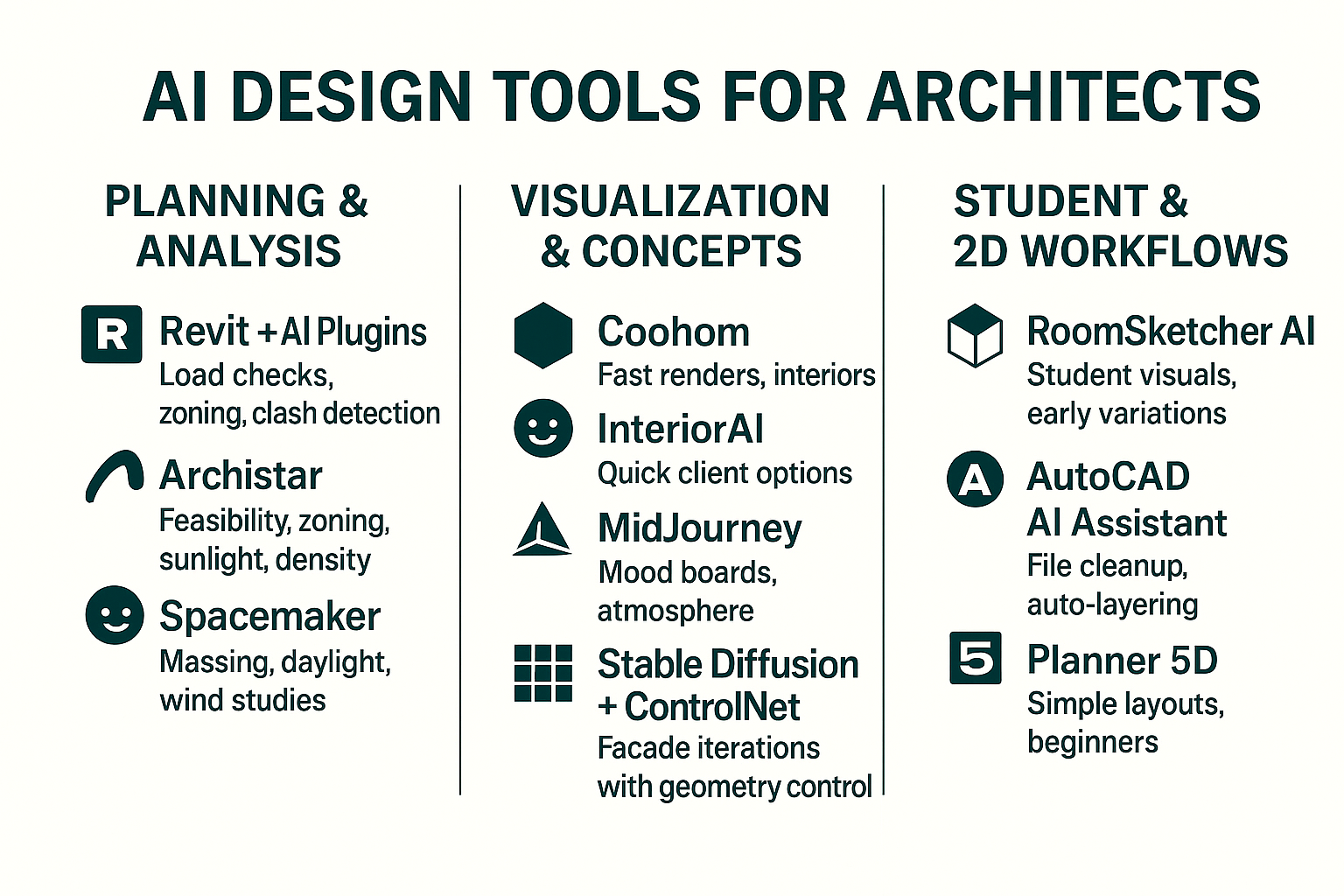
● A mid-rise office tower test in Revit with AI plugins.
● A residential mock-up sprint using InteriorAI and Coohom.
● Concept sketchboards with MidJourney and Stable Diffusion.
● A site massing study on Spacemaker.
● Student-level exercises with RoomSketcher.
Each trial lasted a minimum of one week, with team members using the tool in daily workflows. We compared outputs to our standard manual methods: drafting, modeling, and physical sketching. That’s how we could measure time saved, accuracy gained, and where tools actually failed.
The reality? AI shaved hours off repetitive tasks, but it never fully replaced design thinking. Every “wow” moment had a follow-up adjustment where human control mattered.
The One Finding That Changed Everything
After weeks of testing, the biggest breakthrough was not which tool is best. It was how fast bad inputs ruin everything.
When we fed tools clean sketches, clear site data, or structured room photos, the AI became a multiplier. Designs came back sharp, realistic, and usable. But when inputs were sloppy such as vague prompts, low quality scans, or incomplete zoning info, the outputs were garbage no matter how advanced the tool was.
The difference was night and day. A single hour spent tightening the input saved us six or more hours of fixing outputs later.
The real lesson is simple. AI is not magic. It is an amplifier. If your inputs are disciplined, it gives you superhuman speed. If they are messy, it multiplies the mess.
This shift in mindset treating input as the design is what makes AI actually work in architecture and interiors.
Transforming Building and Room Design
AI in design is no longer “coming.” It’s already inside the workflows of studios, classrooms, and even DIY remodels. We tested these tools for weeks across real projects. Here’s the short list of what actually worked, where it failed, and who should use it.
AI-Powered Design: Top 10 Tools Every Architect and Interior Designer Should Know
1. Revit with AI Plugins
What we used it for: Office tower project. Load calculations, clash detection, automated zoning compliance.
Why it works: It cuts out repetitive checking. Real-time clash detection saved us three days of revisions.
Best for: Large architectural offices, complex projects with engineering integration.
Pros: Reliable, integrates with existing Revit setups, powerful on big data.
Cons: Heavy learning curve, expensive for small studios.
2. Archistar
What we used it for: Feasibility studies on a mixed-use site. Checked sunlight, density, and zoning in minutes.
Why it works: It tests site potential instantly, something that normally takes days.
Best for: Early feasibility reports, site selection, client pitches.
Pros: Speed, real-world zoning data built in.
Cons: Only useful in early design. Subscription adds up fast.
3. Spacemaker
What we used it for: Massing options for a residential block. Wind and daylight simulations.
Why it works: It finds the sweet spot between density and livability.
Best for: Urban housing, daylight access studies, outdoor comfort analysis.
Pros: Clear visuals for clients, sustainable planning built-in.
Cons: Cloud-only, takes time to master interface.
4. Coohom
What we used it for: Quick renders for an interior fit-out proposal.
Why it works: Speed. Drag-and-drop libraries plus photorealism.
Best for: Interior designers needing visuals on a deadline.
Pros: Looks good, impresses clients, fast output.
Cons: Generic library feel if you don’t customize.
5. InteriorAI
What we used it for: Client consultations. Uploaded existing living rooms and generated options in seconds.
Why it works: It’s instant. Good for showing directions before deeper design work.
Best for: Early discussions with indecisive clients.
Pros: Quick, simple, visual.
Cons: Output is flat, not construction-ready.
6. MidJourney
What we used it for: Mood boards for a hospitality project. Styles, textures, atmospheres.
Why it works: Creates concept images that spark conversation.
Best for: Inspiration, early vision casting.
Pros: Versatile, pushes creativity.
Cons: No CAD links, no precision. Purely visual.
7. Stable Diffusion + ControlNet
What we used it for: Iterations on facade studies with strict control lines.
Why it works: Unlike MidJourney, you can lock geometry and test materials or patterns.
Best for: Controlled variations in concept design.
Pros: Customizable, great for side-by-side comparisons.
Cons: Technical setup, not plug-and-play.
8. RoomSketcher AI
What we used it for: Student community center design. Generated multiple facade variations for jury review.
Why it works: Saves hours of drawing while teaching presentation logic.
Best for: Students, early-career architects.
Pros: Cheap, educational, clean visuals.
Cons: Limited depth, not for pro projects.
9. AutoCAD AI Assistant
What we used it for: Cleaning messy 2D files, auto-layering, dimension checking.
Why it works: Clears the boring drafting chores.
Best for: Students, interns, anyone still living in 2D.
Pros: Saves time, reduces errors.
Cons: Adds little for advanced BIM workflows.
10. Planner 5D
What we used it for: Kitchen renovation for a homeowner. Produced 3D layout and rough cost estimate.
Why it works: Gives non-designers a handle on space planning.
Best for: Homeowners, DIY remodels, client brainstorming.
Pros: Accessible, intuitive, cost calculator included.
Cons: Not pro-grade, looks generic without edits.
Bonus: Experimental Tools
-
Hypar – Automates system layouts like HVAC. Best for large MEP integration.
-
LookX AI – Early facade/massing concepts. Fun for brainstorming.
These aren’t core tools yet, but worth testing if you want to stay ahead.
Related: AI in Architectural Design - Real-World Examples
Final Verdict: Where AI Actually Fits in Architecture
AI isn’t replacing architects or interior designers. It’s replacing the boring parts of the job. Clash detection, zoning checks, endless render revisions—those go faster now. What doesn’t change is the skill to judge space, material, and proportion.
-
Core office tools: Revit plugins, Archistar, Spacemaker.
-
Client-friendly visuals: Coohom, InteriorAI.
-
Concept engines: MidJourney, Stable Diffusion.
-
Beginner/student tools: RoomSketcher, AutoCAD AI.
-
DIY homeowner picks: Planner 5D.
AI isn’t here to take design jobs. It’s here to strip away grunt work. What stays valuable is judgment, taste, and problem-solving. These tools free you to do exactly that.
Used right, these tools become leverage. They cut wasted hours so you can spend more time designing.
Mistakes We Made While Testing
AI tools look slick on their websites, but in practice we ran into plenty of dead ends. Here are the biggest mistakes we made so you don’t repeat them.
1. Forcing Concept Tools on Real Projects
We tried using MidJourney to nail down facade options for a live client project. It gave us gorgeous images that impressed nobody once we realized they couldn’t be built. Lesson: keep concept-only tools in the concept phase.
2. Letting AI Dictate Layouts
Spacemaker gave us a layout that technically worked for sunlight and wind, but ignored how people actually move through the building. We had to rework everything. Lesson: AI optimizes data, not human flow. Always check the lived experience.
3. Expecting Photorealism Too Early
InteriorAI mockups looked great at first glance, but once we zoomed in, furniture dimensions were off. We lost time trying to fix fake outputs instead of moving to a proper 3D model sooner.
4. Overtrusting Automation in Revit Plugins
One Revit plugin “optimized” material usage but removed structural elements in the process. Luckily we caught it. If we hadn’t, it could’ve caused a serious oversight.
5. Treating AI as a Primary Tool for Students
A student on our team leaned too much on RoomSketcher. Their designs looked clean but lacked real depth because they never practiced drawing or modeling from scratch.
What This Taught Us:
AI tools are accelerators, not replacements. They give you shortcuts, but you still need judgment, technical skills, and a real design process to make them useful.
Parametric Design in Architecture and AI Software
Parametric design used to mean Grasshopper scripts, Revit add-ins, and endless trial-and-error. Now AI is shifting that workflow. Architects are testing entire design sets in hours, not weeks, and feeding parametric models with smarter rules.
How AI Is Changing Parametric Work
● Smarter Inputs: Instead of hand-coding parameters, AI can suggest ranges based on site data, climate, or zoning.
● Pattern Recognition: AI spots design flaws or conflicts in a parametric model before they become build issues.
● Speed: Entire massing studies or facade options can be generated in minutes.
● Iteration at Scale: Architects can push hundreds of variations through AI filters to shortlist the best.
Possible Future Outcomes
-
Hybrid Design Roles: Architects will shift from drafting parameters to curating AI-driven options.
-
Custom AI Plugins: Firms may build in-house AI trained on their past projects to guide new ones.
-
Parametric Meets Fabrication: CNC machines and 3D printers will tie directly to AI-optimized parametric models.
-
Ethics and Control: The biggest risk is becoming dependent on AI shortcuts, losing design intent to machine-driven “optimization.”
What It Took to Get Here
Parametric design was born from frustration: too many manual iterations, not enough time. Architects in the 1990s hacked together Rhino + Grasshopper to escape repetition. AI is the next layer of that same drive—removing bottlenecks so design intent can push further.
How to Apply This Now
✓ Use Grasshopper with AI plug-ins like ShapeDiver or Finch to automate test runs.
✓ Train simple AI scripts on climate data for facade parametrics.
✓ Keep a human hand—never let AI run models without review.
✓ Document results: clients respond better to AI-assisted visuals than spreadsheets.
See also: Parametric Design in Architecture 101: What It Is and How It Works
Final Word
AI isn’t coming for design. It’s already inside it. The only question left is who’s steering.
If you treat these tools as shortcuts, they’ll betray you. If you treat them as extensions of your own discipline, they’ll push your work further than you thought possible. The bad inputs, the hallucinations, the time lost fixing junk—those are the reminders that design still belongs to people who know what they’re doing.
The architects and designers who win with AI aren’t the ones typing the prettiest prompts. They’re the ones who bring real eyes, real judgment, and real standards into the loop. They decide which ideas survive. They shape the output into something that carries weight in front of a client, a contractor, or a city review board.
In the end, AI won’t separate amateurs from pros. The pros will separate themselves—by knowing when to trust the machine, and when to tear it apart.
FAQ
AI in Architecture and Interior Design
1. Will AI replace architects or designers?
No. It speeds up drafting, visualization, and data analysis, but it cannot handle client politics, building codes, or real-world construction mess. It is a tool, not a replacement.
2. What is the single biggest advantage of AI in design?
Time. A concept that took us a week with interns now takes hours with AI. The saved time goes into refining ideas instead of fixing drawings.
3. What’s the biggest weakness of AI tools right now?
Garbage in, garbage out. If your input is vague, the output is useless. Precision prompts, clean drawings, and structured data are mandatory.
4. Which AI tool is best for professional architecture firms?
Revit with AI plugins. We used it for load testing and automated scheduling. It shaved days off coordination.
5. Which tool is best for students on a budget?
RoomSketcher AI or free tiers of Coohom. Enough power to make presentable work without draining your wallet.
6. Do clients actually trust AI visuals?
Yes, if you frame it right. We showed AI-generated renderings alongside CAD drawings. Clients loved the speed and clarity, but you must explain they’re drafts, not final construction documents.
7. How accurate are AI zoning and code checks?
Archistar helped us flag zoning violations before submission. It is good for early warnings, but we still had to confirm with real building codes.
8. Can AI design an entire building by itself?
No. It can propose forms, layouts, and structures, but every project we tested needed human correction. It is a co-pilot, not the driver.
9. Is MidJourney useful in real architecture work?
Yes for early moodboards and concept visuals. No for technical work. It helped us pitch design moods to clients fast, but we had to rebuild details in CAD.
10. Which tool gave the most photorealistic interiors?
Coohom. We tested it on a condo interior and the renderings were client-ready.
11. Are these tools hard to learn?
Some yes, some no. Revit AI plugins took training. InteriorAI was plug-and-play. Expect a learning curve if you’re doing structural work.
12. Do AI tools save money or just time?
Both. We cut hours of manual modeling and reduced errors. Less rework means real budget savings.
13. How do AI tools handle sustainability?
Spacemaker gave us sunlight, wind, and shadow studies in minutes. That changed how we shaped a site plan. AI is strong in energy and daylight optimization.
14. What’s the riskiest mistake we made with AI?
We trusted an AI floorplan too much. The circulation looked clean in the rendering but failed basic fire code. Always double check.
15. Can homeowners really use these tools?
Yes. We tested Planner 5D with a family redoing their kitchen. They understood layouts and materials better than with 2D sketches.
16. Which AI tool is best for quick interior makeovers?
InteriorAI. Upload a photo, choose a style, and you get options. We tested it on a 1980s living room and it looked 2025-ready in 5 minutes.
17. Can AI generate construction drawings?
Partially. AutoCAD AI Assistant did redline corrections automatically. It caught alignment errors, but we still finished details ourselves.
18. Do you need powerful hardware to run these tools?
Not always. Cloud-based tools like Archistar, Coohom, and Planner 5D ran fine on a standard laptop. For Stable Diffusion, a strong GPU helps.
19. Can AI tools work offline?
Most are cloud-based. Stable Diffusion with ControlNet can run offline, but it takes setup.
20. Which tool surprised us most?
Hypar. We used it to auto-generate MEP layouts. It handled ductwork better than expected.
21. Do these tools work together or separate?
Best results came from mixing. We used MidJourney for moods, Stable Diffusion for refinements, and Revit AI plugins for technical work.
22. Are AI renderings realistic enough for clients to approve?
Yes. One client signed off on a retail design after seeing Coohom’s output. We still built physical models, but AI made approvals faster.
23. Do AI tools work for landscape design?
Somewhat. Spacemaker helped us plan site massing and sunlight. Stable Diffusion gave decent landscape visualizations, but details were weak.
24. What’s the best AI tool for facades?
LookX AI. We tested it for a cultural center. It produced façade options we wouldn’t have thought of.
25. Do students risk becoming lazy with AI?
Yes if they only generate images. The smart students used AI for speed, then studied why it worked or failed. AI should push learning, not replace it.
26. Can AI help with cost estimating?
Planner 5D and some Revit plugins gave material estimates. They were rough but good for early budgeting.
27. What’s the biggest misconception about AI in design?
That it will design the project for you. Reality: it’s only as good as your input and still needs your expertise to land legally and creatively.
28. Which tool gave the worst results?
InteriorAI sometimes misread spaces. A bedroom photo we uploaded got turned into a kitchen. Fun, but wrong.
29. Do firms risk client pushback by using AI?
Only if you hide it. When we explained AI as a tool to save time and money, clients supported it. Transparency matters.
30. If you had to pick one tool to keep, which would it be?
Revit with AI plugins. It actually touched construction-level work and saved us real hours in professional workflows.
References
- Autodesk (Revit, AutoCAD):
https://www.autodesk.com
Official site for industry-standard architectural and design tools. - Archistar:
https://www.archistar.ai
AI-driven platform for urban planning and building design. - Coohom:
https://www.coohom.com
Professional 3D visualization and room planning software. - Planner 5D:
https://planner5d.com
Beginner-friendly design platform for creating 2D and 3D layouts. - AI in Architecture and Design (National Institute of Standards and Technology):
https://www.nist.gov
Research and insights into AI applications in design and construction.
Related
Further resources that are actually useful
AI for Interior Design
● AI Room Design – Tools that help you test layouts, lighting, and flow digitally before committing.
● AI Interior Planner – Platforms for arranging furniture, finishes, and circulation in real time.
● AI Decor Tools – Software to generate furnishing options, color palettes, and styling ideas.
● Free AI Interior Apps – Entry-level tools offering quick room design and decor mockups at no cost.
● AI Interior Generators – Systems that create complete room concepts from text prompts.
AI for Architecture
● AI Building Design – Programs that help shape efficient, structurally sound building forms.
● Generative AI Architecture – Tools producing novel concepts and variations for early-stage design.
● AI Render Engines – Rendering platforms that cut down production time for photorealistic visuals.
● AI Architecture Software – Comprehensive suites that blend BIM, simulation, and automation.
● AI in Urban Design – Models used for zoning, massing studies, and large-scale city planning.
Professional AI Tools
● ChatGPT for Architects – Text-based support for briefs, reports, and design documentation.
● AI Workflow Assistants – Systems that track revisions, automate specs, and flag compliance issues.
● Stable Diffusion Design – Image-based AI for concept visuals, material studies, and moodboards.
● Midjourney for Architecture – Creative image generation aimed at conceptual experimentation.
● Neural Architecture Design – Advanced networks optimizing structures, energy use, and performance.
Where AI and Design Meet
● AI + Traditional Design – Using AI as a partner rather than a replacement in the creative process.
● AI for Legacy Projects – Applying AI to modernize outdated plans and integrate new systems.
● AI and Aesthetics – How algorithms influence proportion, rhythm, and harmony in spaces.
● AI for Client Presentations – Real-time visualization to speed up decision-making and buy-in.
● AI in Sustainable Design – Modeling energy, materials, and costs for eco-friendly projects.